Home / Categories / MCP
Which account does an MCP key actually reach?
A key reaches only the account it was created in. That comes from the settings page's own wording, not from creating a key and testing where it landed, and the same page shows the connection address carrying the key as a plain query string parameter rather than something hidden.
What the settings page says, in its own words
Profile picture, then Settings, then MCP & API keys. Under the MCP keys section, the page states: "Manage keys: Create up to 2 keys for your AI tools. You can remove them anytime if needed." Further down it gives the connection address: "If your tool requires an MCP server URL, use: https://mcp.systeme.io/mcp?mcpKey=YOUR_KEY. Replace YOUR_KEY with the key shown below."
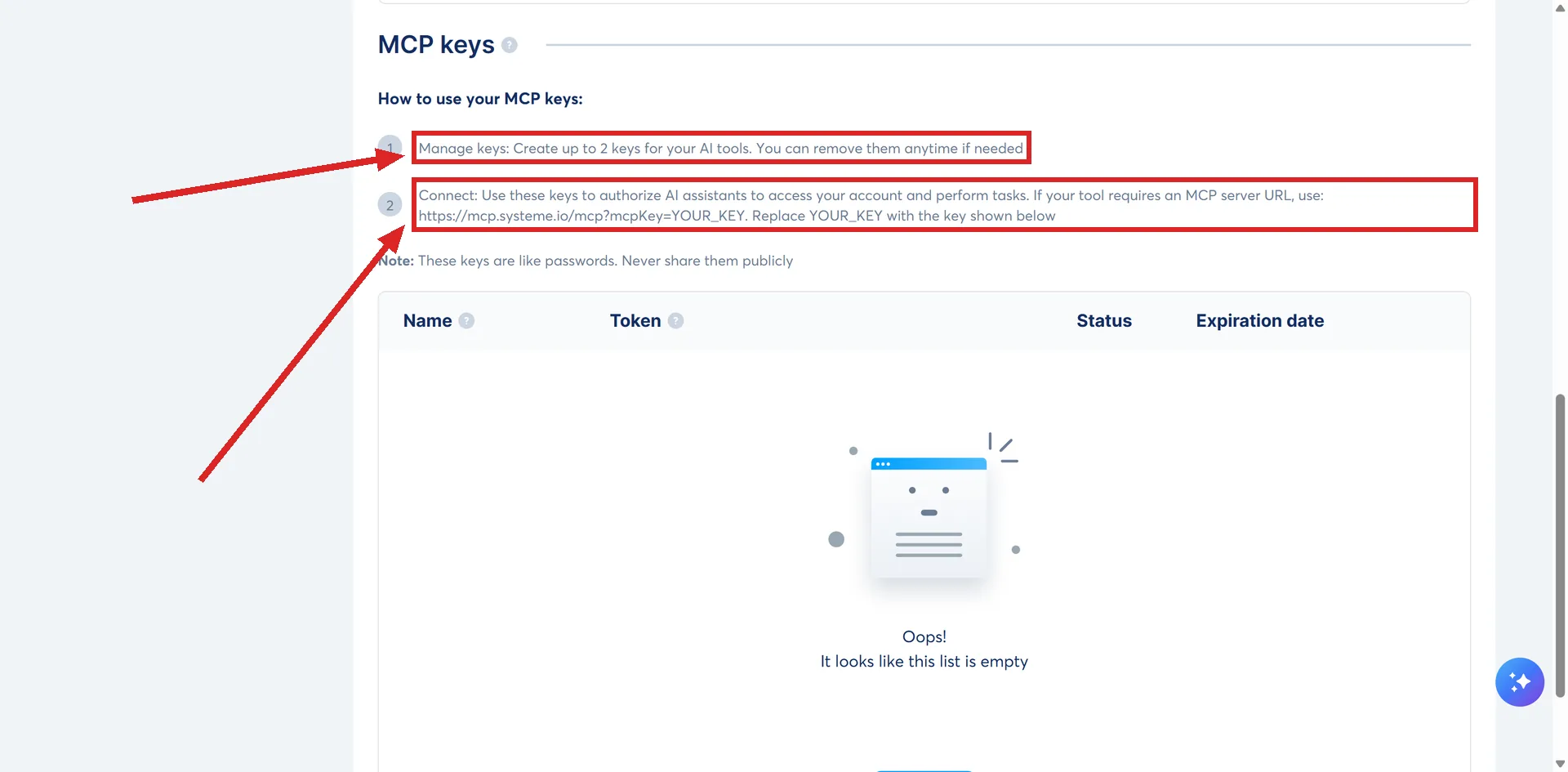
The Public API keys section above it carries the same kind of wording: "Each key is associated with your account." Neither section has a field asking which account a key should reach, and neither has a switcher for moving between accounts.
So a key reaches the account it was made in, and nothing else
An AI holding a systeme.io MCP key operates as whichever account issued that key. The keys section sits inside that one account's own settings, the same as any other setting on the page, so there is nothing on screen that could point a key at a different account even if you wanted it to.
None of systeme.io's MCP setup guides state this directly, because every one of them assumes a single account throughout. The account-scoped wording on the settings page itself is the only place this is actually said.
If you run more than one systeme.io account
systeme.io lets one login hold several separate accounts, through sub-accounts. Each sub-account is a full account with its own settings, so it has its own MCP and API keys screen.
Whether a key made in the main account reaches a sub-account was not tested, and systeme.io does not answer it either. The keys page says only that each key is associated with your account, which reads as one key for one account. My own expectation is that a sub-account needs its own key, because it is a separate account with a separate settings screen. That is a reading, not a result. If you are setting this up across accounts, try it before you rely on it.
Read off the page, not proven by connecting one
No MCP key was created to check any of this. The finding above comes from reading the settings screen's own wording in a live account, not from making a key and watching which account it landed in. That is a real difference in how solid a claim is, and it deserves saying plainly rather than dressing a read up as a test.
What was not checked at all is whether some other route could make a key reach a second account despite that wording. Nothing found suggests it can. It was not tried.
The connection address carries the key in plain sight
The web address pasted into an AI tool is https://mcp.systeme.io/mcp?mcpKey=YOUR_KEY, with your own key in place of the last part. systeme.io's own setup guide for Claude shows the identical format.
That means the key, which is what decides which account gets reached, travels as a query string parameter rather than something hidden inside a request header. A web address in that shape can end up saved in browser history, written into a server log, or sitting inside a screenshot or a shared screen recording, without anyone meaning to hand it out. Whoever ends up holding that full address is holding the key too, and with it, a working connection to whichever account issued it.
How I checked this answer
Nothing on this site is written from memory. These are the sources I checked to write this answer, and the date I checked them.
- The MCP and API keys settings page, checked 5 September 2026A live systeme.io account
- How to connect your systeme.io account to Claude using MCP keyshelp.systeme.io, article 11230
Checked on
Did this answer your question?
Keep reading
- What is MCP, and why would I connect systeme.io to an AI? The bridge between a chat window and your account, and what switching it on takes.
- What can an AI actually do inside my systeme.io account? Counted off a live connection: 113 tools in 14 areas, and two systeme.io pages that both undercount them.
- Why has my systeme.io AI connection stopped working? The key carries a built-in expiry date, and one AI tool's own guide names the second cause.