Home / Categories / MCP
What is MCP, and why would I connect systeme.io to an AI?
MCP is an open standard for connecting an AI assistant to an outside platform. systeme.io runs an MCP server, so a chat window can read and change your account when you type a sentence at it.
What the letters mean
MCP stands for Model Context Protocol. systeme.io describes it as an open standard designed to connect AI models with outside data and tools.
It is not a systeme.io invention and not a systeme.io feature you use inside the dashboard. It is a shared format, and systeme.io has built a server that speaks it.
The two ends of it
systeme.io describes the server as a bridge between two things.
- The host: your AI tool, for example ChatGPT or Claude.
- The server: your systeme.io account.
Without that bridge, an instruction typed at an AI tool stops in the chat window. It can write you an email, but it cannot put that email into systeme.io.
What connecting it actually gets you
Typing instead of clicking. Once connected, an instruction in ordinary English runs against your real account.
systeme.io's own documented examples read like this.
- List the last 20 contacts.
- Create a new tag named 'New Leads'.
- Create a new funnel named 'Summer campaign'.
- Update the subject line of the summer sale newsletter.
The work happens in the chat window. The result appears in the systeme.io dashboard.
What a full instruction looks like
The detail goes in the sentence, because there is no form to fill in. systeme.io's own worked examples carry the values inline:
- Create the following contact: John Doe, systemeio.help.demo@gmail.com, (202) 555-0123.
- Assign the tag 'New Leads' to the contact systemeio.help.demo@gmail.com.
- Create an opt-in funnel step named "Summer leads" for the "Summer Campaign" funnel.
On funnel steps systeme.io adds that the more detail the prompt carries, the closer the generated page lands to the design and content wanted.
What you need before it works
One MCP key, generated inside systeme.io.
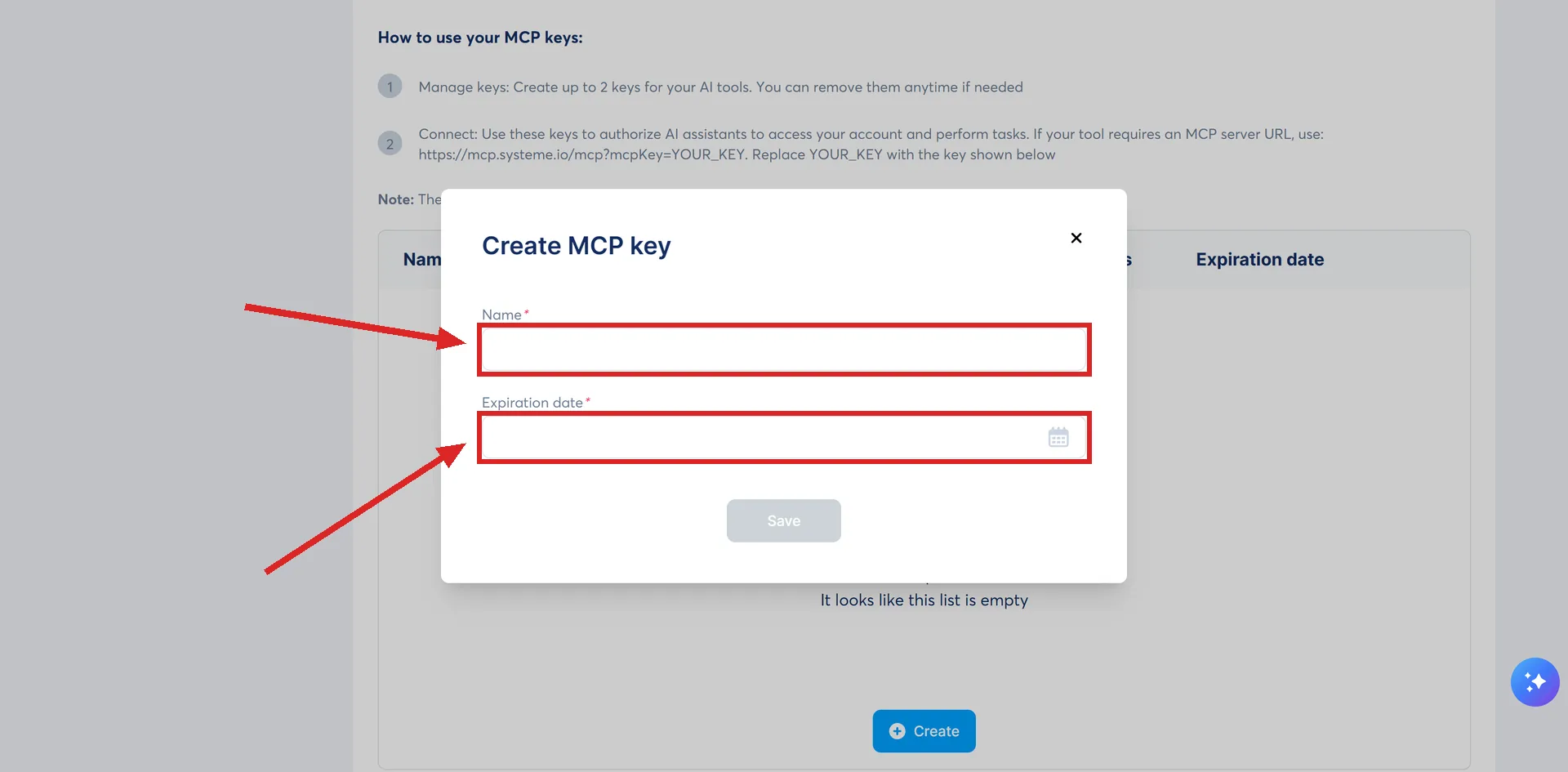
Click your profile picture, choose Settings, then MCP & API keys in the left menu. Scroll to the MCP keys section and press Create.
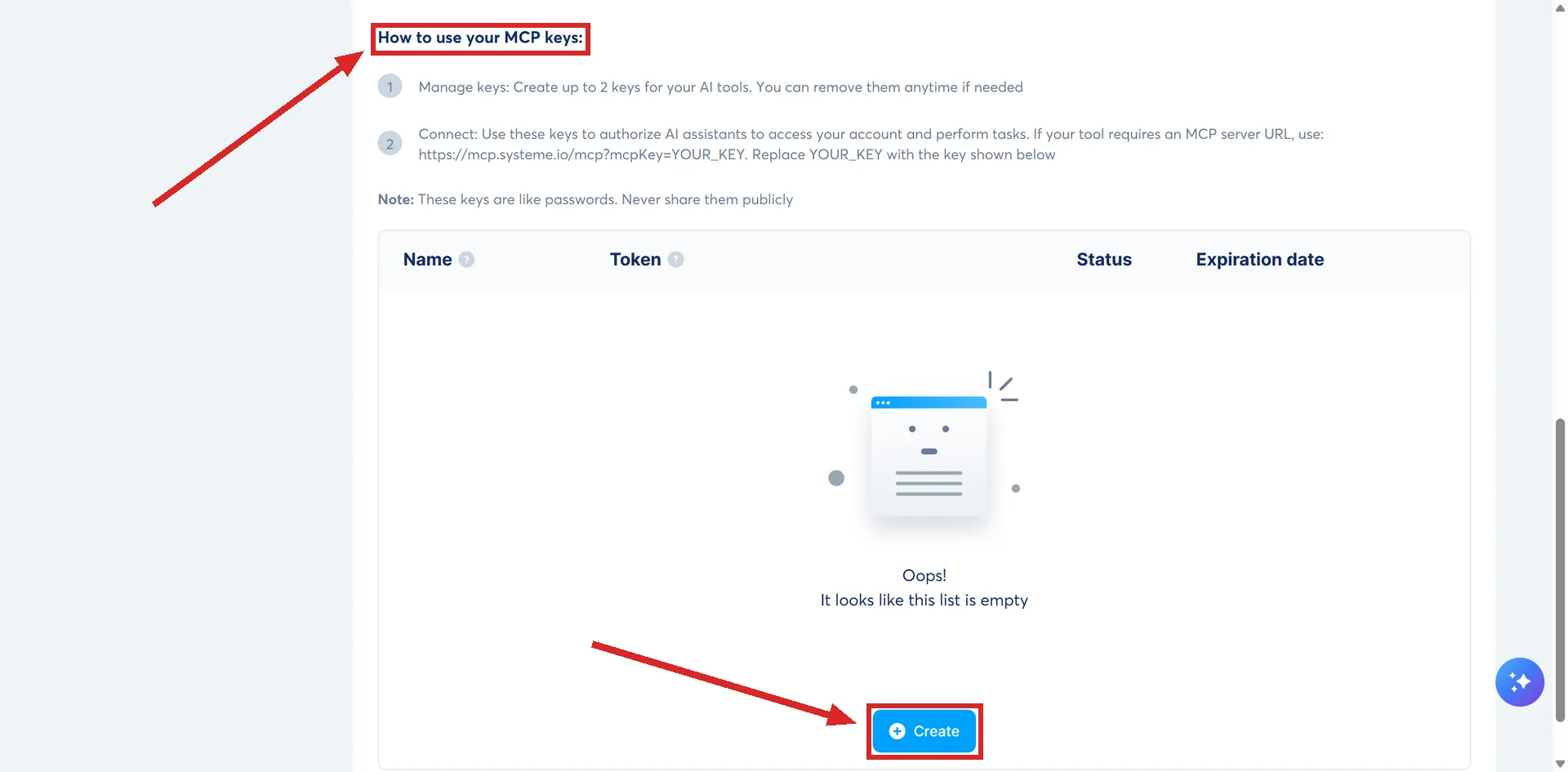
A key takes a name and an expiration date.
The page is called MCP & API keys, and the MCP keys section is further down it. Public API keys are a separate thing on the same page.
Where the key gets pasted
The connection address is https://mcp.systeme.io/mcp?mcpKey=YOURMCPKEY, with your own key in place of the last part.
Claude takes it through Connectors. Under Customize, then Connectors, then Add, then Add custom connector, the setup asks for a name and that remote MCP server URL. systeme.io recommends leaving the two advanced settings fields empty. After that, the connector is switched on per conversation from the plus button in the chat input.
ChatGPT is rougher. systeme.io states it has no official ChatGPT application and that access to the MCP server is in beta, so the server can only be added through ChatGPT's Developer mode, as a custom app using the same URL with authentication set to No Auth.
What state the feature is in
systeme.io calls it an initial release. Its developer documentation carries a status notice saying the same thing and that capabilities and stability are still being worked on.
Two consequences are documented. OAuth, which systeme.io names as the recommended authentication method, is not supported yet and is planned. And systeme.io says you may run into minor stability issues in the meantime.
How I checked this answer
Nothing on this site is written from memory. These are the sources I checked to write this answer, and the date I checked them.
- How to use the systeme.io MCP server (Model Context Protocol)help.systeme.io, article 9489
- How to connect your systeme.io account to Claude using MCP keyshelp.systeme.io, article 11230
- How to connect your systeme.io account to ChatGPT using MCP keyshelp.systeme.io, article 11229
- How to manage your contacts with the systeme.io MCP serverhelp.systeme.io, article 11331
- How to manage your newsletters and email campaigns with the systeme.io MCP serverhelp.systeme.io, article 11407
- How to manage your funnels with the systeme.io MCP serverhelp.systeme.io, article 11408
- How to use the systeme.io public API (Application Programming Interface)help.systeme.io, article 2323
- The systeme.io MCP server overview, authentication and supported operationsdeveloper.systeme.io/docs/mcp-server
Checked on
Did this answer your question?
Keep reading
- Why has my systeme.io AI connection stopped working? The key carries a built-in expiry date, and one AI tool's own guide names the second cause.
- Will migrating hurt my email deliverability? Reputation does not travel with you. What resets on the move, and what to do while it rebuilds.
- Is the free migration actually free? Free of a fee, not free of a subscription. Which plans qualify, and what the team rebuilds.