Home / Categories / Payments
Do I need a registered business to take payments?
systeme.io itself does not ask for a registered business. The payment gateway does ask: Stripe wants a country and a business type, where individual is one of the choices, and PayPal wants a Business account. Whether the law where you live requires you to register is a question for your own jurisdiction.
Where the question actually lands
Not on systeme.io. Its free plan requires no credit card, and its documentation sets no business-registration requirement.
Payments are switched on separately afterwards, by connecting a gateway under Settings, then Payment gateways. The questions about who you are come from that step, and they are asked by Stripe or PayPal rather than by systeme.io.
What Stripe asks for
Connecting Stripe sends you to Stripe's own signup or login. It asks for the country where your business is registered, and for the type of business. The three choices it offers are individual, company and nonprofit organization.
The next screen asks you to verify your personal information. systeme.io's documentation is direct about why: that verification is what activates payments.
What PayPal asks for
A PayPal Business account. systeme.io's integration guide lists it as a requirement rather than a suggestion.
An existing personal PayPal account can be converted into a Business account rather than opening a second one, and systeme.io's guide notes that the conversion is free.
What sits with you either way
Two settings inside systeme.io are worded as decisions for the seller to make, which tells you where the responsibility sits.
- Tax. Click your profile picture, then Settings, then Payment settings. A tick box reads Don't charge VAT to customers on payment pages, and Save sits at the top of that page. It is an account-wide default, and a funnel can be excepted from it.
- Terms and conditions. The text shown on your order forms is written by you, in the same Payment settings screen, and appears as a popup on the payment page.
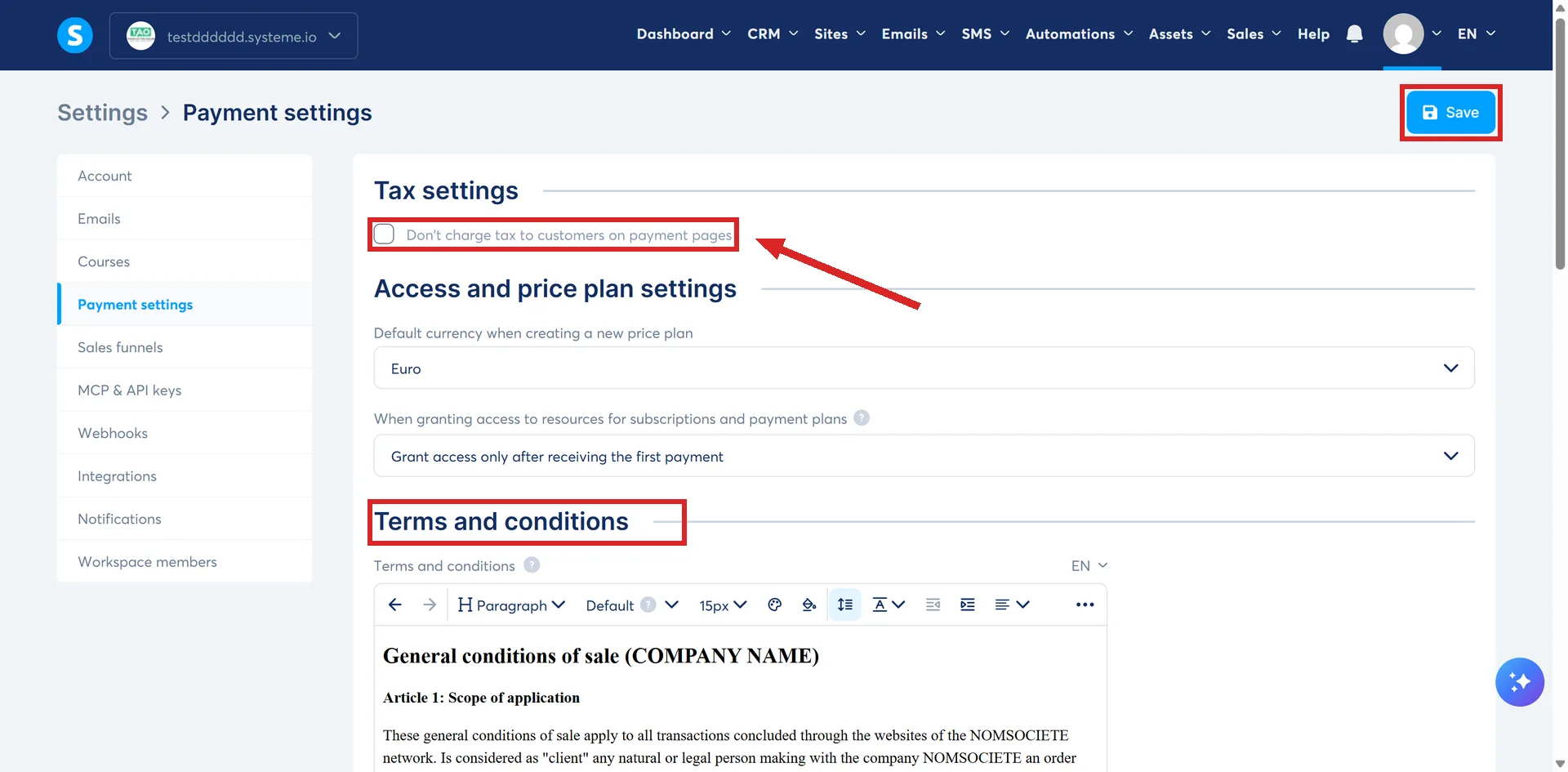
The terms take a second step to become visible. Open the order form in the editor, click Popups, add a popup with the + icon, open Edit popup settings, and select the text element holding the terms. After that, anything typed into Payment settings updates the popup on the page automatically.
Terms on an ordinary page work differently. systeme.io's route is Add step, then Info page as the page type, the terms in a text element on it, then a hyperlink to that page's URL from wherever the link belongs.
systeme.io supplies the boxes. What goes in them is yours.
Where this answer stops
Nothing above says whether you are allowed to trade without registering a business, what you owe in tax, or how to be invoiced correctly. Those depend on the country you live in, the country your buyers live in, and what you sell.
That question belongs to your own tax authority or an accountant who works in your jurisdiction. This page is not legal or tax advice.
How I checked this answer
Nothing on this site is written from memory. These are the sources I checked to write this answer, and the date I checked them.
- How to connect your Stripe account to systeme.iohelp.systeme.io, article 225
- How to integrate PayPal with systeme.iohelp.systeme.io, article 132
- How to charge VAT to your customershelp.systeme.io, article 260
- How to not charge VAT to your customershelp.systeme.io, article 269
- How to add the terms and conditions to your pageshelp.systeme.io, article 365
- The plan comparison table and the pricing FAQ below itsysteme.io/pricing
Checked on
Did this answer your question?
Keep reading
- What happens when a customer's subscription payment fails? Three more attempts, then cancellation. Who decides the timing is the part nobody expects.
- Coupon or price-plan discount: which one do I want? One of these two is not a feature. Here is what people mean by it, and when it beats a code.
- What is an upsell, and when does the customer see it? A second offer, on its own page, after the money has already changed hands.