Home / Categories / Payments
Coupon or price-plan discount: which one do I want?
A coupon, nearly always. A price plan in systeme.io has no discount setting of its own, so the alternative is building a second price plan at the lower amount and putting that on the order form instead.
What a coupon is
A code the buyer types into the order form to get money off. Coupons live under the Assets tab, at Coupons, and are created there rather than inside the funnel.
Click Create to open the coupon form.
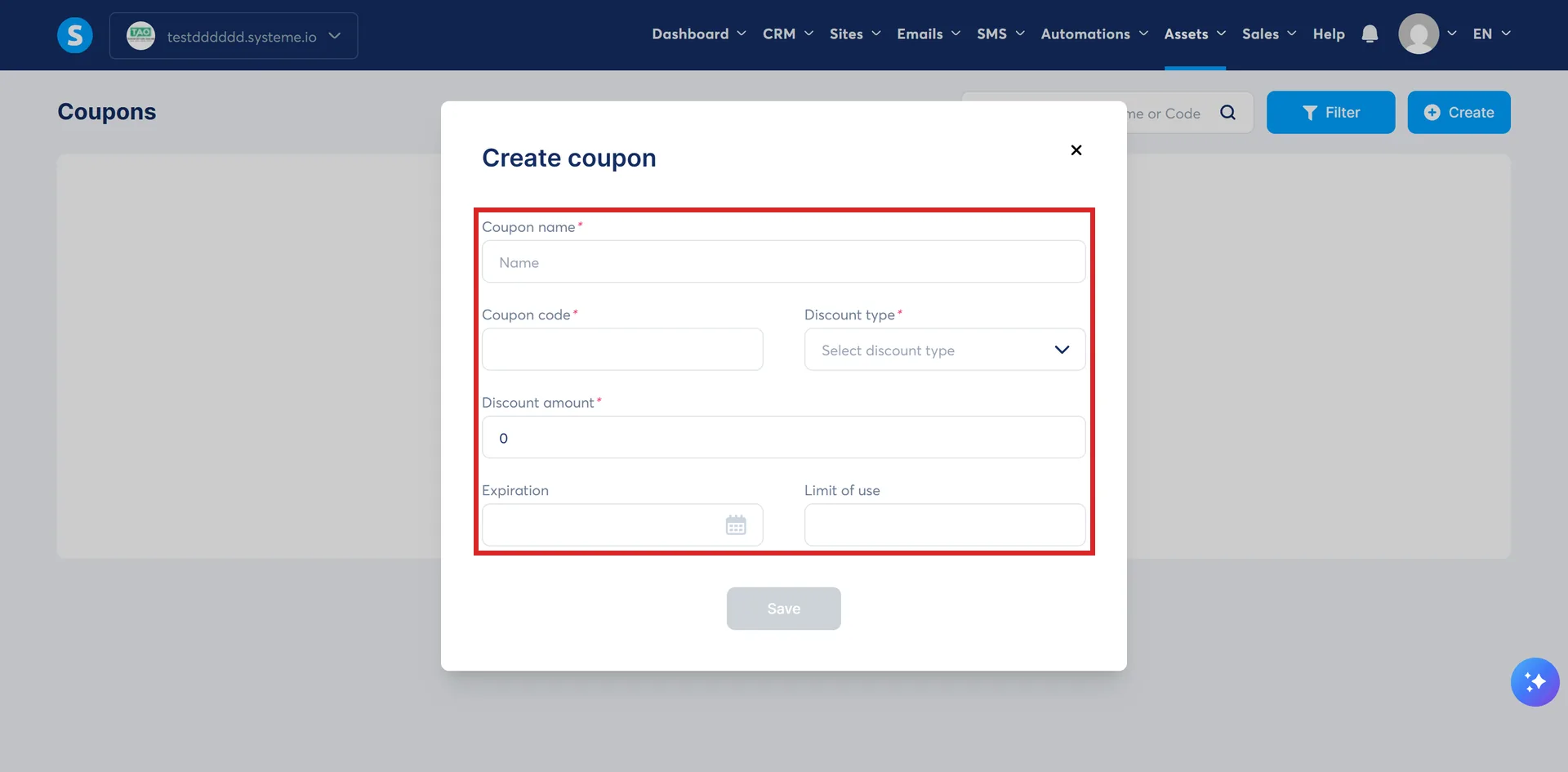
Creating one asks for six things.
- A name, for your own reference
- The code the customer types
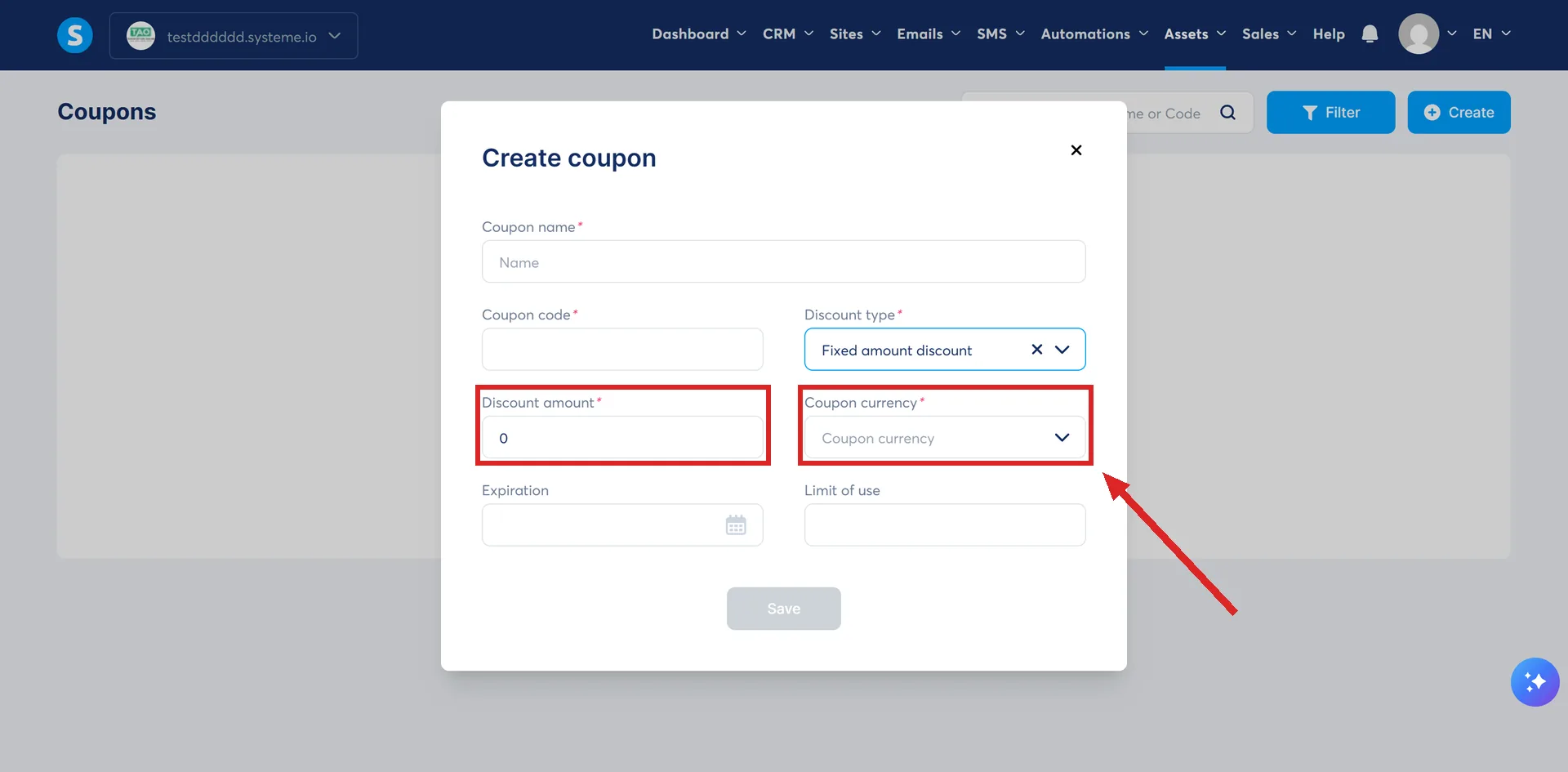
- A discount type: a fixed amount or a percentage
- The amount itself
- An expiration date
- A limit on how many people can use it
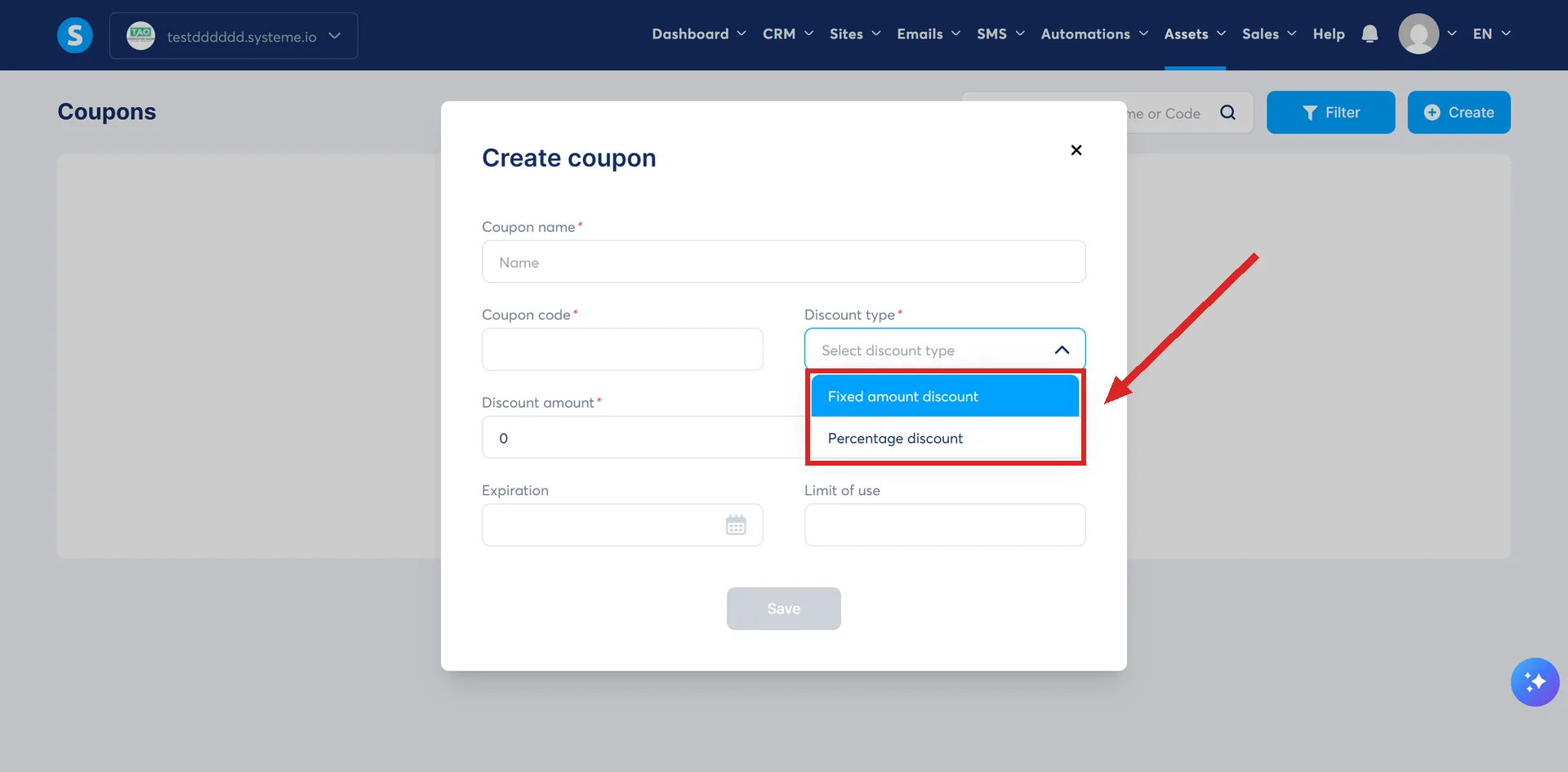
Pick the fixed amount type and a Coupon currency field appears as well, because a flat sum has to be denominated in something.
What each discount type does to a price
systeme.io's two worked examples both run against a $1,000 price plan.
- Fixed amount set to $20: the customer pays $980.
- Percentage set to 10%: the customer pays $900.
The fixed amount is deducted from the price plan. The percentage is worked out from the total.
What a price plan holds
A price plan is where the amount and the schedule live. The settings systeme.io documents for one are the display names, the statement descriptor, the type (one-time payment, subscription or payment plan), the amount, the interval between payments, the number of payments, an optional trial period, and the tax behaviour.
There is no discount among them. A price plan holds one amount, and nothing in it records what the full price was.
So what does a price plan discount actually mean?
Building a second price plan at the lower amount and selling that one instead. An order form accepts one or more price plans, so a reduced plan can sit alongside the standard one or replace it for a while.
The swap is made in the order form's own settings, on the same screen as the Coupons section rather than anywhere in Assets.
It is a real technique. It is not a discount feature, which is why looking for the setting is a waste of an afternoon.
The two side by side
| Coupon code | Second price plan | |
|---|---|---|
| What the buyer does | Types a code | Nothing. The lower price is what they see |
| Expiry | A date set on the coupon | Whenever you change the order form back |
| Use limit | A number you set, or blank for unlimited | None |
| On a subscription | Comes off each payment on its due date | It is the recurring amount |
| Extra work on the page | A Coupon element dragged into the editor | None |
| Changing the amount later | Not possible. Create another coupon | Edit the plan, or create another |
Which one do I want?
- A code handed to one group, or read out to a live audience: coupon.
- An offer that has to expire on a date, or stop after 50 buyers: coupon.
- A lower price for a whole launch window, with no code to leak: second price plan.
- A price the buyer should see fall when they type something: coupon.
What a coupon does to a subscription
It comes off every payment, not only the first. The discount is applied on the payment due date each month, so a $100 monthly subscription with a $20 coupon bills at $80 a month for as long as it runs.
To hand something over for nothing, set the fixed amount equal to the price, or set the percentage to 100.
Where the two steps actually are
Open the funnel and click the order form. Scroll down to the Coupons section, click the plus icon, select the discount type, choose the coupon code, then Save.
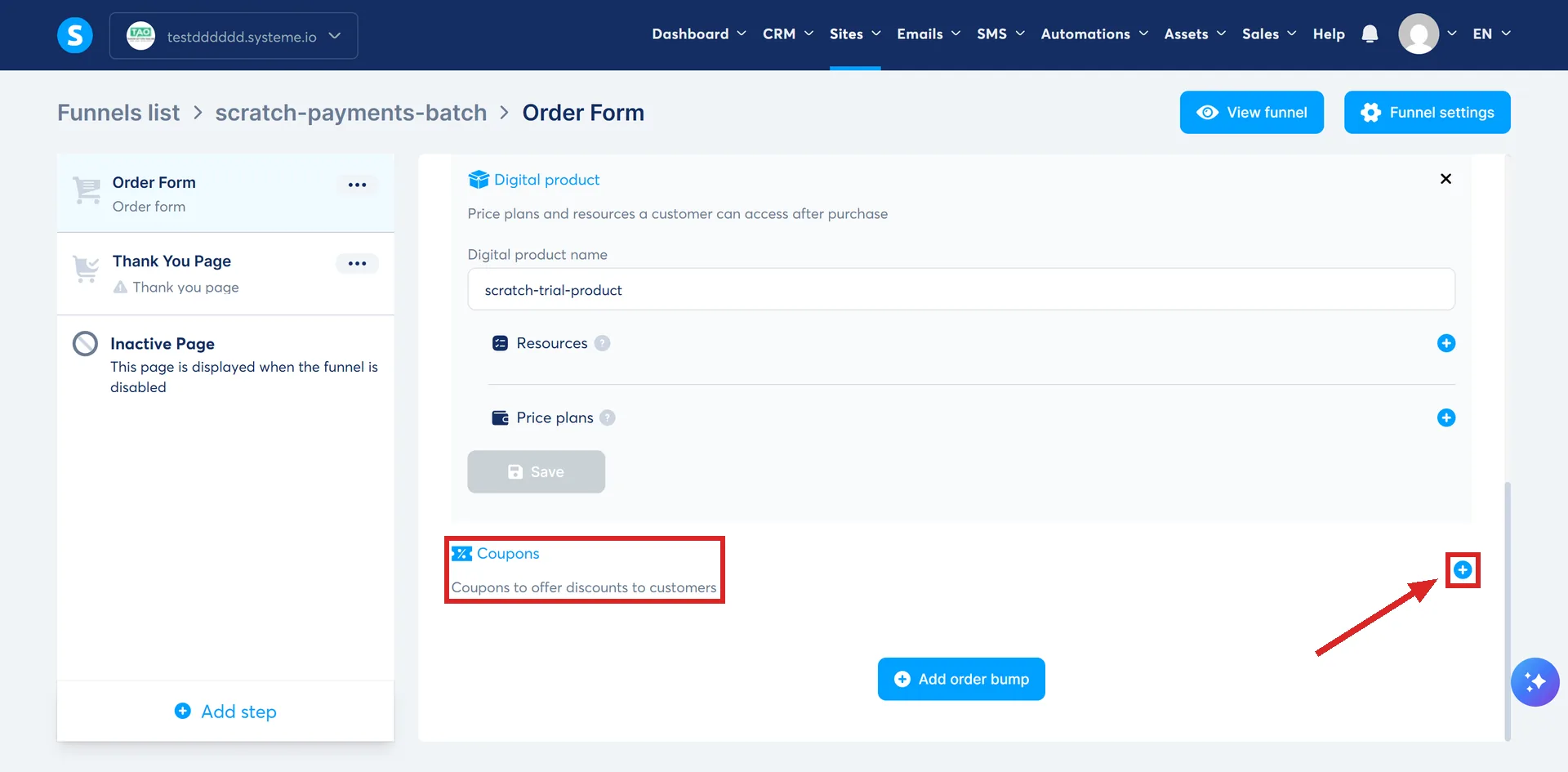
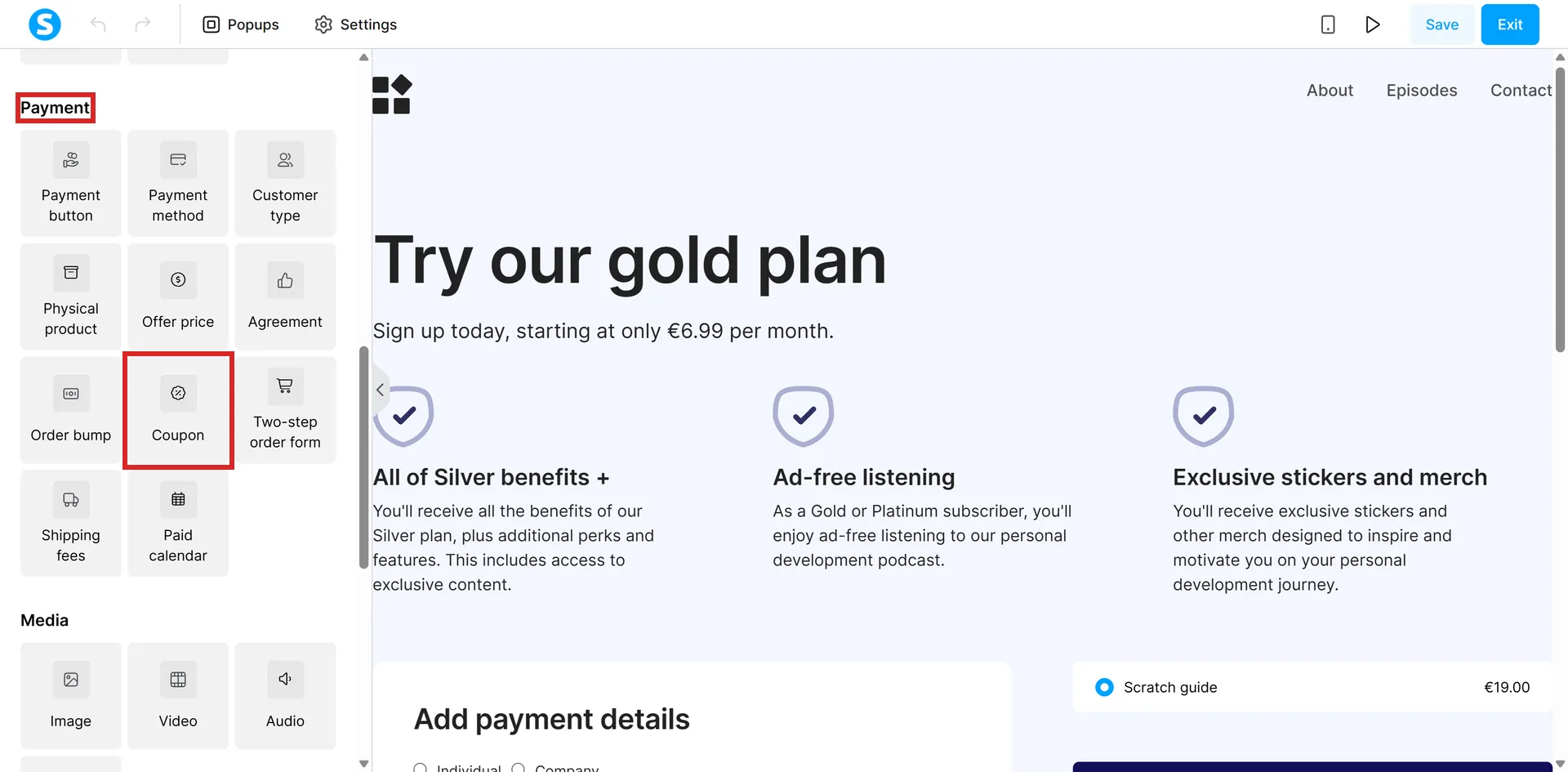
Then click Edit page to open the editor, drag the Coupon element onto the page, and save again. The coupon exists after the first step. A buyer can only use it after the second.
The rules that catch people out
- Pick the expiry from the calendar popup. Type the date in by hand and the coupon will not work.
- Leave the limit box empty for unlimited uses.
- The amount is final. Once a coupon exists, its discount amount or percentage cannot be changed. A different discount means a different coupon.
- Two steps put it on the page. Adding the coupon in the order form settings is one. Dragging the Coupon element into the page in the editor is the other. Skip the second and the buyer has nowhere to type.
- Changing the funnel's currency disconnects the coupon. Switching a sales funnel's currency disconnects every coupon, product and price plan from that funnel's order form, upsell and downsell pages. systeme.io says all of it has to be reconfigured by hand afterward.
That a price plan carries no discount field is an absence, so it was checked rather than read. A price plan pulled back from a live account through systeme.io's own API returns a name, a type, an amount, a currency, a recurring option and a tax behaviour. There is no discount of any kind on it.
How I checked this answer
Nothing on this site is written from memory. These are the sources I checked to write this answer, and the date I checked them.
- How to create and add a coupon code to your order formhelp.systeme.io, article 247
- How to create and configure a price planhelp.systeme.io, article 153
- How to create an order form/payment pagehelp.systeme.io, article 252
- How to manage your price plans and coupons with the systeme.io MCP serverhelp.systeme.io, article 11412
- The fields a price plan is actually made ofA live systeme.io account
- How to change the currency of an existing sales funnelhelp.systeme.io, article 1969
Checked on
Did this answer your question?
Keep reading
- Does systeme.io take a cut of my sales? systeme.io takes nothing. That is not the same as the sale costing you nothing.
- Do I have to send invoices, and will systeme.io do it for me? The invoices already exist. Getting them to the customer is the part that is yours.
- What is a squeeze page? The common name for a page systeme.io calls something else. And the two elements it needs.