Home / Categories / Payments
Do I have to send invoices, and will systeme.io do it for me?
An invoice is generated for every transaction and kept under Sales, Transactions. Sending one to a customer is a manual action, and there is a bulk export for the rest. Whether you are obliged to issue one at all depends on the rules where you trade.
Do I have to send them?
That depends on where you are registered, where your buyer is, and whether the buyer is a business or a person. It is not a systeme.io question, and its documentation does not answer it.
What the platform does show is that the question is taken seriously. The transaction filters include the customer's country and their customer type, company or individual, and the documentation says outright that these exist for accounting and regional business-to-business e-invoicing rules such as Peppol.
The rules themselves belong to your tax authority or an accountant in your country. This page is not legal or tax advice.
What systeme.io produces on its own
One invoice per transaction, generated by systeme.io rather than written by you. They collect under Sales, then Transactions, alongside every sale, and each one can be sent, exported or filtered from there.
A refund produces one too. Refunding a customer generates an invoice showing a negative amount, which can be sent to them as proof the refund happened.
Sending one to a customer
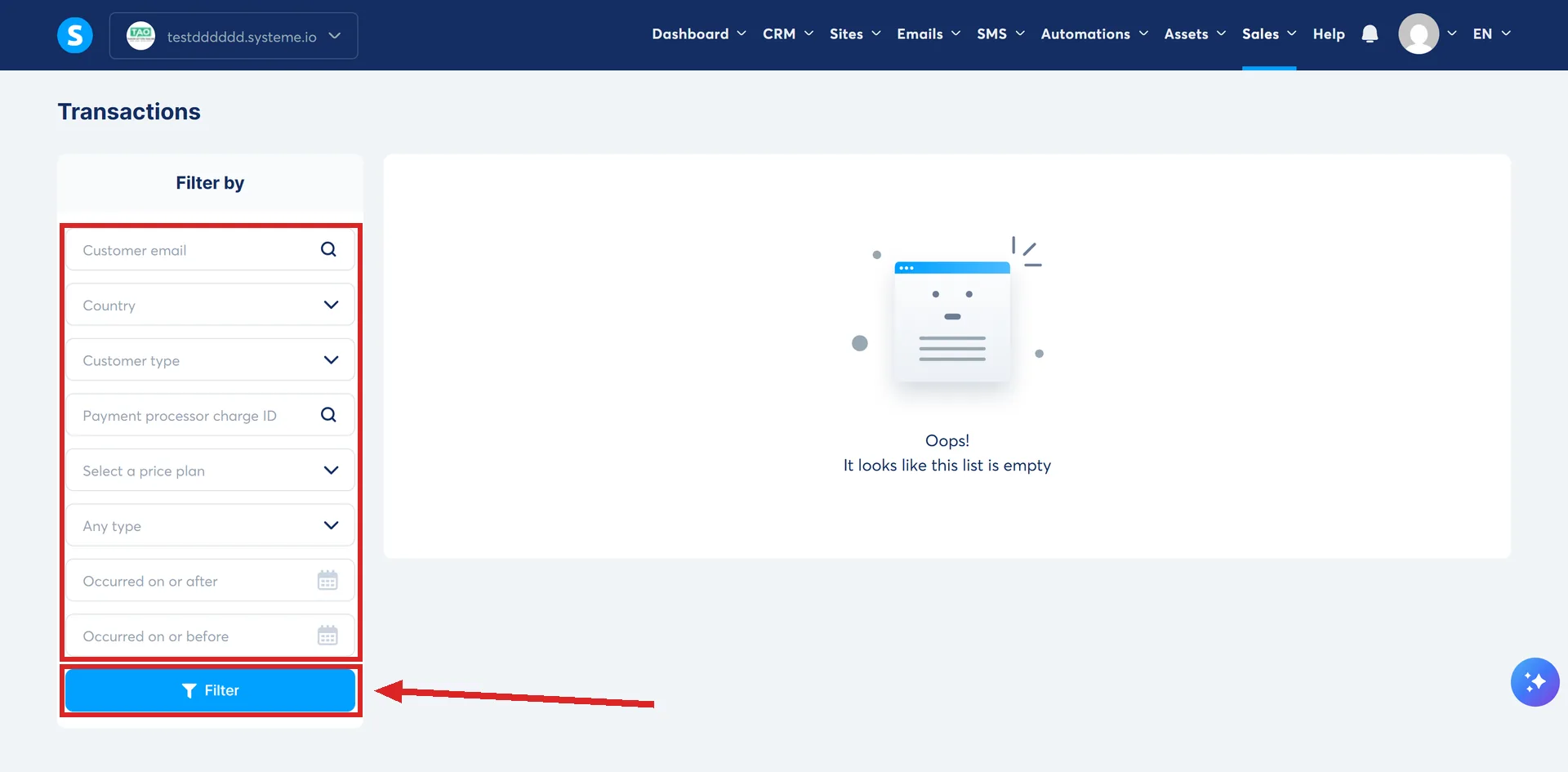
Open Sales, then Transactions. Filter by the customer's email address, find the transaction, click the three dots and choose Send invoice to customer.
The filter menu down the left of that page carries eight fields: customer email, country, customer type, payment processor charge ID, price plan, transaction type, occurred on or after, and occurred on or before. Enter a value and click Filter before the list narrows.
There is no bulk send. Several invoices to the same customer go out one at a time, or as an export you email over yourself.
Getting a lot of them out at once
Select the transactions on the same screen, or select them all, then pick an export.
- Export to PDF builds the invoice documents and emails a download link to the address on your systeme.io account. The download is an archive, so you need something on your machine that opens one.
- Export to CSV asks which columns to include and which delimiter to use, then emails a link the same way.
Filter first if you only want a period. The date filters are on the same page.
The two exports arrive under different subject lines, which matters when you are hunting for one in an inbox. The PDF export comes as Your export of invoices. The CSV export comes as Your exported invoices.
The PayPal trap
On a payment plan or a subscription paid through PayPal, systeme.io needs PayPal's notification to process the payment and generate the invoice. If those notifications are not configured, or PayPal fails to send one, the transaction and its invoice never appear.
Single payments are safe: they display without the notification. Resending the messages by hand from inside PayPal generates the missing transaction and invoice.
Where VAT on them comes from
The switch is account-wide. Under Settings, then Payment settings, a tick box reads Don't charge VAT to customers on payment pages. Clearing it turns VAT on everywhere, and an individual funnel can then be excepted in its own funnel settings.
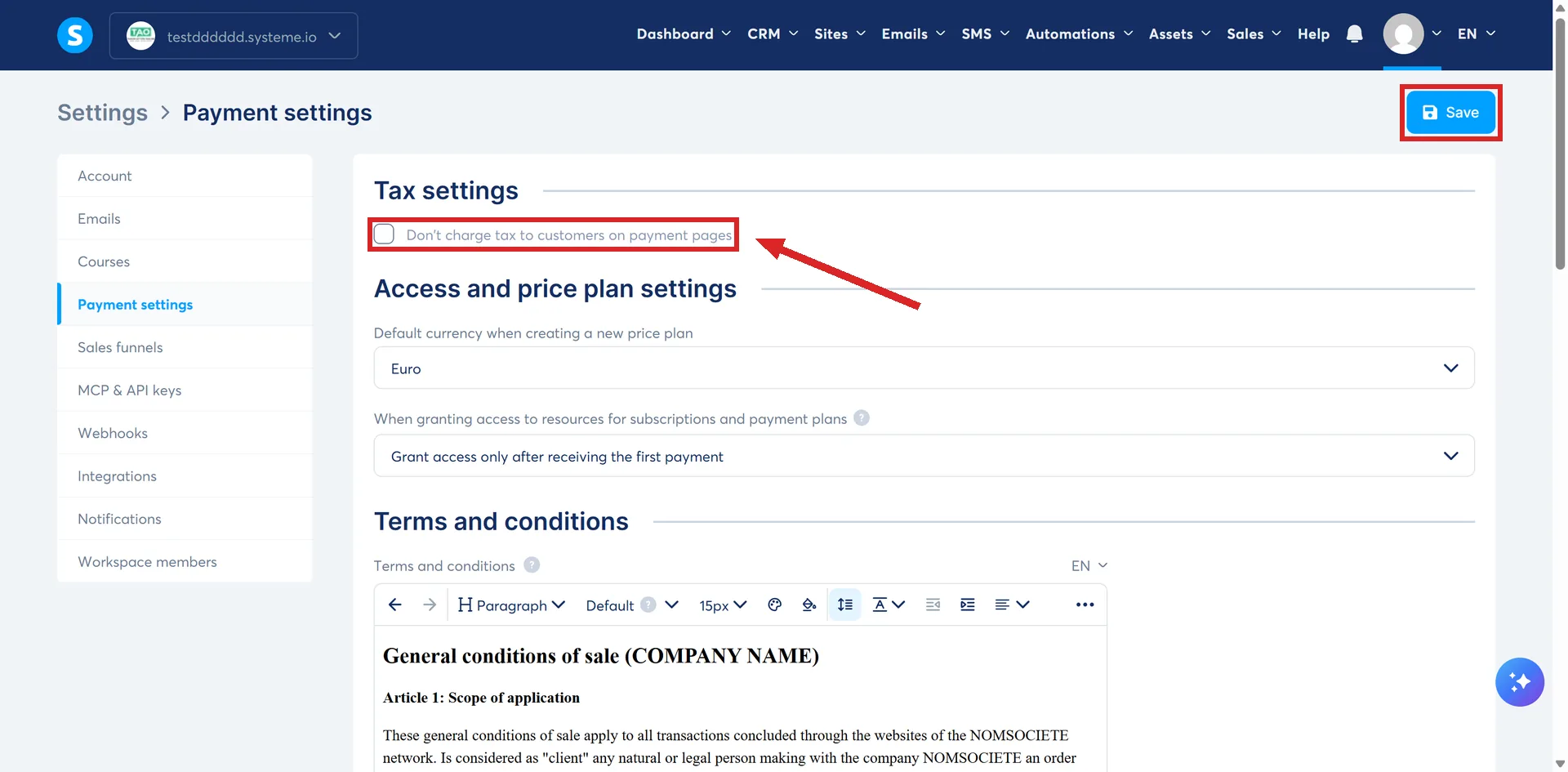
Leave VAT off globally and the exception cannot be made. systeme.io locks the per-funnel option in that direction, so a business that needs VAT on some offers and not others has to enable it globally first, then switch it off funnel by funnel.
For information products and services, the rate applied is the one for the buyer's country of residence, added on top of a price you enter excluding VAT. systeme.io's own worked example: a seller in France, where VAT is 20%, selling a training course to a resident of Belgium, where it is 21%, charges the Belgian 21%.
Physical products follow the seller's country instead. The rate is typed in per product, under the Assets tab at Physical products, and systeme.io's recommendation is the rate of your own country of residence.
The field that silently zeroes it
The VAT rate is worked out from where the buyer is. If the Country field is not on your order form, systeme.io cannot tell, and the rate applied is 0%.
Your own systeme.io invoices
Different thing, same word. Invoices for your own paid subscription are not emailed to you unless you ask. Click your profile picture, then Settings, then Notifications, and scroll down to My subscription invoices.
There is a tick box per subscription plan, each named after the plan it covers, systeme.io Unlimited plan for instance. An account paying for more than one thing ticks them separately.
systeme.io's wording is that invoices go by default to the customer's company rather than to individual customers, which is why the box exists.
How I checked this answer
Nothing on this site is written from memory. These are the sources I checked to write this answer, and the date I checked them.
- How to send an invoice to a clienthelp.systeme.io, article 318
- How to export multiple customer invoices to PDF formathelp.systeme.io, article 2006
- How to export your transactions to CSVhelp.systeme.io, article 2007
- How to refund your customerhelp.systeme.io, article 259
- Why aren't my PayPal payment transactions appearing?help.systeme.io, article 314
- How VAT is managed in systeme.iohelp.systeme.io, article 281
- How to charge VAT to your customershelp.systeme.io, article 260
- How to not charge VAT to your customershelp.systeme.io, article 269
- How to receive invoices automaticallyhelp.systeme.io, article 250
Checked on
Did this answer your question?
Keep reading
- How is a free trial actually billed? No money at signup, one charge waiting at the end. And the card check that is not a charge.
- Why does my order form show the wrong currency? One setting looks like the fix. It only ever applies to funnels that do not exist yet.
- What is a price plan, and why isn't it just a price? Three types, a schedule, and a home outside the page that uses it.