Home / Categories / Sales funnels
What is an upsell, and when does the customer see it?
An upsell is a second offer on its own page, shown straight after someone buys. They can accept it without entering their card details again.
Where it sits
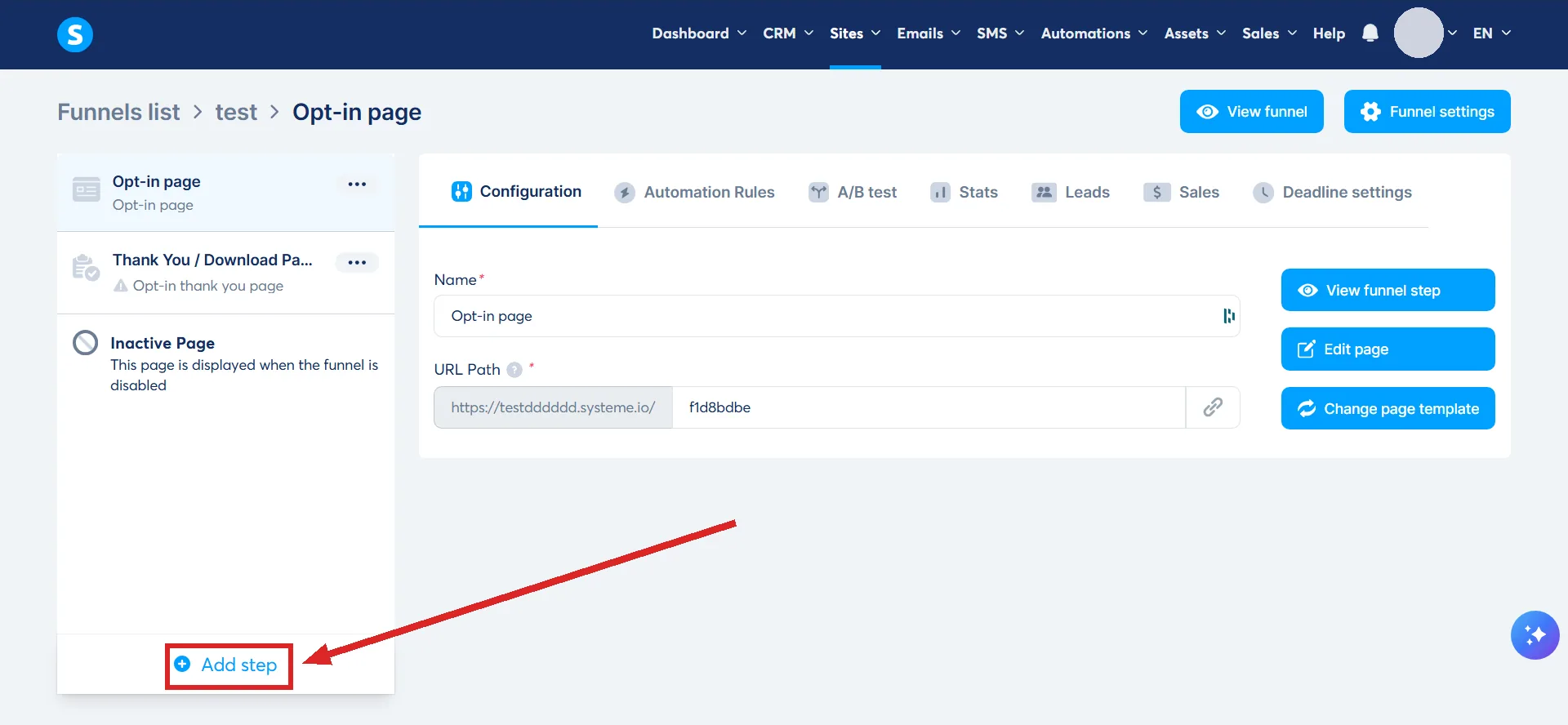
An upsell is its own step in the funnel, with its own page. Open Sites, then Sales funnels, then the funnel, and click Add step in the menu on the left.
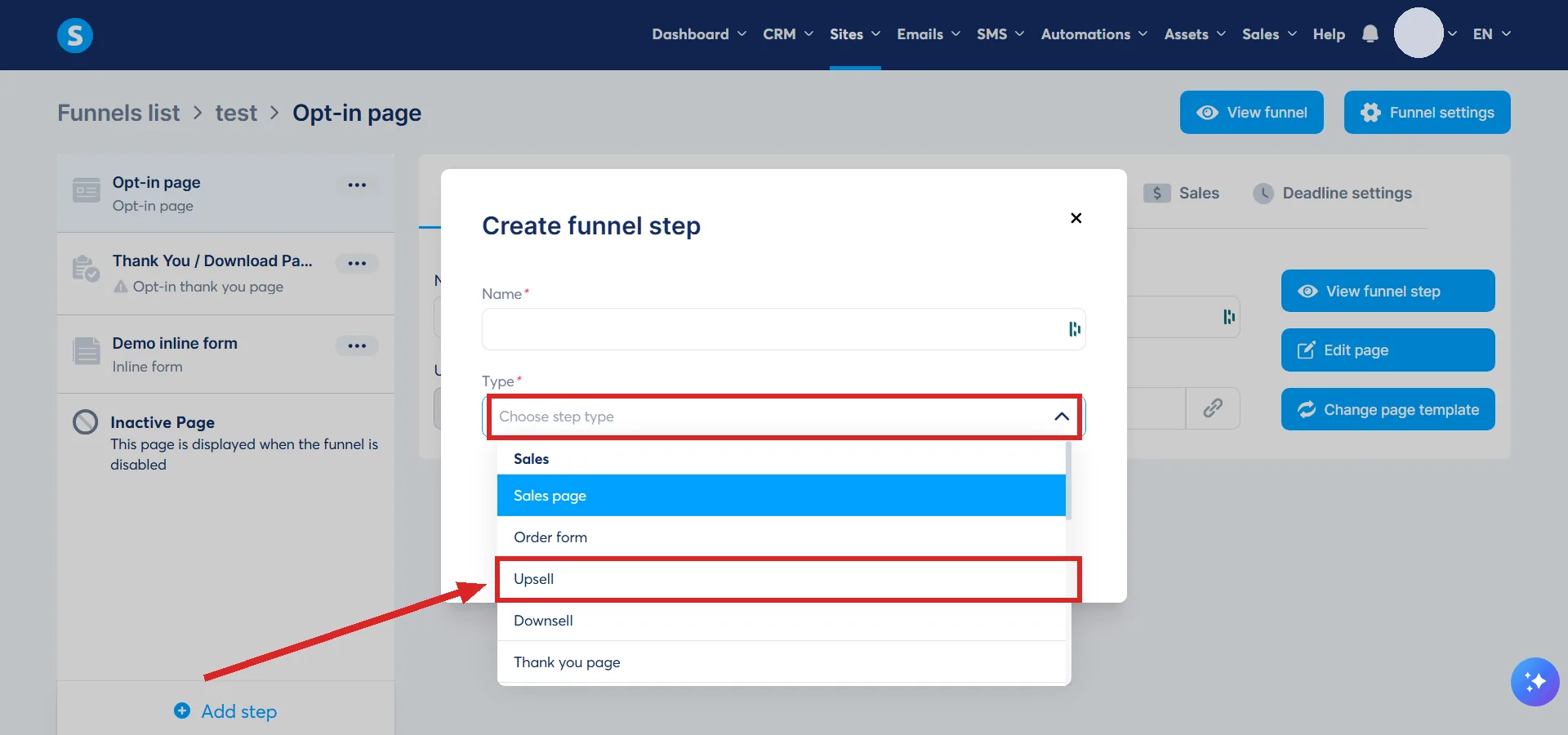
In the Create funnel step popup, set the Type to Upsell. Choose a template or start from scratch, click Save, then click Select on the template you want. The step's configuration pane opens, and Edit page on it opens the editor.
The order is fixed. The upsell page has to come after the main order form, and a downsell page, if you use one, has to come after the upsell.
That handoff is automatic. Once payment is validated, systeme.io redirects the buyer to the upsell page on its own, and the documented chain runs through one funnel's own list of steps, from the opt-in page to the thank you page. Nothing describes a way for it to reach a step sitting in a different funnel, so an upsell built in a separate funnel from the order form is not part of that list, and there is nothing documented that would connect the two automatically.
The documentation also says nothing about what happens if a payment attempt fails or is left pending.
Why the one-click part matters
The buyer has already paid by the time they land here. In systeme.io's own words, the customer can buy the upsell without re-entering their payment information.
That is the whole reason the page type exists. The hard part, handing over a card, already happened.
The two buttons you add yourself
The page arrives with no way to say yes and no way to say no. Inside the editor you have to add an Accept button and a Decline button so the buyer can take the offer or pass on it.
What Decline actually does
It takes the buyer straight to the thank you page.
The original order was paid for on the order form, before the upsell page ever loaded, so declining does not touch it. The buyer lands exactly where they would have landed if there had been no upsell in the way.
What you can put on it
Digital or physical, the same choice as the order form. A digital upsell hands over a course, a course bundle, a tag, or a community once payment clears.
A calendar event cannot be sold on an upsell or a downsell page. Unlike an order bump, an upsell page accepts one or several price plans.
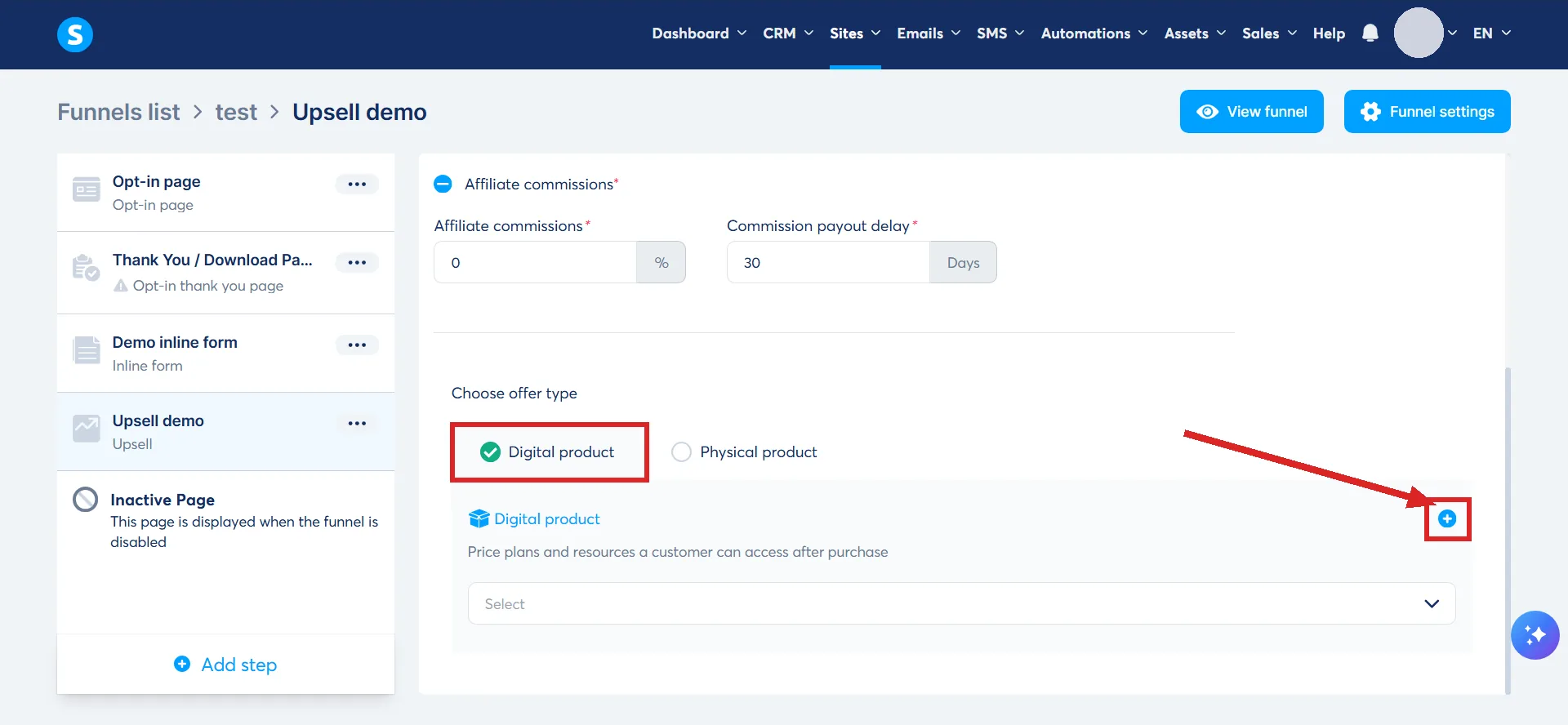
The product is attached on the step's configuration pane rather than in the editor. Choose Digital product as the offer type, click the plus icon to set up a new digital product, name it, then click the plus icon again to add the resource the buyer gets.
What the charge looks like
An accepted upsell is billed separately from the main order. You and the customer both see an individual charge for each product rather than one combined total.
Nobody is being charged twice. It is two transactions for two products.
How I checked this answer
Nothing on this site is written from memory. These are the sources I checked to write this answer, and the date I checked them.
- How to create an upsell and a downsellhelp.systeme.io, article 243
- The difference between an upsell and an order bumphelp.systeme.io, article 315
- What the Decline button on an upsell page doesA live systeme.io account
- How to configure links between funnel pageshelp.systeme.io, article 330
Checked on
Did this answer your question?
Keep reading
- Order bump or upsell: which should I add first? One is a setting on a page you already built. The other is a whole page.
- What pages does a simple funnel actually need? Two, and systeme.io builds both of them for you. The rest is optional.
- If I delete a student, do they lose their course progress? No bin, no grace period. What Delete erases that the gentler option, Dismiss, does not.