Home / Categories / Contacts
What happens to a contact already in my account when I import them again?
Importing a contact whose email is already in your systeme.io account does not create a duplicate. It updates the existing record instead, and any column that has a value in the file overwrites whatever was already there, even if that value was newer. This is different from typing a duplicate email into the manual Create contact form, which systeme.io refuses outright.
What happens when the person is already on your list
I picked an existing contact with an empty first name field and one tag already on record, then imported a CSV containing that same email address with the first name filled in. No second contact was created. The list stayed at the same number of contacts, and on the existing record, the first name changed from empty to the value in the file. The date the contact was originally added, and the tag it already carried, both stayed exactly as they were.
Compare: typing in the same email by hand is refused outright
The manual Create contact form does not behave the same way. Typing in an email address that already exists and saving returns an error: "This email address has already been used." No contact is created. That matches systeme.io's own documentation, which names the email address as the primary identifier for a contact.
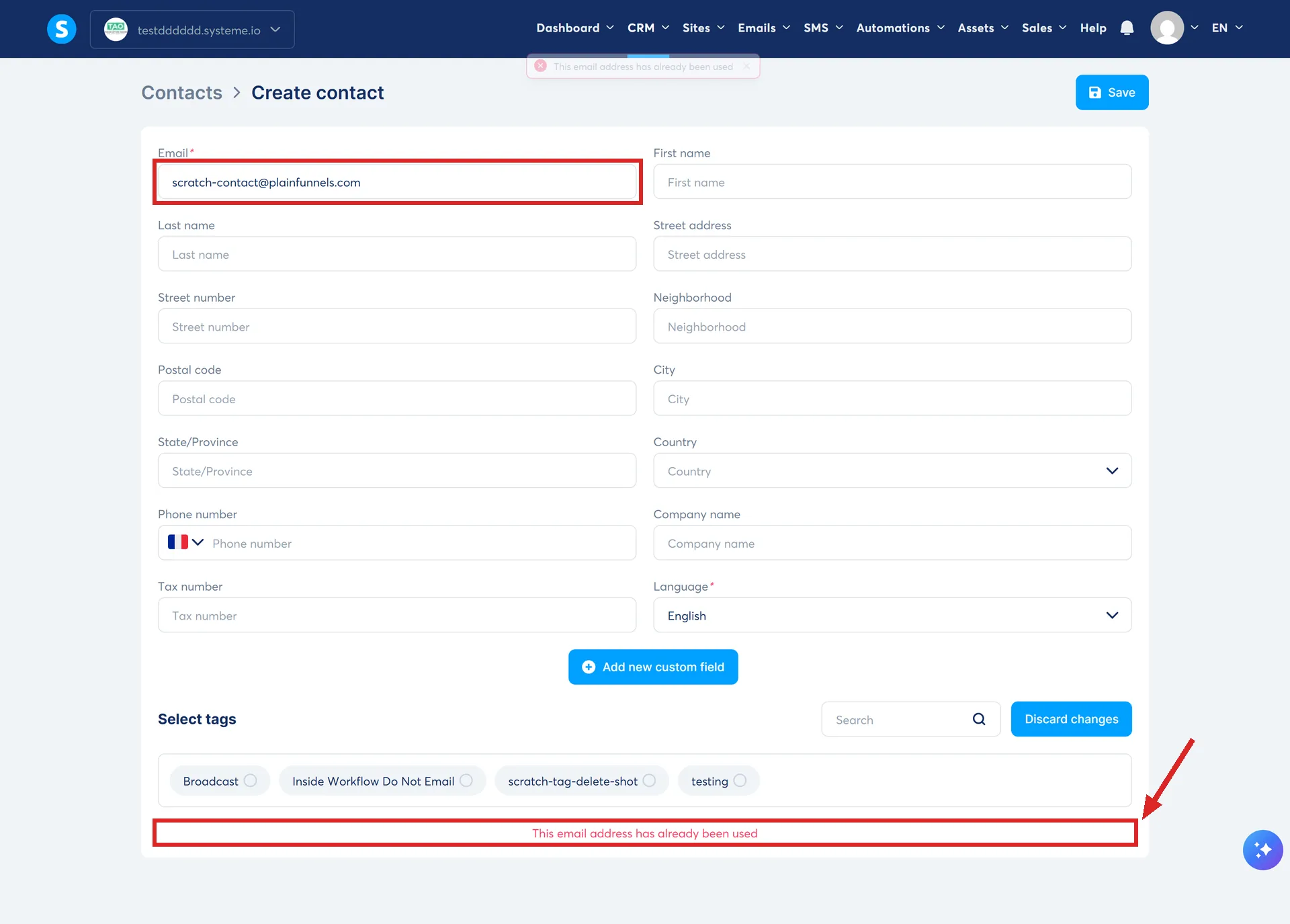
An import does not refuse, and it gives no warning either. It updates the existing record without asking.
The rule that catches people out: a second import overwrites again
I imported the same email address a second time, with a different first name in the file. The record changed again, replacing the first value with the second one. An import is not a safe merge that only fills in blanks: any column that has a value in the file replaces whatever was already on the record, even if what was already there was newer. Importing an old export over a list that has since been updated by hand will overwrite the newer information with the old, and nothing on screen will tell you that it happened.
What is still open: a blank column
Every column tested here had a value in it. Whether an empty cell in the CSV clears out an existing value on the contact, or is skipped and leaves the existing value untouched, was not tested and should not be assumed either way. Anyone re-importing a file with gaps in it should check the specific column that matters, on a throwaway contact, before trusting it with real data.
An import's own summary can look like a failure for a few minutes
Right after one import in this test finished, the summary line read "Registered 0/2, Approved." Checked again a few minutes later, the same line read "Registered 2/2, Approved." What causes that lag is not established. It may be the import continuing to process after the page reports success, or it may be the same kind of stale display other screens in this account showed that day, which does not update until it is reloaded. Either explanation fits what was seen, and neither was confirmed. A low number right after an import finishes is not proof that anything failed: check again a few minutes later, or reload the page, before assuming it did.
Where the documentation stands
systeme.io's own import guide walks through the steps: the file format, the delimiter, mapping the columns. Its migration guide covers cleaning a list and removing duplicates before you ever reach that screen. Neither one says what happens when an email in the file already belongs to a contact in the account, in either direction. This account test is the only place that gap gets answered.
How I checked this answer
Nothing on this site is written from memory. These are the sources I checked to write this answer, and the date I checked them.
- Importing a CSV containing an email address that already belonged to an existing contact, tested 5 September 2026A live systeme.io account
- How to import or export a contact listhelp.systeme.io, article 238
- Migration of your contact list to systeme.io: what you need to know before getting started (advanced tips)help.systeme.io, article 10953
Checked on
Did this answer your question?
Keep reading
- What is a custom field, and when do I need one? Made from the contact list, not the editor. What the unique key is, and where the field shows up after that.
- Can I get deleted contacts back? There is a bin, and it holds them for 30 days. Where it is, and the row that never empties.
- I deactivated the last emails in my campaign. Does it count as completed? Nothing completes, so the tag does not fire. It has to be added another way.