Home / Categories / Contacts
What is a custom field, and when do I need one?
A field you define yourself to hold information a contact record has no built-in box for. It is created from the Contacts list, then offered as an input type on any form.
What it is
A field on the contact record that you define yourself, holding information systeme.io has no built-in box for. A birthday, an interest level, a customer number, anything a business needs to keep against a person.
The built-in fields cover the common ones. A form arrives with standard inputs such as first name and phone number, and the extras that can be added without creating anything include postal code and company name.
Where one is created
Not in the page editor. It is made from the contact list, and it has to exist there before a form can offer it.
- Go to Contacts under the CRM tab.
- Click any contact in the list.
- Click Add new custom field.
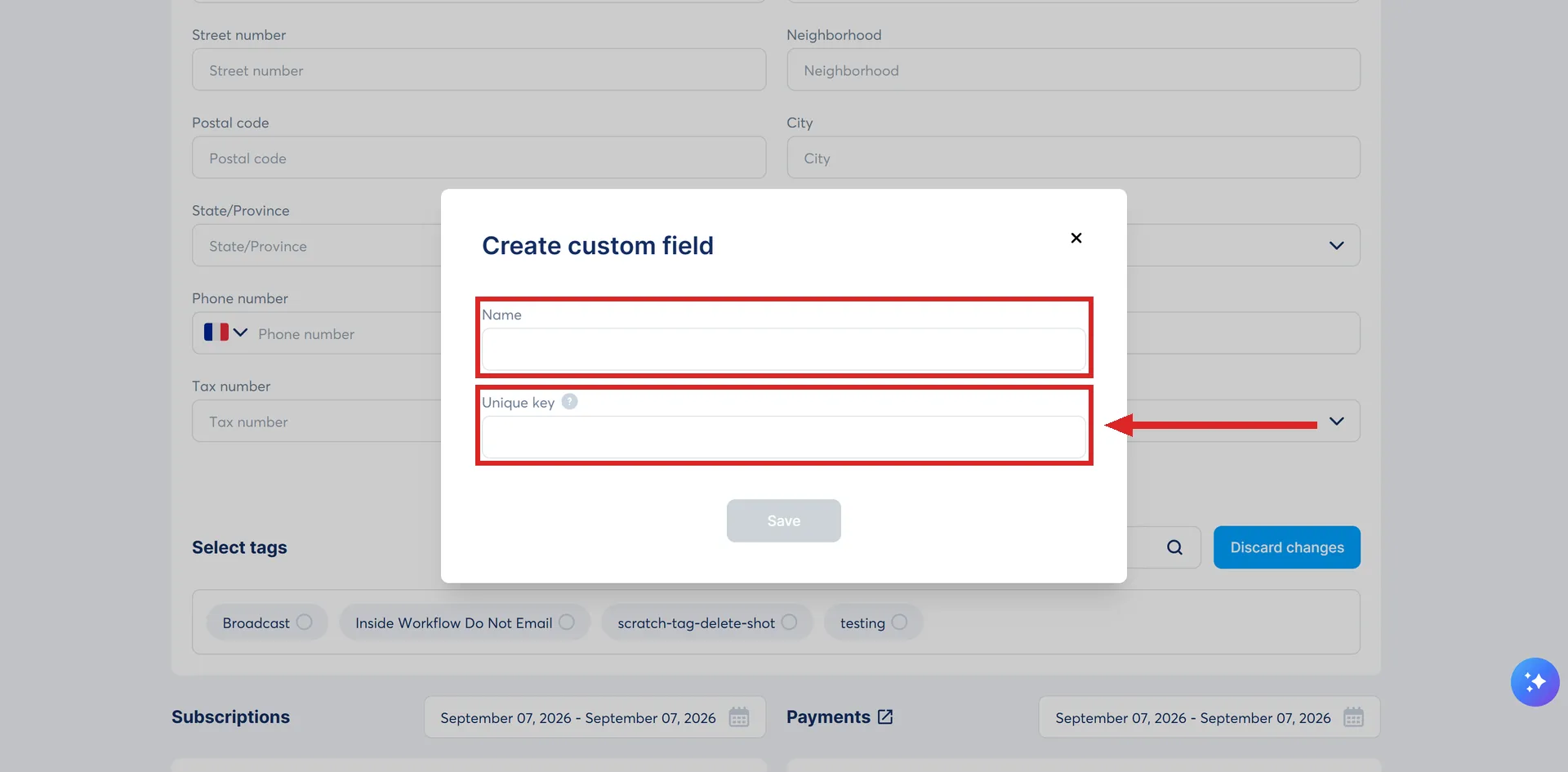
- Fill in a Name and a Unique key, then save.
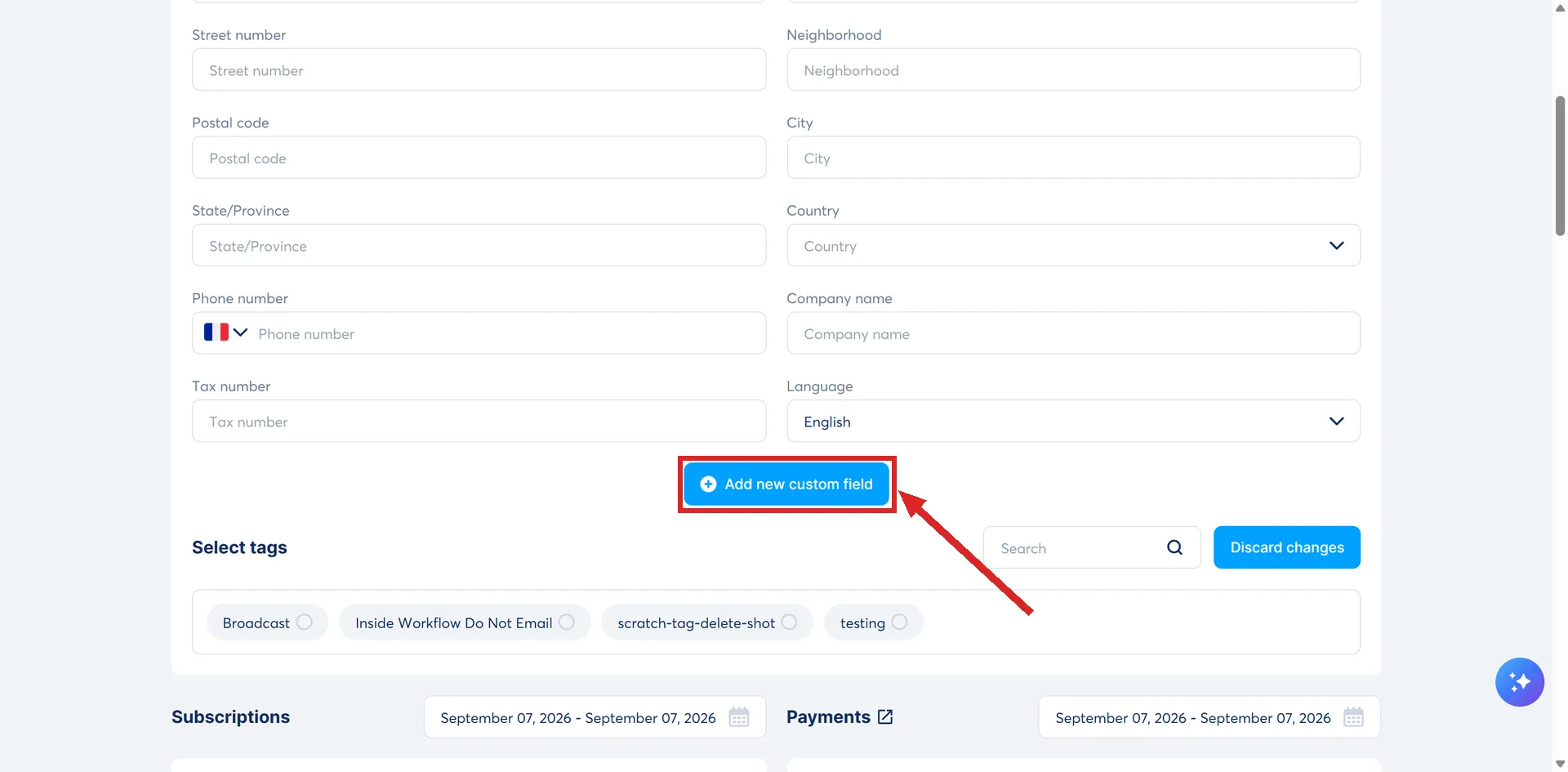
The name is the label. The key is what the field is identified by, and systeme.io's article sets no rule for what it may contain and gives no example of one.
Adding it to a page ends with Save at the top of the editor. systeme.io's warning on that button is worth reading once: after a save, the previous version of the page cannot be restored.
Where it turns up afterwards
- As an input type. Drag a Form input element onto a page and click it. The custom field appears in the Input Type list next to the built-in types. That list is what decides the behaviour, not the label: systeme.io's own example is that picking Email as the input type is what adds the person to the contact list when the form is submitted.
- Inside the Form element. The plus button that adds a field offers the defaults, a checkbox, or a custom field. systeme.io's note is that custom fields are created from the contacts page and then appear automatically in the form settings under Custom fields.
- On a website. The Websites feature uses the same Form element, and the same note is repeated in its documentation.
- During an import. The column mapping step can point a column of a CSV at a custom field.
When one is worth making
Three situations, taken from what systeme.io's own pages describe.
- The information has no built-in field to sit in.
- A list is coming in from another tool and carries a column that has to land somewhere.
- Personalising or segmenting later depends on a value the built-in fields do not hold.
The mapping matters as much as the field. An import that does not point a column at the right custom field puts that data nowhere.
When a tag does the job instead
A custom field stores a value. A tag is a label that is either on a contact or it is not, and assigning one can trigger an automation rule by itself.
If the answer is a number, a date or a line of text, it belongs in a field. If the answer is yes or no, and something should happen the moment it becomes yes, it belongs on a tag.
How I checked this answer
Nothing on this site is written from memory. These are the sources I checked to write this answer, and the date I checked them.
- How to add a custom form input fieldhelp.systeme.io, article 172
- How to add a form field and a form element to your pagehelp.systeme.io, article 1662
- How to create a websitehelp.systeme.io, article 4526
- Migration of your contact list to systeme.io: what you need to know before getting started (advanced tips)help.systeme.io, article 10953
- How to automatically and manually add tags to your contactshelp.systeme.io, article 348
Checked on
Did this answer your question?
Keep reading
- Can I get deleted contacts back? There is a bin, and it holds them for 30 days. Where it is, and the row that never empties.
- What actually happens when I delete a contact? It goes to a bin, not to nothing. And your contact count drops the moment it does.
- Where do my course videos actually live? On systeme.io itself, if you upload them. The two numbers that decide whether that works.