Home / Categories / Contacts
Can I get deleted contacts back?
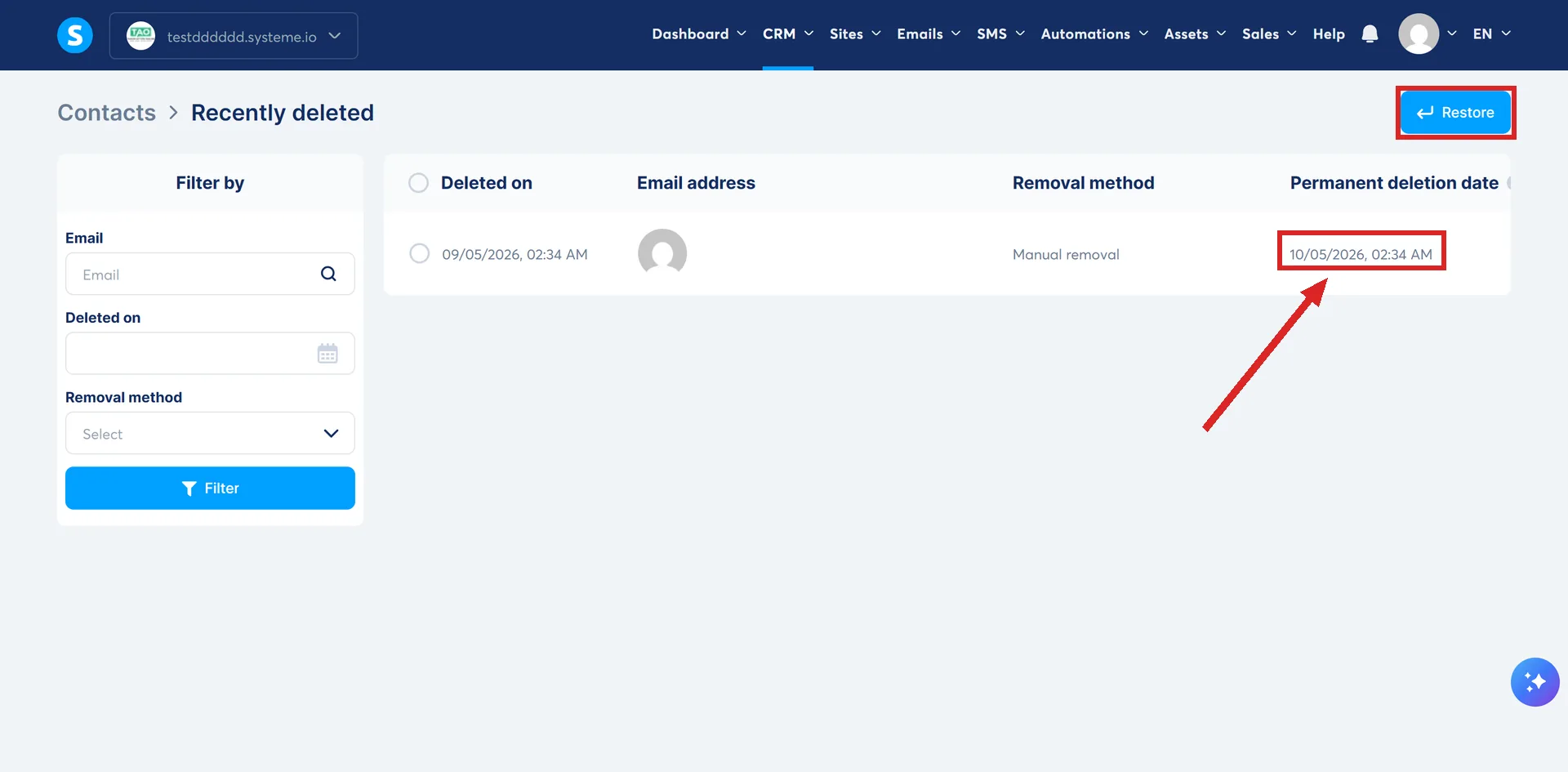
Yes, for 30 days. Deleted contacts go to a Recently deleted bin inside Contacts, where a Restore button puts them back. After 30 days they are removed for good.
Where the bin is
Click Contacts in the CRM menu, then Recently deleted on the Contacts page.
Every row carries four things: the deletion date, the email address, the removal method, and the date that contact will be permanently deleted.
Tick the ones to bring back and click Restore. Filters down the left narrow a long list by email, deleted date or removal method.
The 30 day window
Deleted contacts are kept for 30 days before being permanently removed.
A bulk delete lands in the same place on the same clock. Selecting a whole filtered list and deleting it moves those contacts to the bin, restorable until the 30 days are up.
systeme.io's own worked example of that: filter by Tag, pick the tag Lead, click Select all, click Delete, then Confirm. Only the tagged contacts go, and all of them are recoverable from the bin.
The row that says Not applicable
Some rows show no permanent deletion date. systeme.io's explanation is that the contact still has access to courses or communities, and will not be permanently deleted from the system until that access is removed.
Spotting a deletion without opening the bin
Hovering over a contact's email address in the dashboard sidebar shows their current status. For a deleted contact a tooltip appears with two lines: Contact removed, and the date of removal.
Clicking that email address in the Live updates feed opens the Recently deleted page directly.
A deleted funnel or blog is a different process
There is no 30 day bin for those. Recovering deleted content such as a funnel or a blog is a paid service handled by the technical team, and only when the deletion happened within the last 7 days.
The request takes four details: the account email address, the exact name of the deleted funnel or blog, the domain it used, and the time and timezone of the deletion. Support confirms whether recovery is possible before any payment is taken.
Paying is not the last step. Once payment is made, the same support thread needs a reply confirming it, and only after that reply does the team forward the request to the developers who carry out the recovery.
Whether a course or anything besides a funnel or a blog qualifies for the same service is not stated in the documentation.
How I checked this answer
Nothing on this site is written from memory. These are the sources I checked to write this answer, and the date I checked them.
- How to restore deleted contactshelp.systeme.io, article 11332
- How to delete multiple contactshelp.systeme.io, article 308
- How to request a recovery for deleted contenthelp.systeme.io, article 10861
Checked on
Did this answer your question?
Keep reading
- What is the safest way to import an old list? The file it will take, the two things set during the import itself, and the wait afterwards.
- Contacts are disappearing from my list and I did not delete them. Nobody clicked delete. Software did, for one of three documented reasons.
- What is drip content, and should I use it? Lectures on a timer instead of all at once, and the option it costs you.