Home / Categories / Emails
What is a tag actually for?
A tag is a label you put on a contact so you can reach that group again. Newsletters are sent to tags rather than to a list, and adding a tag can set an automation running.
What a tag is
A tag is a label attached to a contact. systeme.io describes tags as a way to classify contacts by their origin or status: contact, customer, student, and so on.
Nothing about the contact changes when one is applied. The tag is a marker that lets you pull that group back out of the database later.
Why they are not optional
A newsletter is addressed to tags. systeme.io's own wording is that without tags you will not be able to segment your audience or send targeted newsletters, and creating a newsletter lists an existing tag as something you need first.
Automation reacts to them too. Tag added is one of the triggers an automation rule can watch for, so applying a tag can send an email or subscribe somebody to a campaign.
The three ways a tag gets on a contact
- An automation rule sets it when something happens.
- A payment page hands it over as the resource a buyer receives.
- By hand, from CRM then Contacts: tick the contacts, More actions, Add tag.
Tags can also be created from inside an automation rule. Type a name that does not exist yet and it is created for you, so there is no need to set them up in advance.
Should I tag by interest or by action?
Action first. The examples in systeme.io's own documentation are origins and statuses rather than interests, down to the tag it names: Client-course-1, assigned automatically to people who bought that course.
An action tag records something that definitely happened. Interest is a guess until somebody does something about it.
Interest tagging does have a real mechanism behind it, though. The Email link clicked trigger fires on one specific link in one specific email, and systeme.io lists assigning a tag as one of the things it exists for. A click on a link about one topic is a signal, not a guess.
So the working split is: tag the action when money, access or a signup changes hands, and tag the interest when a click tells you which of two things somebody wanted.
The rule that catches people out
An automation rule triggered by Tag added only fires for tags applied after the rule was saved. Contacts already carrying the tag when you build the rule will not set it off.
The reverse bites harder. Tagging a batch of contacts by hand fires every rule watching for that tag, which can subscribe all of them to a campaign at once. systeme.io's advice is to check the existing rules and their triggers before adding or changing any tag.
Reading the tag dashboard
Find the dashboard under CRM, then Tags.
The Tags page shows a Total column, and it is not the number of contacts holding that tag now. It counts every contact that has ever received it, including those it was later taken off.
The current figure is Total minus Removed. A tag showing Total 2 and Removed 1 is on one contact.
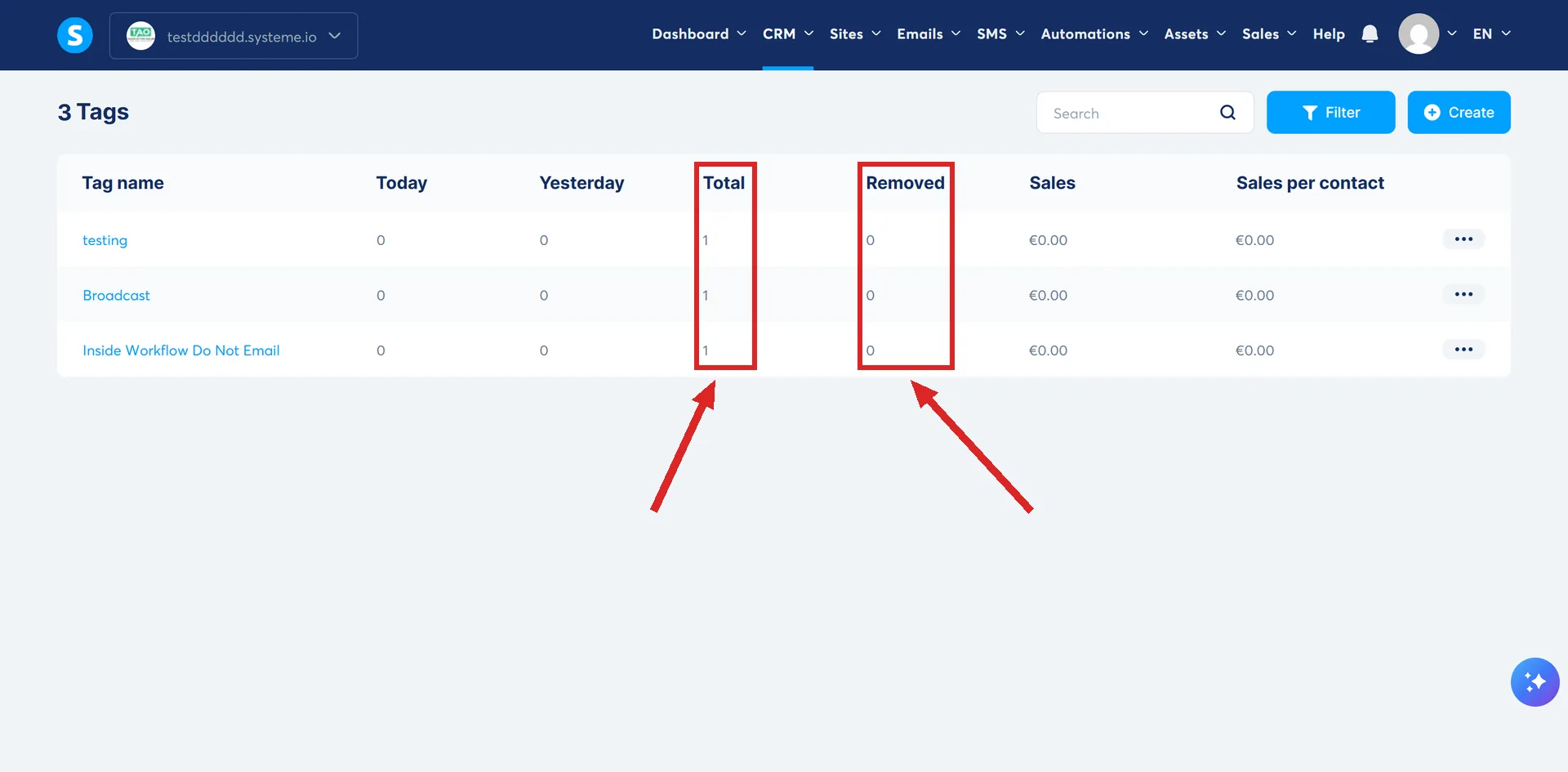
The same page shows how many contacts got the tag today and yesterday, and the revenue earned by contacts carrying it.
For a tag doing a real job, the lead magnet funnel guide puts one on every new subscriber and uses it to start the emails.
How I checked this answer
Nothing on this site is written from memory. These are the sources I checked to write this answer, and the date I checked them.
- How to create a taghelp.systeme.io, article 303
- How to automatically and manually add tags to your contactshelp.systeme.io, article 348
- How automation rules workhelp.systeme.io, article 140
- How to trigger automations after contacts click links in an emailhelp.systeme.io, article 2927
- How to send or schedule a newsletterhelp.systeme.io, article 358
Checked on
From my own use
I keep my tags to a minimum now, because early on I did not write down what each one was for, and within months I had forgotten. Keep a spreadsheet with a line describing every tag. A tag named Bought Course XYZ gets confusing fast once you have three versions of that course, or several price points, and need to send a training update to the right buyers.
Did this answer your question?
Keep reading
- What is a custom field, and when do I need one? Made from the contact list, not the editor. What the unique key is, and where the field shows up after that.
- What counts as a contact against my plan? The four numbers, what creates a contact, and what happens on the fourth day after you pass one.
- Should I build my website with a funnel or a blog? There is a third option, and it is the one their own help centre buries.