Home / Categories / Sales funnels
What is a price plan, and why isn't it just a price?
A price plan is the object that holds both the amount and the schedule for something you sell. It has three types, it belongs to the account rather than to one page, and nothing can be sold until one is attached.
Why it is not a number
A price is an amount. A price plan is an amount plus a schedule, and systeme.io makes you pick which of three shapes that schedule takes.
| Type | What systeme.io asks you to set |
|---|---|
| One-time payment | The payment amount and the tax behaviour |
| Subscription | A trial period (a duration and a unit of days, weeks, months or years, or 0 for none), the cost, the interval between payments, and the tax behaviour |
| Payment plan | Everything a subscription asks for, plus the total number of payments: enter 5 for five monthly payments |
systeme.io describes setting up a payment plan as similar to setting up a subscription, with that count as the only difference between them.
None of the three types carries a discount field. Taking money off a price is a coupon's job, or it means building a second plan at the lower amount and putting that one on the order form instead.
What one looks like filled in
These are systeme.io's own example values for a subscription plan.
| Field | Example value |
|---|---|
| Trial period | 0, which means no trial |
| Time unit for the trial | Days, weeks, months or years |
| Subscription cost | $20/month |
| Interval between payments | Every 1 month |
| Tax behaviour | Set before saving |
Switch the type to Payment plan and one more field appears: the total number of payments. systeme.io's example puts 5 in it, for five monthly payments.
The fields that are not money at all
Before the amount, a new plan asks for a display name for the dashboard, a display name for the order form, and a statement descriptor.
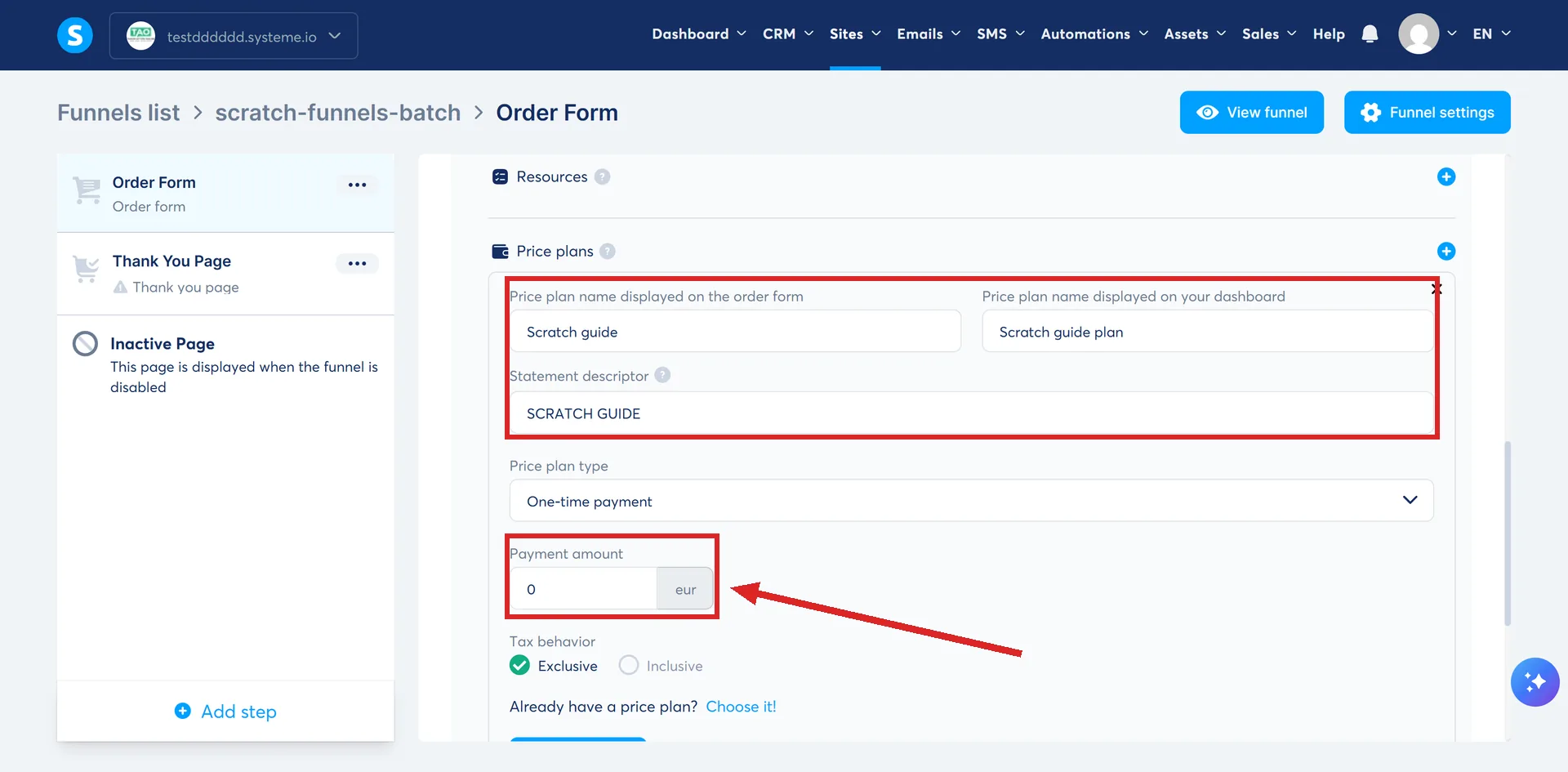
Two display names is not a mistake. What a plan is called on your own dashboard and what a buyer reads on the order form are separate fields, so an internal name like "Course, monthly, launch" never has to reach a customer.
Where a price plan actually lives
You build one from the order form. Open Sites, then Sales funnels, then the funnel, then the order form step. Choose Digital product as the offer type, click the plus icon beside it to add the resource, name the product, then click the plus icon again to configure the price plan. The menu that opens offers existing plans from a dropdown, or Create a new one.
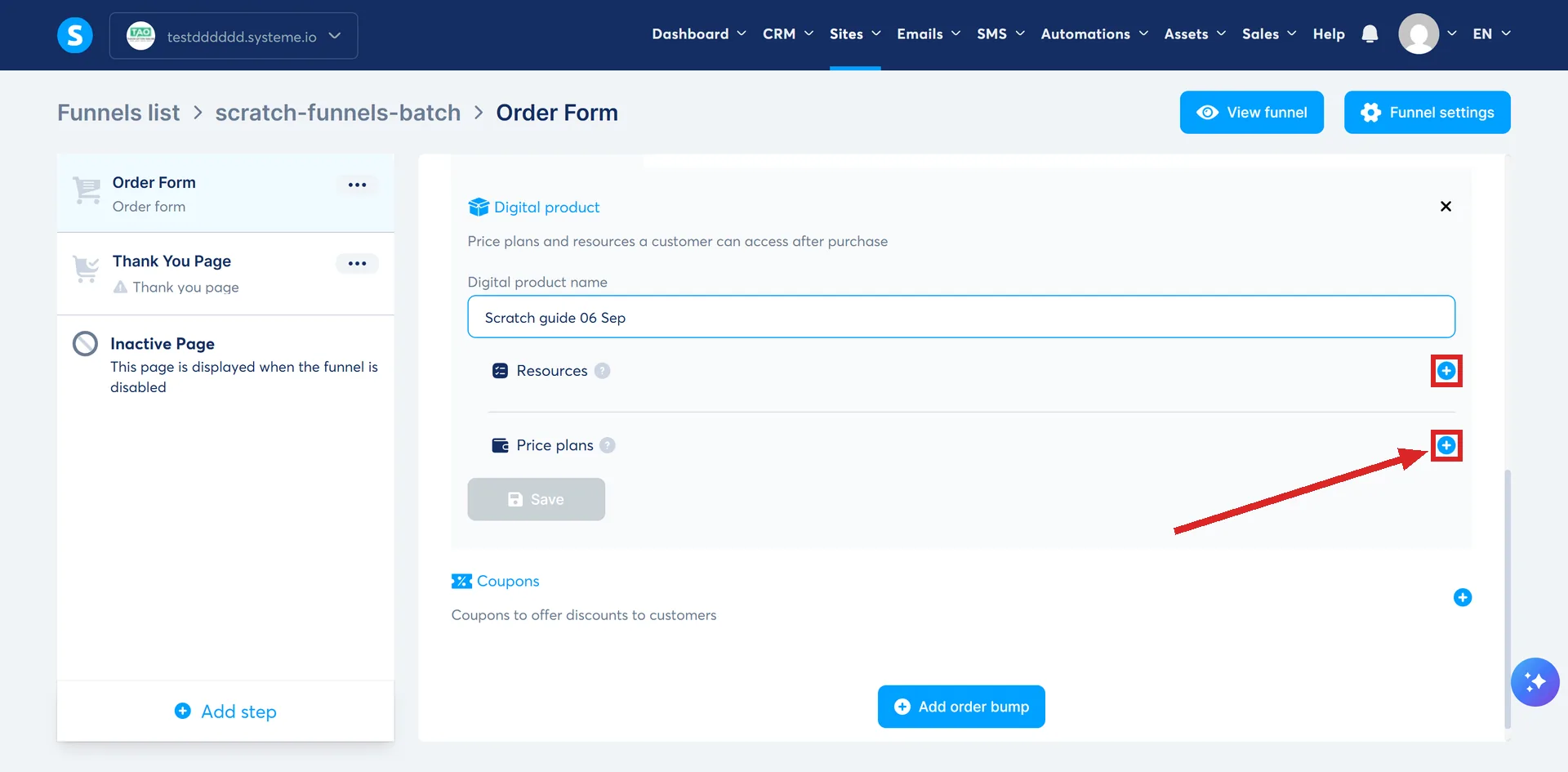
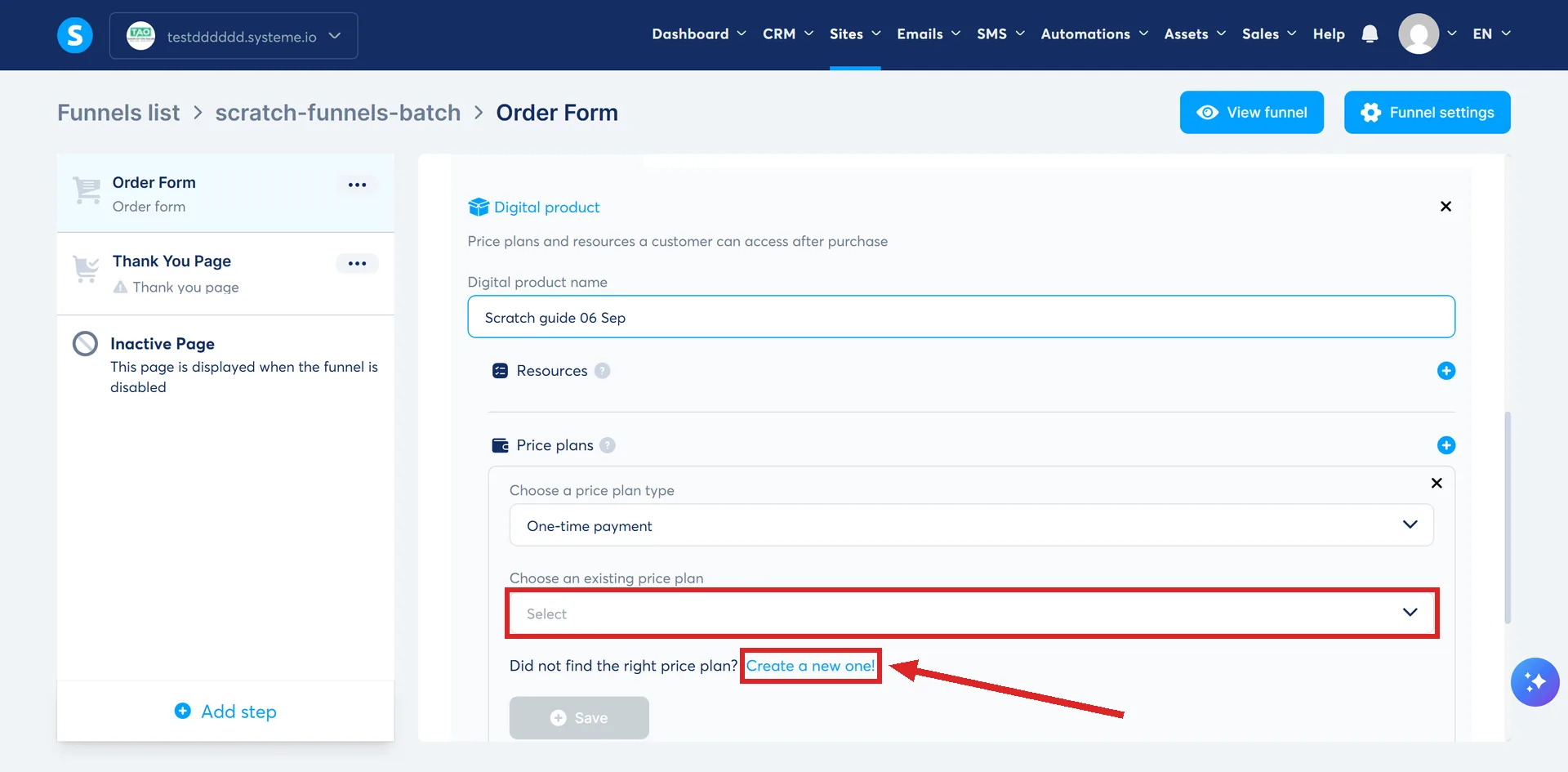
That dropdown matters. Plans are picked from a list of ones that already exist, rather than typed out fresh on every page.
What deleting one proves
Removing a plan asks which of two things you meant, and the wording is worth reading before clicking.
- Remove the price plan for this offer only. It goes from the current page.
- Permanently remove this price plan from your account. systeme.io states this deletes the plan from the entire account, including any other payment pages where it is currently used.
A plan can therefore be attached to several payment pages at once, and the second option reaches all of them.
How many one page will take
- An order form takes one or more pricing plans.
- An upsell or downsell page takes one or several.
- An order bump takes a single price. systeme.io marks that one IMPORTANT.
The exception nobody reads
Price plans are created from the order form for digital products only. systeme.io is explicit that for a physical product the price plan has to be created when the product itself is added instead.
Nothing sells without one
An offer with a resource attached and no price plan is not sellable. systeme.io's wording is that you must add a price plan to your offer before you can sell it.
A cap on how many can be sold sits on the offer as well, not on any one plan. systeme.io's note is that a sales limit applies to all of an offer's price plans, one-shot, subscription and payment plan alike, so every plan attached to that offer draws down the same total.
How I checked this answer
Nothing on this site is written from memory. These are the sources I checked to write this answer, and the date I checked them.
- How to create and configure a price planhelp.systeme.io, article 153
- How to delete a price planhelp.systeme.io, article 326
- How to create an order form/payment pagehelp.systeme.io, article 252
- How to create an upsell and a downsellhelp.systeme.io, article 243
- How to add an order bump to an order form/payment pagehelp.systeme.io, article 154
- How to sell a course bundlehelp.systeme.io, article 2048
- How to set a sales limit on your offershelp.systeme.io, article 1747
Checked on
From my own use
Price plans have never confused me, and that is the best thing about them. Nothing is hidden. In my experience a lot of other platforms add limits and extra costs that their pricing pages do not make clear.
Did this answer your question?
Keep reading
- What is a thank you page for, beyond saying thank you? The page a funnel ends on, whichever answers the buyer gave. What belongs on it.
- What is an A/B test, and how long before the result means anything? Two variants, one goal page, and the number systeme.io never publishes.
- Why can't my student download their certificate of completion? Two switches, not one. Check your own course setting before assuming it is the student's progress.