Home / Categories / Courses & memberships
What is drip content, and should I use it?
Drip content is one of the access types you can grant on a course. Instead of the whole course opening at once, each lecture unlocks after a delay in days that you set on the lecture itself.
Where the delay is set
On the lecture, not on the course. Open Assets, then Courses, then the course, then a module, and click Add lecture. The popup asks for four things: a name, a delay after the previous lecture in days, an Enable comments tick box, and a page template.
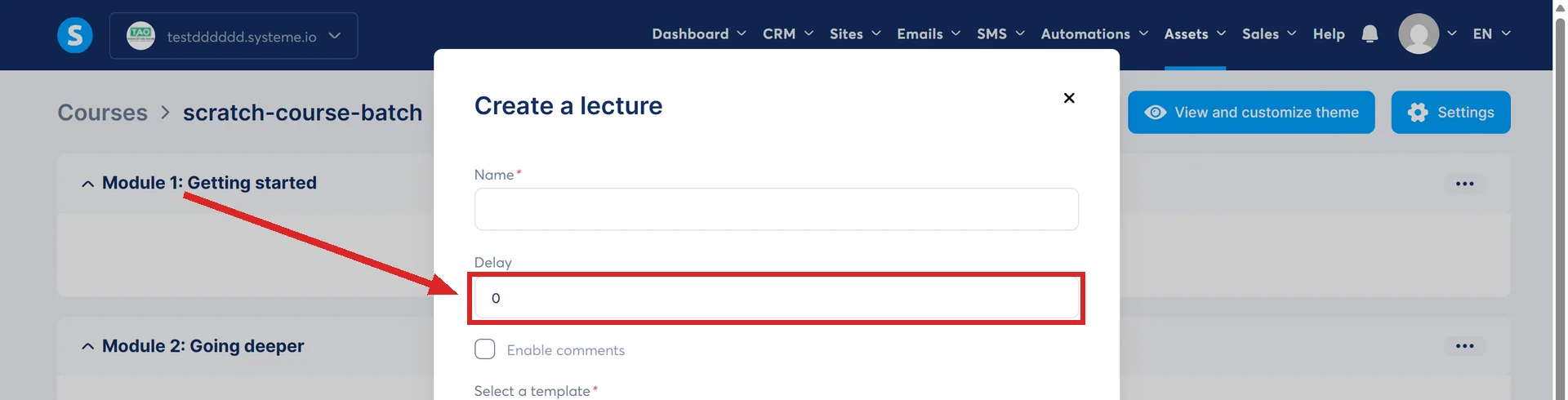
systeme.io's worked example: set the first lecture of the first module to 0 days, so it opens the moment somebody registers, then set every lecture after it to 1 day. That releases one new lecture a day.
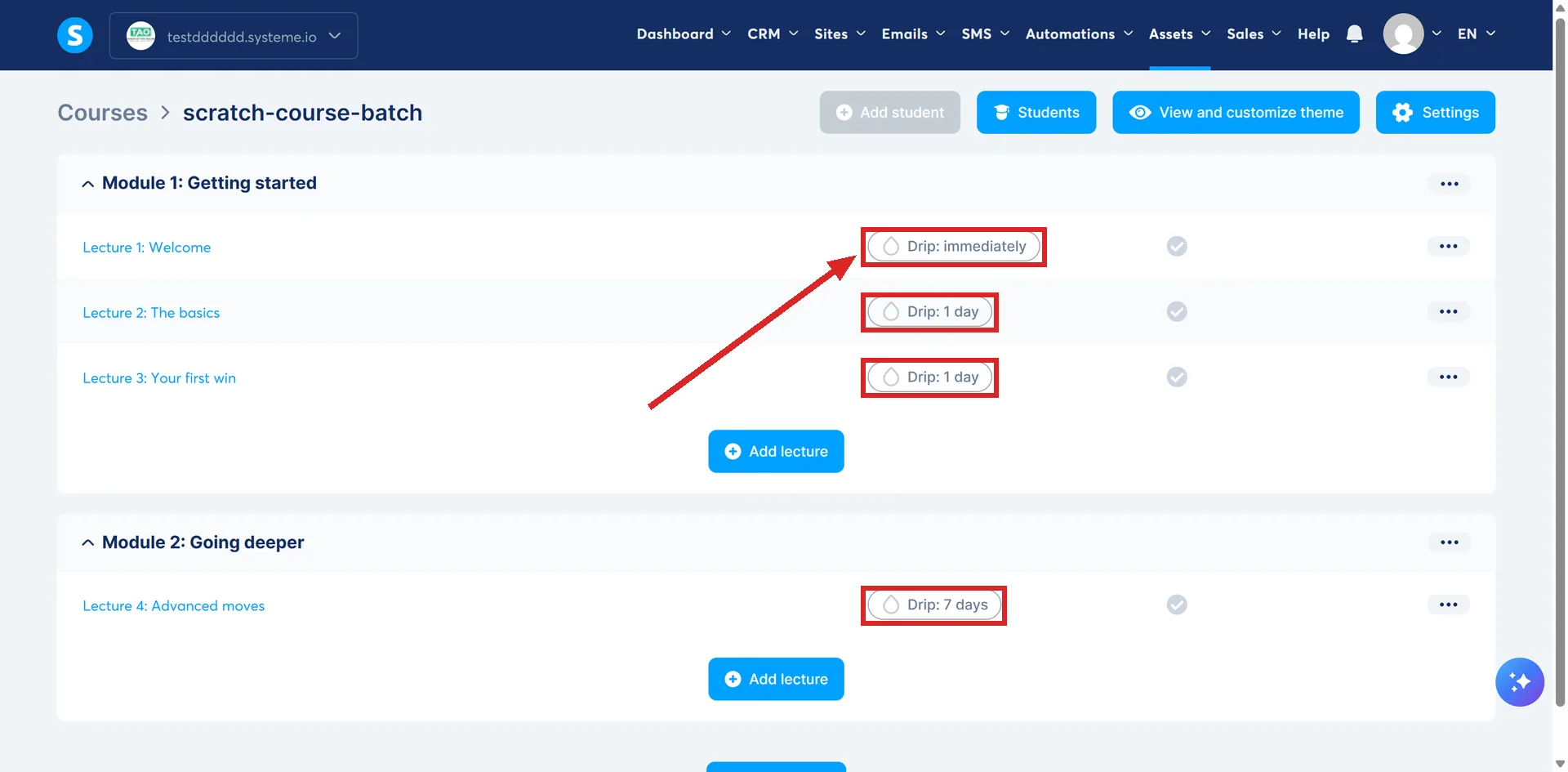
What that looks like in days
Filled in that way, a student who registers on day 0 gets this.
| Lecture | Delay set on it | Day it opens |
|---|---|---|
| Module 1, lecture 1 | 0 days | Day 0, the moment they register |
| Lecture 2 | 1 day | Day 1 |
| Lecture 3 | 1 day | Day 2 |
| Lecture 4 | 1 day | Day 3 |
Every number is a gap, never a date. Change lecture 4 from 1 day to 7 on the schedule above and it moves from day 3 to day 9, because it counts seven days from lecture 3 rather than seven from the day the student joined.
What the delay counts from
The previous lecture, not the day the student joined. Put 7 days on a lecture and it unlocks seven days after the one before it, not seven days after enrolment.
systeme.io words the starting point two ways across its pages. One says the delay begins after the previous lecture is viewed. Another says the lecture unlocks the set number of days after the student gains access to the previous one. The pages agree that the clock is tied to the previous lecture, and differ on whether watching it is what starts the clock.
Changing a delay after people have enrolled
If the lecture has not unlocked yet, the schedule recalculates from the new number.
systeme.io's example runs like this. Three lectures, each set to 1 day. A student is two days in, so lectures one and two are open and lecture three is a day away. Change lecture three from 1 day to 5, and it now unlocks 5 days after lecture two.
An unlock that was about to happen can be pushed back that way. A lecture that has already unlocked is not affected.
Should I use it?
Two things change the moment access is set to drip content.
You lose the expiration delay. An expiry in days, which shuts access down a set number of days after it opens, cannot be set on a course granted with drip content.
You gain a view of the schedule. Open Assets, then Courses, then Students, click a student's email address, hover the three dots next to the course and pick Show lectures access dates. A popup lists when each lecture opens for that person. The option only exists for drip access, not for full or partial.
The dates and times in that popup follow the format and time zone set in the account's own settings, so they are your clock rather than the student's.
The email that tells them a lecture is ready
Each lecture can carry its own notification. Open the course, click the three dots next to the lecture, and pick Create a drip access email.
It asks for a subject, a sender name and a sender email address, then hands you an editor. The same menu edits or removes the email later.
The popup also asks which editor you want, Visual or Classic. Afterwards that three-dot menu carries two more options: Edit drip campaign email and Remove email message.
Two things that make drip look broken
Lectures have to be activated. A lecture that was built but never activated does not reach a student whatever its delay says.
If the course also grants access on a specific date, the drip schedule starts from that date rather than from the purchase. The student receives the access email straight after paying, and the course stays shut until the date arrives.
Where drip is not offered
A light course sold through an order form is different. systeme.io states that the access types currently available for one are full access and partial access.
The light course builder itself does take a delay field per lecture, and a Drip label appears next to a lecture once it is saved with one.
How I checked this answer
Nothing on this site is written from memory. These are the sources I checked to write this answer, and the date I checked them.
- How to create a course using systeme.iohelp.systeme.io, article 164
- How are the different course access types different?help.systeme.io, article 301
- How to grant access to a course on a specific datehelp.systeme.io, article 1619
- How to view access dates for a drip content coursehelp.systeme.io, article 3032
- How to set up email notifications for when a lecture in a drip access course becomes availablehelp.systeme.io, article 472
- How to create a light coursehelp.systeme.io, article 8769
Checked on
Did this answer your question?
Keep reading
- What is a course bundle? Several courses sold as one product, and the delay rule that stacks.
- Can I move a course in from Kajabi or Teachable? No import file is documented. What the migration team rebuilds by hand, and what arrives last.
- What is a bounce, and what should I do about one? Hard, soft, and what the grey and blue addresses in your statistics are telling you.