Home / Categories / Contacts
What actually happens when I delete a contact?
The record moves to a Recently deleted bin instead of disappearing, and it stops counting against your plan's contact limit while it is in there. It can be restored for 30 days, after which it is gone for good.
Nothing is removed at the moment you press Delete
Deleted contacts move into a bin called Recently deleted, where they are kept for 30 days before being permanently removed.
That holds whether one contact goes or a whole filtered list. A bulk delete from Contacts in the CRM menu, selecting all and confirming, sends those contacts to the same bin on the same clock.
What the bin knows about each one
Four things per row: the deletion date, the email address, the removal method, and the exact date that contact will be permanently deleted.
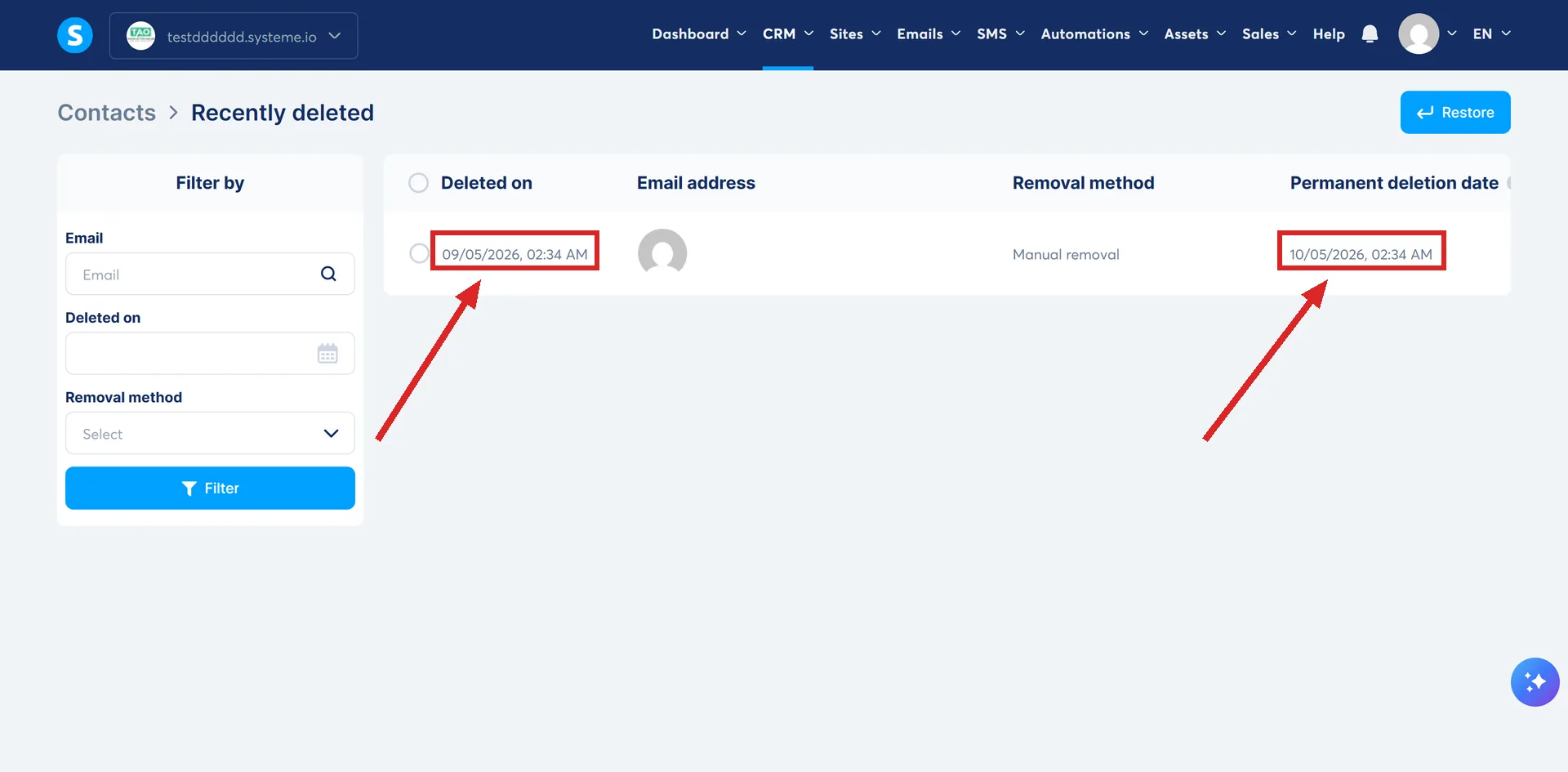
Three of those double as filters down the left of the page, so a bin holding thousands of rows can still be narrowed to the person you are looking for.
A contact in the bin stops counting against your plan
This is the part with money attached, and it is not written on any help page.
systeme.io's support team states that once a contact is deleted and sitting in the bin, they no longer count towards the plan's contact limit. Deleting is therefore a legitimate way to bring an account back under its limit, and the effect does not wait for the permanent deletion 30 days later.
That matters because the limit is what triggers a restriction. Passing it starts three warning emails, one a day, and an alert on the dashboard, with the restriction applied on the fourth day if nothing has changed. Deleting contacts is one of the two documented ways out, the other being an upgrade.
To see where an account stands, click the profile picture, then Settings, then My plan.
Restoring inside the 30 days
Contacts can be restored at any point in the window, from Contacts in the CRM menu, then Recently deleted.
Restoring the original record brings the history back with it. So a person who deleted themselves out of your list and then opted in again while their old row is still in the bin does not have to start from nothing.
What a new opt-in creates once the 30 days pass
A fresh contact, with no link to the old one.
After 30 days the contact is permanently removed and the original record is gone for good. The same person opting in again arrives as a new record carrying none of their previous history: no tags, no dates, no record of what they bought.
That is the real cost of a deletion, and it lands a month after the click that caused it.
The deletion that never completes
Some rows show no permanent deletion date at all, reading Not applicable instead.
systeme.io's explanation is that the contact still has access to courses or communities, and will not be permanently deleted from the system until that access is removed. Deleting a student does not remove them while their course access stands.
Worth knowing that no single page joins these up. The help centre documents the 30 day bin in one article and the plan contact limits in another, and neither one mentions the other.
How I checked this answer
Nothing on this site is written from memory. These are the sources I checked to write this answer, and the date I checked them.
- A reply from systeme.io support, 4 September 2026, on free trial billing and deleting contactssysteme.io support
- How to delete multiple contactshelp.systeme.io, article 308
- How to restore deleted contactshelp.systeme.io, article 11332
- What happens when my account gets restrictedhelp.systeme.io, article 1086
Checked on
Did this answer your question?
Keep reading
- Contacts are disappearing from my list and I did not delete them. Nobody clicked delete. Software did, for one of three documented reasons.
- What happens to my automation rules when I delete a tag? The rule vanished along with the tag. A second, untouched rule proves that was a real deletion, not a page that failed to load.
- Can I move a course in from Kajabi or Teachable? No import file is documented. What the migration team rebuilds by hand, and what arrives last.