Home / Categories / Editor
What is the SEO section of the editor actually for?
The SEO section is six fields on each page, reached through Settings in the editor. Five describe the page. The sixth decides whether search engines may index it. systeme.io says that box starts ticked, but the pages tested for this site arrived with it empty.
Where it is
Open Sites, then Sales funnels, then the funnel, then the page, then Edit page. In the editor, click Settings in the top left of the panel, then scroll down to Search Engine Optimization (SEO).
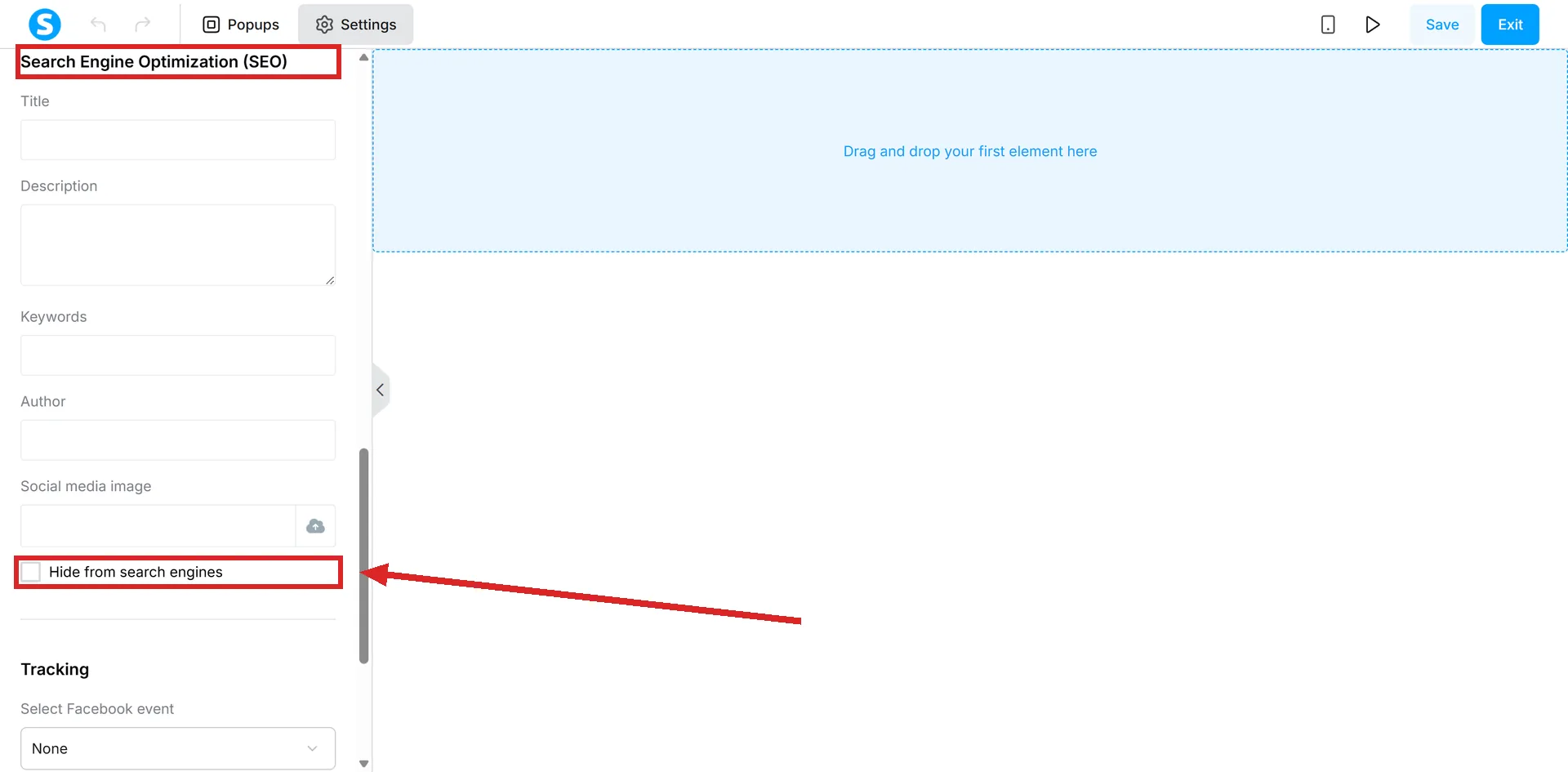
It belongs to the page, not to the funnel. Every page has its own set of these fields.
The six fields
| Field | What systeme.io says it does |
|---|---|
| Title | Shows as the page title in the visitor's browser tab, and as the title when the page is shared on social media |
| Description | The text that appears when the page is shared on social media |
| Keywords | Links the page to specific terms people search for. Several are separated by commas |
| Author | Displays the author's name |
| Social media image | The image displayed when the page link is shared. Added through the upload icon |
| Hide from search engines | A tick box controlling whether search engines index the page |
The field that decides whether anyone can find the page
systeme.io's own article says pages are hidden from search engines by default, with the box arriving ticked. In a test account I found the opposite. The box was unticked on every page I opened, funnel pages and blog pages alike. A new funnel page created on 11 September 2026 arrived the same way. More than half of those pages served a "noindex" tag telling search engines to stay away regardless, including every blog post, and one page managed both at once: box unticked, noindex sent.
Do not trust the tick box either way. Open the live page, right-click it, choose View page source, and search for the word robots. If you find "noindex", search engines have been told to skip that page, whatever the editor shows you.
So a page that has never appeared in a search result does not necessarily have an SEO problem. It may never have been let in.
What that costs you later
Google finds systeme.io pages through the sitemap.xml file. systeme.io's note is that a page with indexing disabled will not be indexed, and that after re-enabling it you have to request indexing manually in Google Search Console before the change takes effect.
Unticking the box is therefore not the end of the work. The manual request in Search Console is part of the same job.
What each field actually fills in
systeme.io's worked example is a link to a test page shared on Facebook, and the fields land like this.
| Field | What carries the value |
|---|---|
| Title | The browser tab, and the headline on the share card |
| Description | The text under that headline on the share card |
| Keywords | The terms the page is linked to. Several go in the one box, separated by commas |
| Author | The author name shown for the page |
| Social media image | The picture on the share card, put there through the upload icon beside the field |
| Hide from search engines | Nothing on the page. It decides whether search engines may index it |
What the title and description are described as
Both are explained in terms of the browser tab and social sharing. The worked example in the help centre is a link shared on Facebook.
The article does not say what either field does to a search result. That silence is worth knowing about before you write them as if they were search snippets.
Nor does it publish any example wording, any recommended length or any character count for either one. There is no systeme.io figure to work to, which is why no number appears above.
Where the shared image shows up
The social media image is the preview shown when a page link is posted on Facebook, Instagram, WhatsApp, LinkedIn or X. It is uploaded from this same panel.
Before you leave the editor
These fields need Save, like anything else in the editor. Once changes are saved, the version before them cannot be restored.
How I checked this answer
Nothing on this site is written from memory. These are the sources I checked to write this answer, and the date I checked them.
- What is the "Search Engine Optimization (SEO)" section for?help.systeme.io, article 510
- How to control your page's visibility on search engineshelp.systeme.io, article 617
- How to change the title of a pagehelp.systeme.io, article 350
- How to set a social media image for your pagehelp.systeme.io, article 351
- New funnel pages checked for their Hide from search engines settingA live systeme.io account
Checked on
Did this answer your question?
Keep reading
- Can I paste in my own HTML, CSS or JavaScript? Yes, in three places. Two of them are boxes, one is an element you drag on.
- What is a popup trigger, and which one should I use? Five ways to make a popup appear. Three need nothing from the visitor.
- Is a sequence the same thing as a campaign? Same features, different names. What your old tool called things, and what systeme.io calls them.