Home / Categories / Editor
What is a popup trigger, and which one should I use?
A trigger is the event that makes the popup appear. systeme.io offers five: open automatically, open after a set number of seconds, open on exit intent, open from a button, and open from a text link.
Where popups are created
Inside the page, not in a separate popups area. Open Sites, then Sales funnels, then the funnel, then the page, then Edit page.
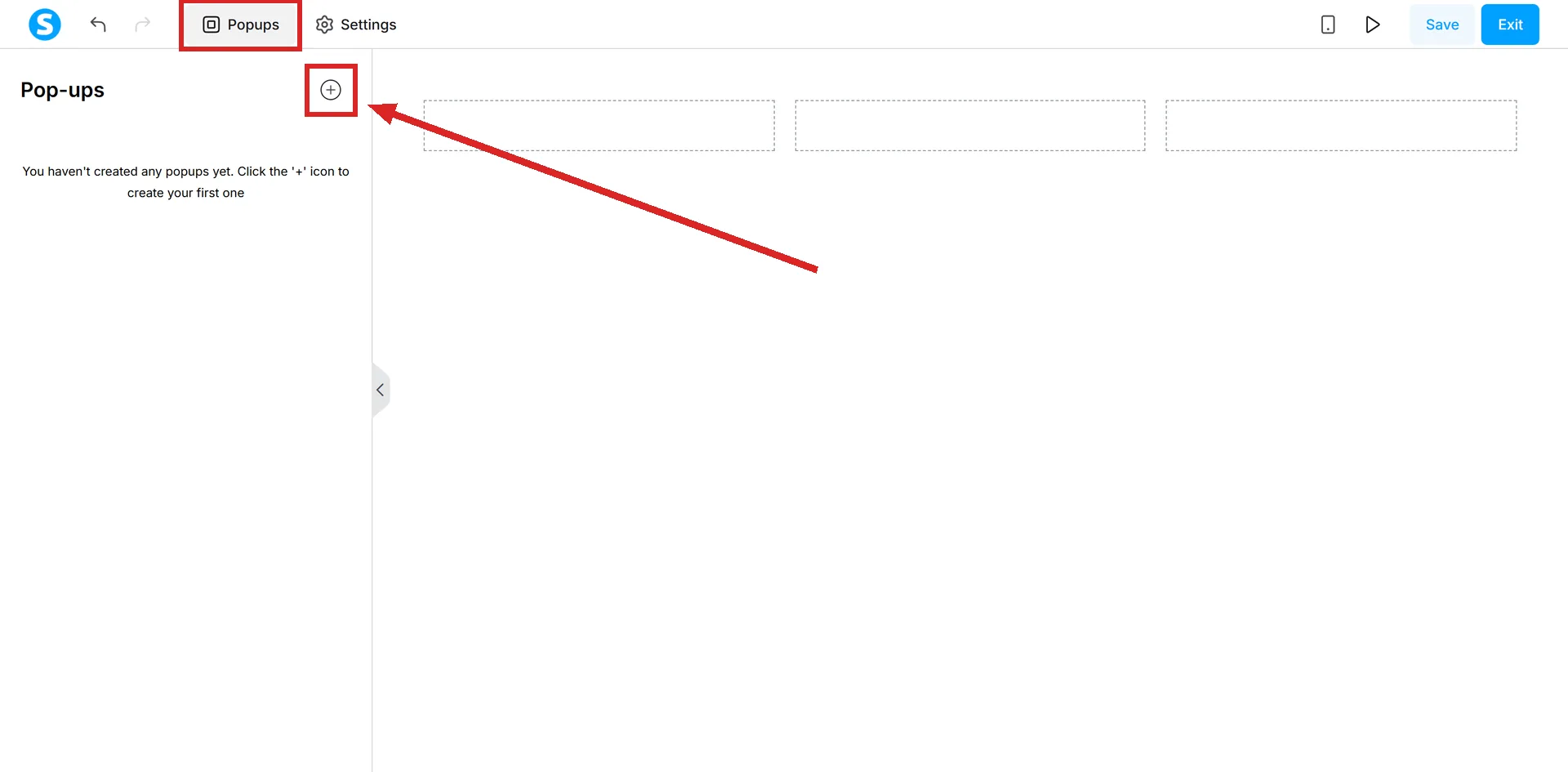
In the editor, click Popups in the upper left, then the + icon. The new popup appears in the editor, and Edit popup settings above it opens its options.
The three that need nothing from the visitor
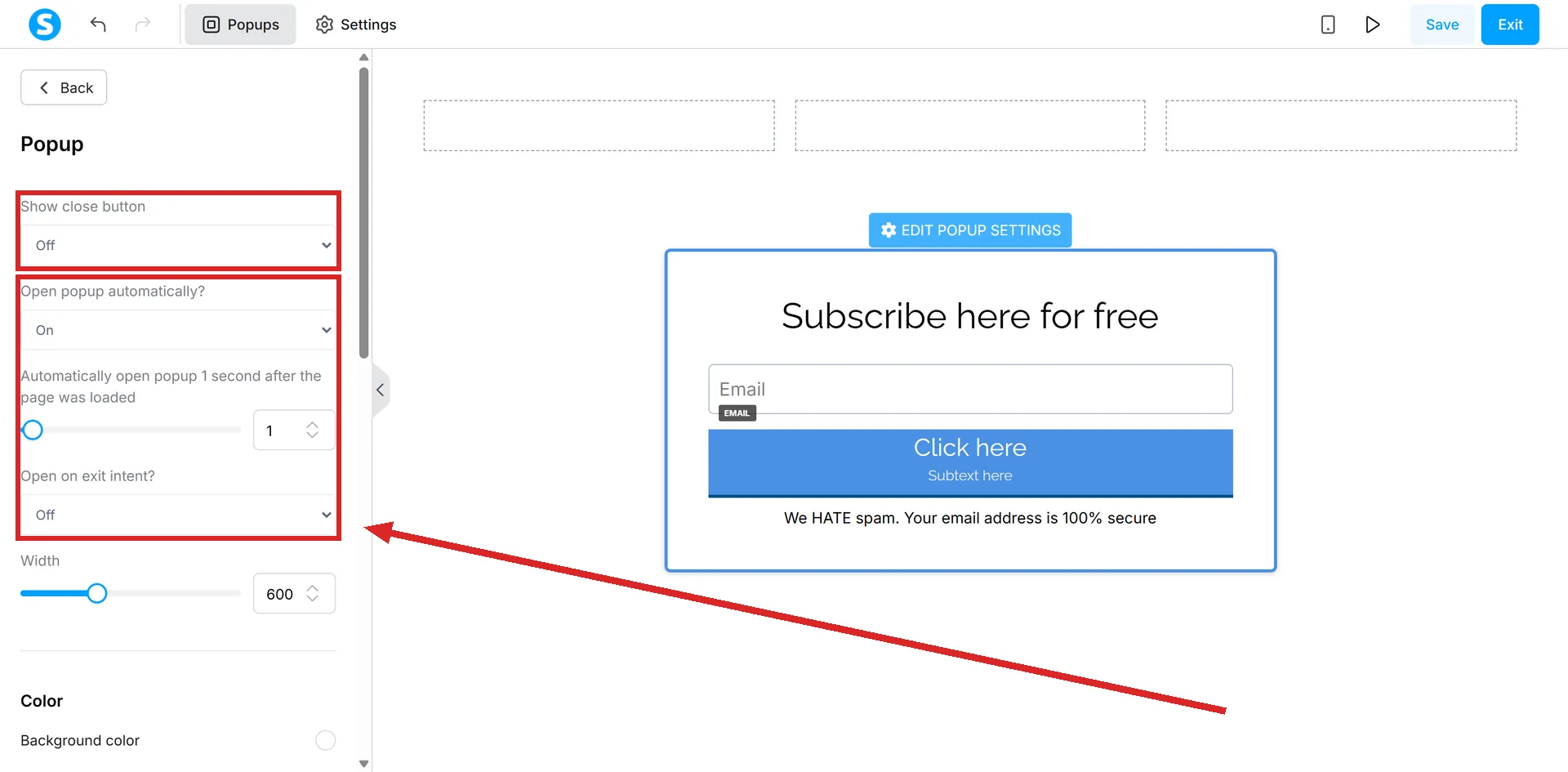
All three live in the popup's own settings panel.
- Open the popup automatically. The popup opens with no action from the visitor.
- Set a delay in seconds. A number you type. The popup waits that long before opening.
- Open on exit intent. An option in the same list.
A fourth setting sits with them and is not a trigger. Show close button is about the way out of a popup, not the way in.
The two that need a click
- A button. Drag a Button element onto the page, open its settings, and choose Show popup as the action when the button is clicked.
- A text link. Highlight the words, click the link icon, choose Popup, pick which popup should open, then save.
The order matters for the button. The popup has to exist on the page before Show popup can be picked as an action.
Which one do I want?
| Trigger | What has to happen | What must exist first |
|---|---|---|
| Automatically | Nothing | The popup |
| Delay in seconds | The visitor stays for the time you set | The popup |
| Exit intent | Not documented | The popup |
| Button | A click on the button | The popup, before the action can be chosen |
| Text link | A click on the linked words | The popup |
The exit intent row is blank on purpose. systeme.io lists the option and does not say, there or in the other popup articles read for this answer, what movement counts as an exit. Anyone using it is testing it rather than reading about it.
Triggering one from another website
A popup can be opened from a page that is not on systeme.io. Click Add step in the funnel's left-hand menu, choose Popup Form from the Opt-in category, pick a template, and edit it.
Create a link then generates the HTML for a text link. On the external site that code goes between the body tags, and clicking the text opens the popup.
The same screen offers two other versions: the full script, and an embedded form. To have the popup itself load on an external site, the script is copied with Script and pasted into that site's header or footer code section.
Making the popup save anything
A popup carrying a form stores nothing until its button is set to Submit form, with a destination chosen for where the visitor goes after they submit.
How I checked this answer
Nothing on this site is written from memory. These are the sources I checked to write this answer, and the date I checked them.
- How to add a popup to a pagehelp.systeme.io, article 409
- How to trigger a popup from a text link (on systeme.io or external sites)help.systeme.io, article 337
- How to configure a buttonhelp.systeme.io, article 170
- How to embed a systeme.io form or popup on an external websitehelp.systeme.io, article 266
Checked on
Did this answer your question?
Keep reading
- Can I paste in my own HTML, CSS or JavaScript? Yes, in three places. Two of them are boxes, one is an element you drag on.
- What size should my images be? No published page-image size anywhere. The two numbers that do exist are for a favicon and for email.
- Why hasn't my campaign email gone out yet? A delay that is still running, an email nobody activated, or a hold sitting on the account itself.