Home / Categories / Editor
What size should my images be?
For an image on a page, systeme.io does not publish a recommended size. It gives real numbers in only two places: the favicon, and the width of a marketing email.
The honest answer for a page image
There is no published figure. The help centre article on adding an image covers dragging the Image element on, uploading the file, and making the image clickable. It names no width, no height and no file size.
A recommended page-image size attributed to systeme.io is coming from somewhere other than the help centre.
The setting that stands in for one
In the editor, drag the Image element from the panel on the left onto the page, click its settings icon, then the upload icon. The popup that opens has an Upload tab for a new file from your computer and a Your images tab for one already in the account.
In that same window there is a tick box, Optimize uploaded images. systeme.io describes it as automatically compressing your files to improve page loading speed, with no noticeable loss in quality.
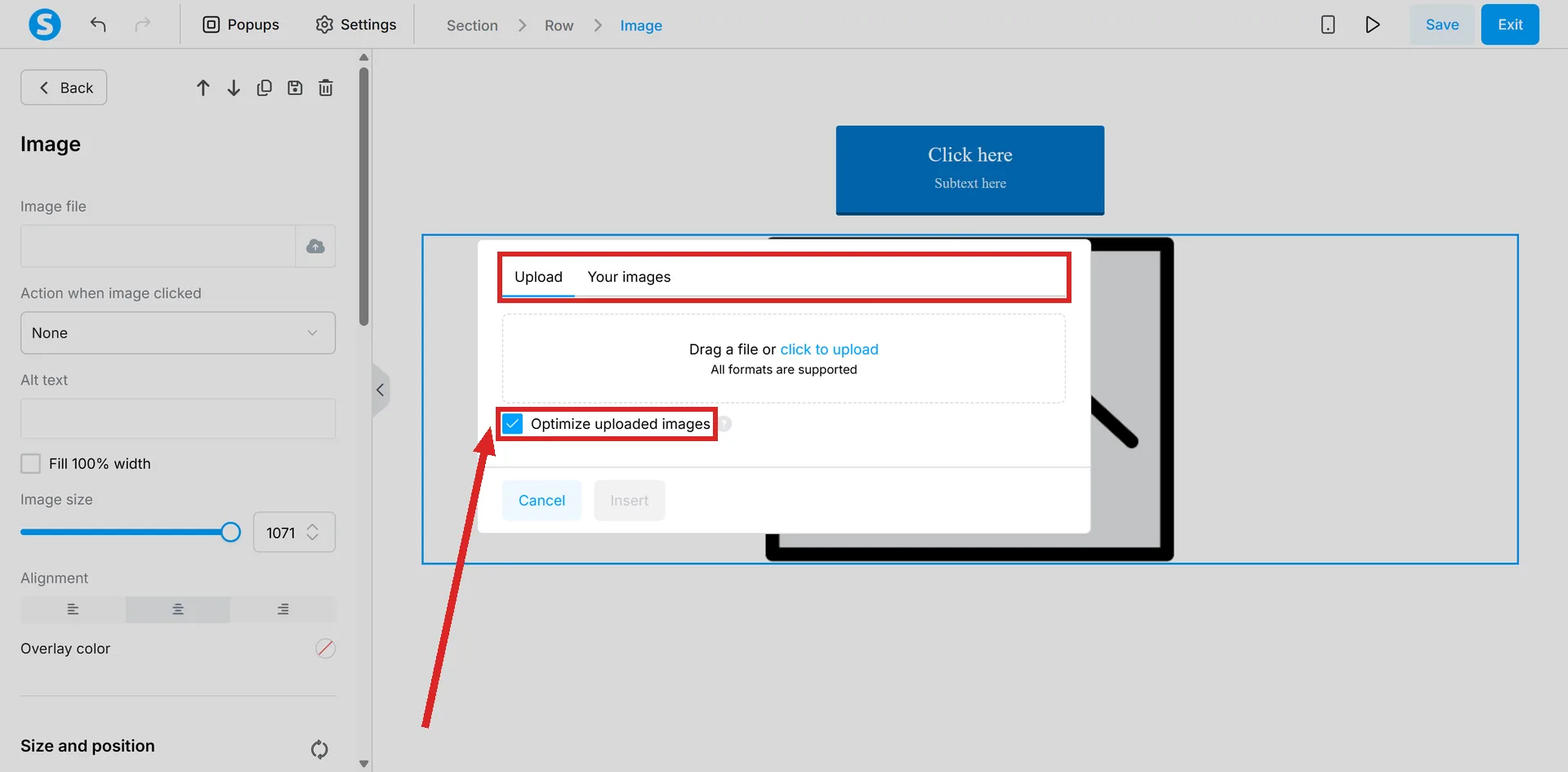
That box is the platform's answer to the file-size half of the question. The description covers compression, and says nothing about dimensions.
The two images it does give a size for
| Image | Published size | Formats |
|---|---|---|
| Favicon | 32x32px ideal. Maximum width 64px, and anything wider cannot be uploaded | PNG, JPG, JPEG, GIF |
| Image inside an email | 600 to 650px, published as the recommended maximum width for marketing emails and compatible with most email clients | JPEG for photos, PNG for graphics and logos with transparent backgrounds |
The favicon is set per domain, not per page, and it turns up on digital stores, funnels, blogs, courses and community pages.
It is nowhere near the editor. Click your profile picture, then Settings, then Custom domains. Find the domain, click its three dots icon, choose Settings, then Select an image in the popup, and Save.
What that means for an email
The width is only part of it. systeme.io recommends keeping the whole email under 100 KB, and says images should be compressed before sending. Animated GIFs are called acceptable but often heavy.
What will upload at all
The file manager sits under Assets, then Files. The types it names are images as JPG and PNG, video as MP4, documents as PDF and audio as MP3, given as examples rather than as a closed list.
Files uploaded once are available everywhere in the account: pages, emails, funnels, courses and automations. The same file does not need uploading twice.
The rule that catches people out when swapping an image
Deleting a file that is currently in use does not remove it from live content. systeme.io does this on purpose, to stop a deletion breaking a layout.
So tidying the file manager will not clear an old image off a page. That change has to be made in the editor.
How I checked this answer
Nothing on this site is written from memory. These are the sources I checked to write this answer, and the date I checked them.
- How to add an image to a pagehelp.systeme.io, article 341
- How to change the favicon of your pageshelp.systeme.io, article 150
- Email deliverability: how spam filters workhelp.systeme.io, article 10452
- How to manage your files in systeme.iohelp.systeme.io, article 4455
Checked on
Did this answer your question?
Keep reading
- Why does my page look fine on desktop and broken on mobile? There are two views of the page and you have been editing one of them.
- Countdown timers: which ones are honest and which are not? Four types on one element. The difference is what a visitor sees on a second visit.
- Can I send from my Gmail address? No, and there is a date on it. Which free addresses still work, and what to use instead.