Home / Categories / General
What can I actually export out of systeme.io?
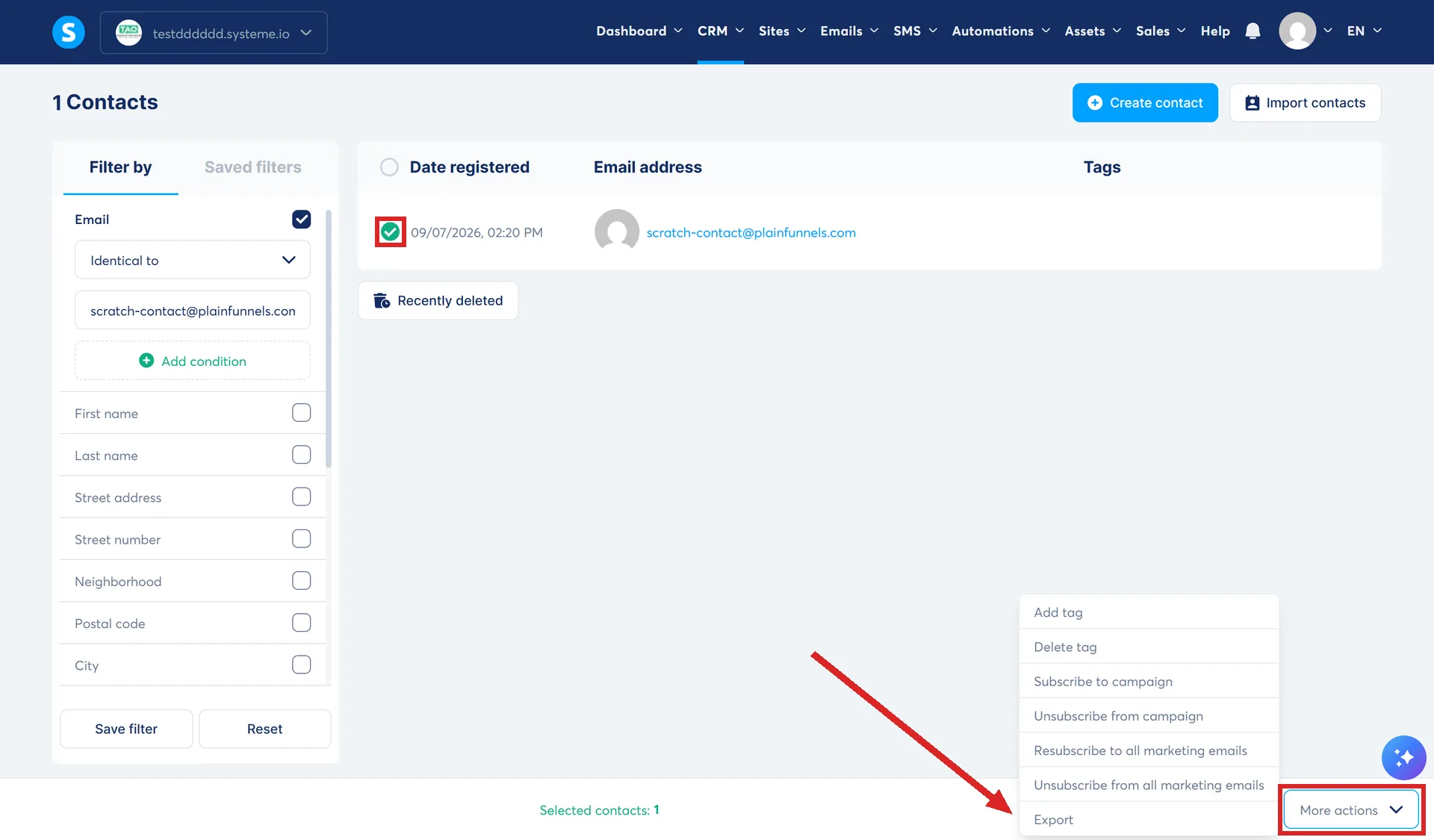
Six things export out of systeme.io as a CSV or a PDF: contacts, transactions, invoices, course students, one student's session log, and one customer's consent record. Nothing exports a page, a funnel, an email or a blog post itself.
The six exports that exist
| What | Where | Format |
|---|---|---|
| Contacts | CRM tab, then Contacts, select rows, then More actions, then Export | CSV, emailed link |
| Transactions | Sales, then Transactions, select rows, then Export to CSV | CSV, emailed link |
| Customer invoices | Sales, then Transactions, select rows, then Export to PDF | Zipped PDFs, emailed link |
| Course students and progress | Assets, then Courses, then Students, select rows, then Export to CSV | CSV, emailed link |
| One student's session log | The student's page, Enrollments, three dots, then Export session log report | Direct download |
| One customer's consent record | Sales, then Transactions, one row, three dots, then Customer consent record | Downloaded PDF |
Two of them come with a locked door
An assistant given full admin rights can view the entire contact list but cannot export it. systeme.io states plainly that only the account owner can run that export, whatever role anyone else holds.
Course student data is looser. systeme.io's article on that export says it is open to workspace owners and admins alike, so a role that is blocked from the contact list can still pull student progress.
One export depends on a setting you had to turn on first
A student's session log only has something in it if Store student sessions was already ticked in the course settings before that activity happened. Turn it on afterward and the export for that earlier period comes back empty, because nothing was being recorded yet.
What does not export
None of systeme.io's help articles describe a way to export a funnel, a page, an email, a newsletter or a blog post as a file. The closest thing to moving that kind of content anywhere is Share, which copies a funnel, a course or a block into a different systeme.io account rather than onto your computer, and does not produce a file you can open outside systeme.io at all.
The clock on a download link
Contact exports and course student exports both name the same window: the emailed link works for 3 days, then it is gone and has to be requested again. Neither the transaction export article nor the invoice export article states an expiry at all, so it is not clear whether the same 3 day window applies there too.
How I checked this answer
Nothing on this site is written from memory. These are the sources I checked to write this answer, and the date I checked them.
- How to import or export a contact listhelp.systeme.io, article 238
- How to export your transactions to CSVhelp.systeme.io, article 2007
- How to export multiple customer invoices to PDF formathelp.systeme.io, article 2006
- How to export students and their course progress datahelp.systeme.io, article 11132
- How to export a student's session loghelp.systeme.io, article 346
- How to view and download customer consent recordshelp.systeme.io, article 11433
- How to invite an assistant to your systeme.io accounthelp.systeme.io, article 1709
- How to share a sales funnel with other accountshelp.systeme.io, article 148
- How to share a coursehelp.systeme.io, article 1716
- How to share a block with other accountshelp.systeme.io, article 1663
Checked on
Did this answer your question?
Keep reading
- Can I move a funnel or a course from one of my accounts to another? There is a Share button, not a Move one. That difference is most of the answer.
- Why does my domain show the wrong page when someone types it without a path? The homepage is just whichever item still has an empty path box. Find the other one holding it.
- What commission should I offer? Four fields, what each one changes, and why nobody can hand you the number.