Home / Categories / Emails
What is the difference between a campaign and a newsletter?
A newsletter is one email you send now or schedule for later. A campaign is a series of emails that goes out automatically, spaced by delays you set.
Newsletter
You write one email. You pick who gets it. You send it now, or you pick a date and time.
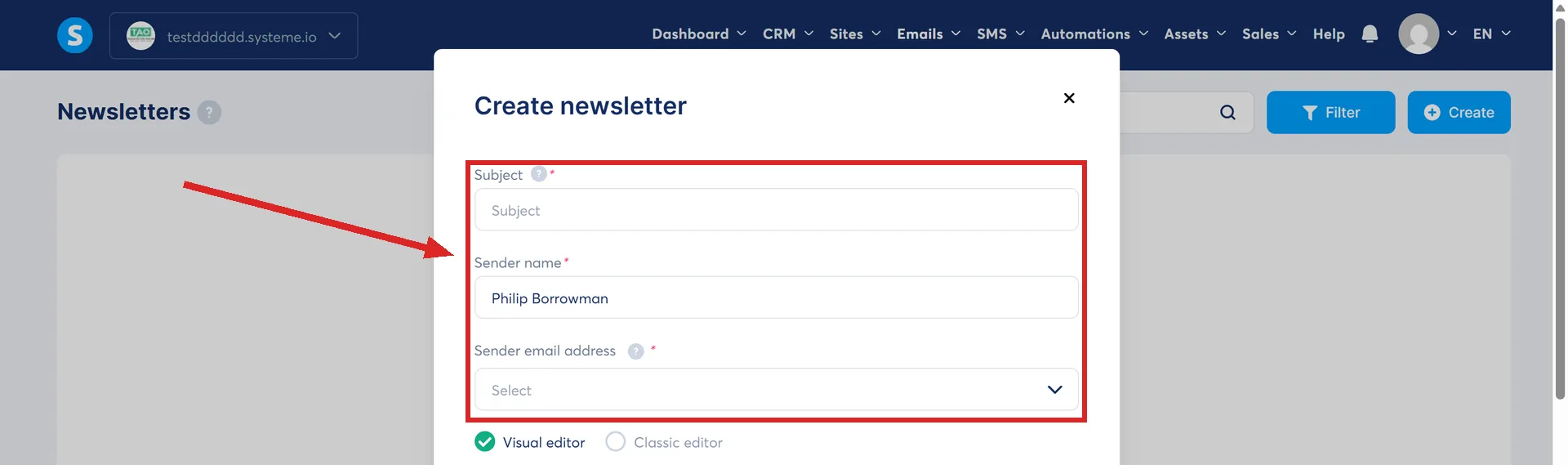
It is built at Emails, then Newsletters, then Create. The popup asks for a Subject, a Sender name, a Sender email address, and which editor to write in, classic or visual.
When it is written, the buttons are Save and test, Save and send, Save and schedule, Save draft, Create an A/B test, and Exit. Save and send goes now. Save and schedule asks for a date.
Use it for anything tied to a moment: a launch, an offer ending, a piece of news, a normal weekly email.
Campaign
You write several emails once and set a delay on each one. When somebody joins, the clock starts for them personally. Email one lands an hour later, email two a day after that, and so on.
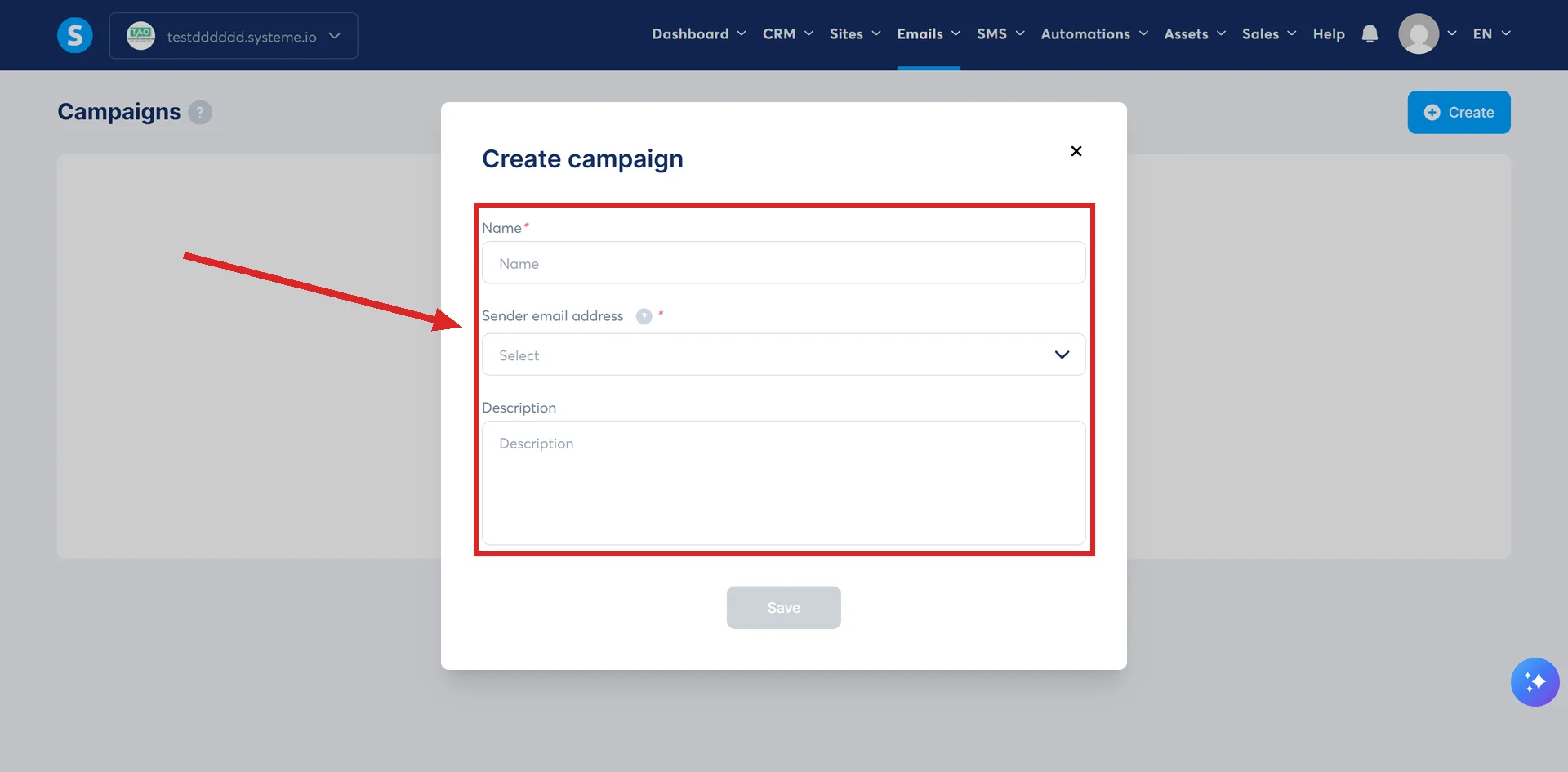
It is built at Emails, then Campaigns, then Create. That popup asks for a name, a sender email address and a description.
Someone who joins today gets the same run as someone who joined last March. You never touch it again.
Use it for anything that should happen to every new person: a welcome sequence, a free course delivered over five days, the follow-up after a purchase.
Where the timing is actually set
A newsletter has one timing control, the date on Save and schedule. A campaign email has four fields, and they sit in the panel on the right of the email editor:
- This email will be sent after
- Delay before sending email
- Times when email should be sent
- Days of the week when this email should be sent
systeme.io recommends against setting several delays on the same email, to avoid confusion.
Who ends up receiving it
This is the difference that surprises people more than the timing does.
A newsletter is addressed. In its Email settings you pick tags to include and tags to exclude, and every contact carrying an included tag gets it when you press send. A contact who joins tomorrow has missed it.
A campaign is entered. Nobody receives it by existing on your list. Somebody or something has to subscribe them: an automation rule with a Subscribe to campaign action, or by hand from CRM, then Contacts, ticking the addresses, then More actions, then Subscribe to campaign. From that moment they walk the sequence at their own pace, so a contact who joins tomorrow starts at email one.
Side by side
| Newsletter | Campaign | |
|---|---|---|
| Menu | Emails, then Newsletters | Emails, then Campaigns |
| How many emails | One | Several, in a fixed order |
| When it goes | Now, or on a date you pick | On delays, each counted from that contact's previous email, the first from when they joined |
| Who gets it | Contacts holding an included tag | Contacts subscribed to the campaign |
| A contact who joins tomorrow | Never sees it | Starts at email one |
Switching editor part way through an email loses whatever you had written in the one you left. That applies to both.
The rule that catches people out
A campaign email only sends once every delay you set on it has been met. If you add a delay and also restrict it to Sundays only, the email waits for both. Stack enough conditions and an email can look broken when it is just waiting.
Which one do I want?
- Everyone gets it at the same moment, once: newsletter.
- Everyone gets it at the same point in their journey: campaign.
The welcome sequence guide builds the campaign half of that, with a delay on each email and a test before any of it goes out.
How I checked this answer
Nothing on this site is written from memory. These are the sources I checked to write this answer, and the date I checked them.
- How to set up an email campaignhelp.systeme.io, article 367
- How to send or schedule a newsletterhelp.systeme.io, article 358
- How to manually subscribe a contact to an email campaignhelp.systeme.io, article 159
- Setting up email campaigns: a guide to common scenarios and key considerationshelp.systeme.io, article 10453
Checked on
From my own use
I once built a Workflow where a campaign would have done the job. The campaign was simpler, and it showed me the open stats. Newsletters have never caused me any trouble, because each one is a single email.
Did this answer your question?
Keep reading
- How many emails can I send on the free plan? Unlimited. Sending is not what the plans are priced on.
- What is a sender address and why does it matter so much? The From line on everything you send. One setting, and it decides whether anything arrives.
- Is systeme.io free? Yes, and the free plan never expires. Here is exactly what fits inside it.