Home / Categories / Emails
What is a sender address and why does it matter so much?
The address your emails are sent from. In systeme.io it is one setting under Settings, Emails, and every address used for sending has to be confirmed before it works.
What it is
The sender address is the address your emails come from. It is set once, in the Sender section: profile picture, then Settings, then Emails.
That single setting covers a lot of ground. It applies to transactional emails such as login details and invoices, and to newsletters and campaigns as well.
Every sending address has to be confirmed
An address is not usable for sending until it has been confirmed. In Settings, Emails, there is a Verified email addresses section: add the address, then click the link in the mail that arrives at it. The status changes to Verified.
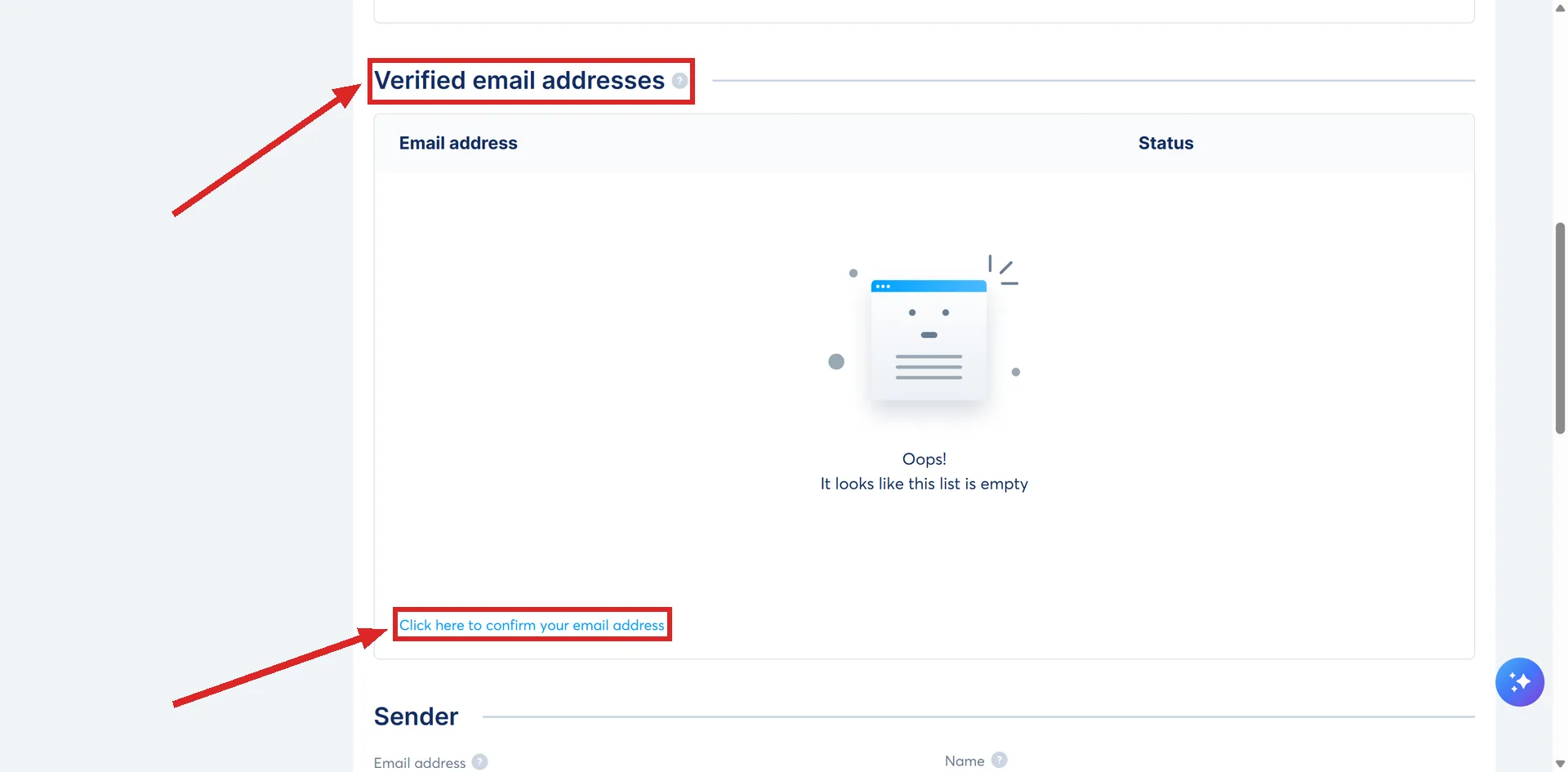
systeme.io's reason is to stop an account being used to send from somebody else's address. Until it is done, even a test email will not reach you.
The address you signed up with is the exception. That one does not need confirming by hand.
Why it matters more than it used to
Inbox providers no longer weigh only the email. They weigh the sender: the domain, the sending behaviour, the engagement it earns.
An address on a domain you own can build a reputation over time. A generic free address cannot, which is why systeme.io now treats those as high risk and refuses several of them.
The domain is expected to look like a live business too. systeme.io asks that the sending domain has a working home page rather than a parking page, because inbox providers look at signals outside the email itself.
An inconsistency between the domain, the sender address and the technical setup is described as enough on its own to lower trust from the first emails you send.
Confirming and authenticating are two different jobs
Confirming an address proves the mailbox is yours, by making you click a link inside it.
Authenticating a domain proves the domain permits systeme.io to send on its behalf, and it needs technical records including SPF, DKIM and DMARC. One does not stand in for the other, and systeme.io lists both as necessary.
Changing it later
A new sender address in Settings applies to new emails only. Emails that already exist keep the old address, and that includes live automations and scheduled campaigns. Each has to be updated by hand.
This is the step people miss after buying a domain. The setting is changed, and a campaign written last month still goes out from the old address.
The sender name is a separate field
The sender name is the words a reader sees in place of the address. It sits in the same Sender section, and it can be overridden for an individual newsletter or campaign email from inside the editor.
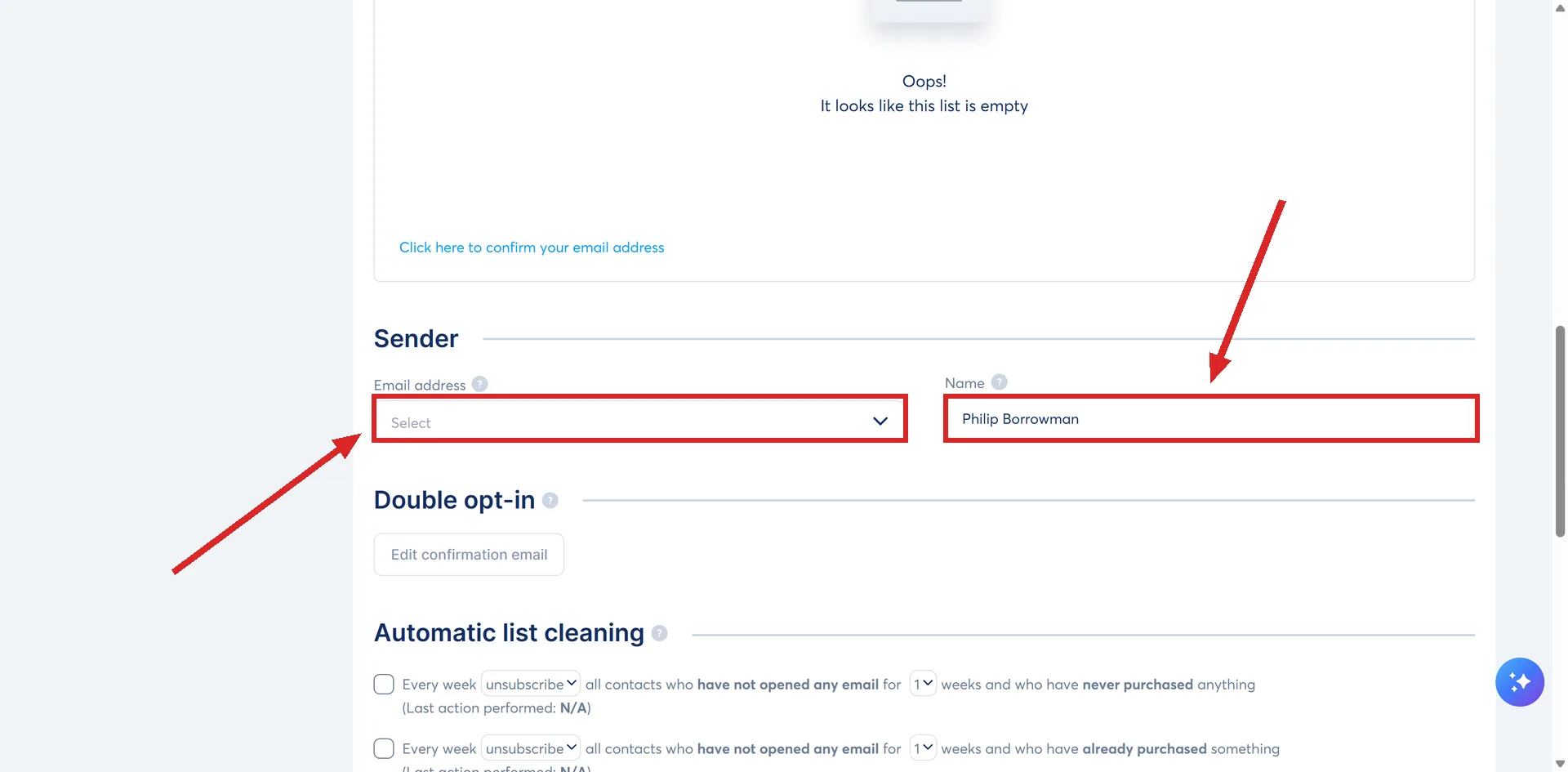
The address can be set per email too. Creating a campaign asks for a sender address for the campaign as a whole, and every email inside it asks again.
The welcome sequence guide sets one up for a campaign, and records a case worth knowing: an address can show as Verified and still be missing from the sender list, because another account has already authenticated its domain.
How I checked this answer
Nothing on this site is written from memory. These are the sources I checked to write this answer, and the date I checked them.
- How to confirm your email sender addresshelp.systeme.io, article 2070
- How to change the sender's email addresshelp.systeme.io, article 278
- How to change the sender's name for your emailshelp.systeme.io, article 288
- General guidelines and best practices for email deliverability during the first few dayshelp.systeme.io, article 4247
- How to set up an email campaignhelp.systeme.io, article 367
- How to send or schedule a newsletterhelp.systeme.io, article 358
Checked on
Did this answer your question?
Keep reading
- What does an email footer legally have to contain? Two switches in Settings, one badge you cannot remove for free, and one question no help article answers.
- How often should I email a list that is brand new? There is no number in the documentation. There is a shape, and it rules out both extremes.
- What is the difference between a page, a funnel and a website? Three words for three sizes of thing, each under a different menu item.