Home / Categories / Sales funnels
What does deactivating a funnel do to links already out there?
Every URL in the funnel keeps working. Visitors land on the funnel's inactive page instead of the page they were expecting, with no 404 error and no automatic redirect.
What a visitor on an old link sees
The inactive page. systeme.io's support team describes it plainly: a visitor who opens any URL from a deactivated funnel sees the inactive page rather than a 404 error, and is not redirected anywhere automatically.
It covers the whole funnel, not one address. Every step inside the deactivated funnel shows the same inactive page.
So a link shared on social media months ago does not break. It stops showing what it used to show.
Where the inactive page is built
Open the deactivated sales funnel and click Inactive Page. That opens an editor for it.
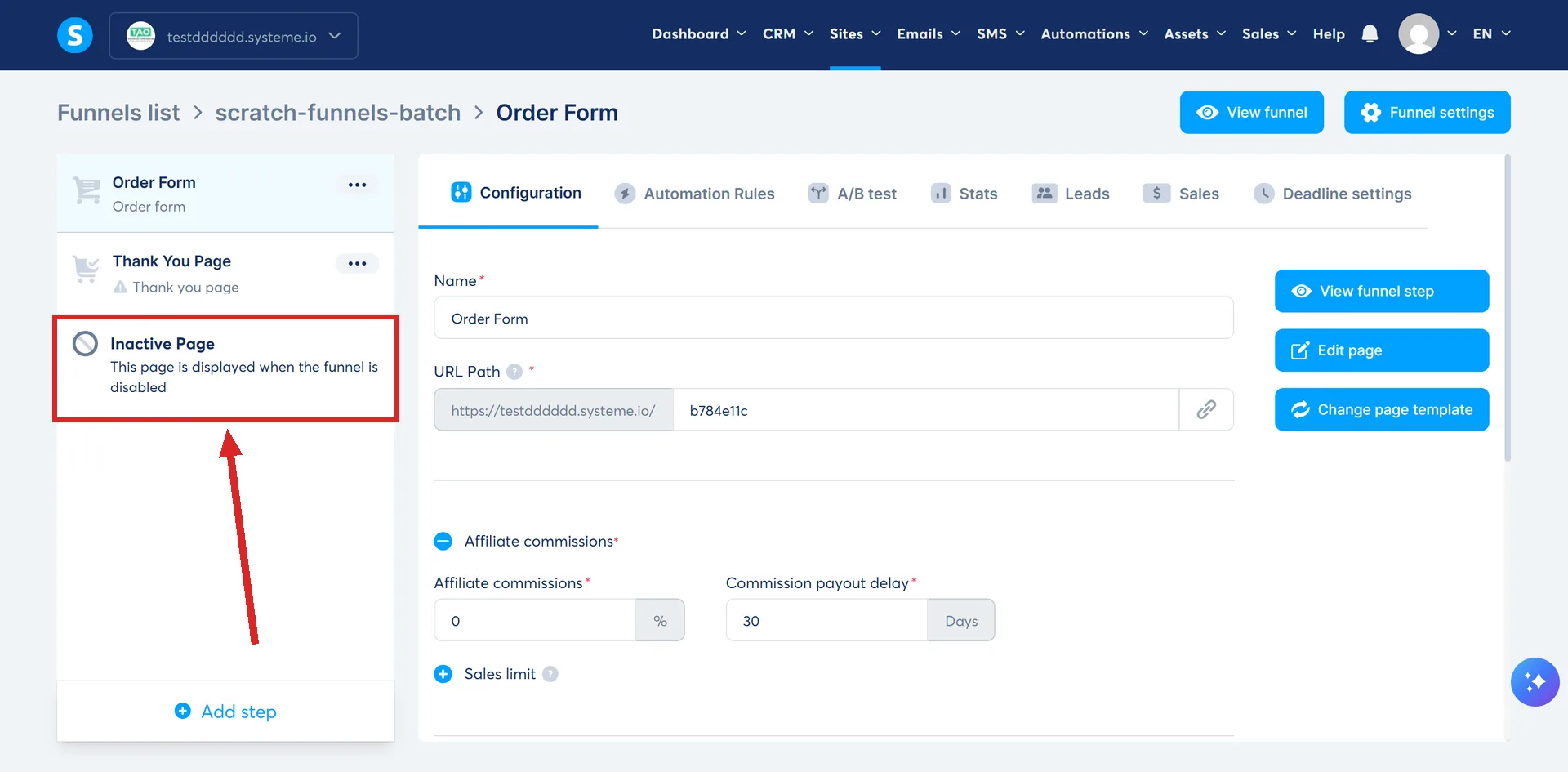
Text, images and buttons go on it the same way they go on any other page. systeme.io suggests a message telling visitors the offer has ended, along with an invitation to subscribe for future updates.
Its own recommendation is to set one up when the funnel link has been shared on social media.
Sending visitors somewhere else
Deactivation does not move anybody. If you want visitors on an old link to end up on a live page, the inactive page needs a button that takes them there.
In the editor, set the button action to Open URL and paste the address of an active page.
The rule that catches people out
A deactivated funnel cannot collect leads directly.
Putting an opt-in form on the inactive page does not get around that. systeme.io states that a form with its button set to Submit form will not work on a deactivated funnel, and that visitors have to be redirected to an active page instead.
That is why the button matters more than the form. The signup has to happen on a funnel that is still switched on.
What deactivation does not stop
Email. Deactivating a funnel does not stop a campaign that is already running for existing subscribers.
Funnel availability and email sending are separate things. Deactivation reaches the funnel's pages and the lead capture through them, and nothing else.
Contacts already in a campaign carry on receiving it until the campaign or the automation behind it is stopped by itself. Closing the funnel is not the same as closing the promotion.
Where the switch is
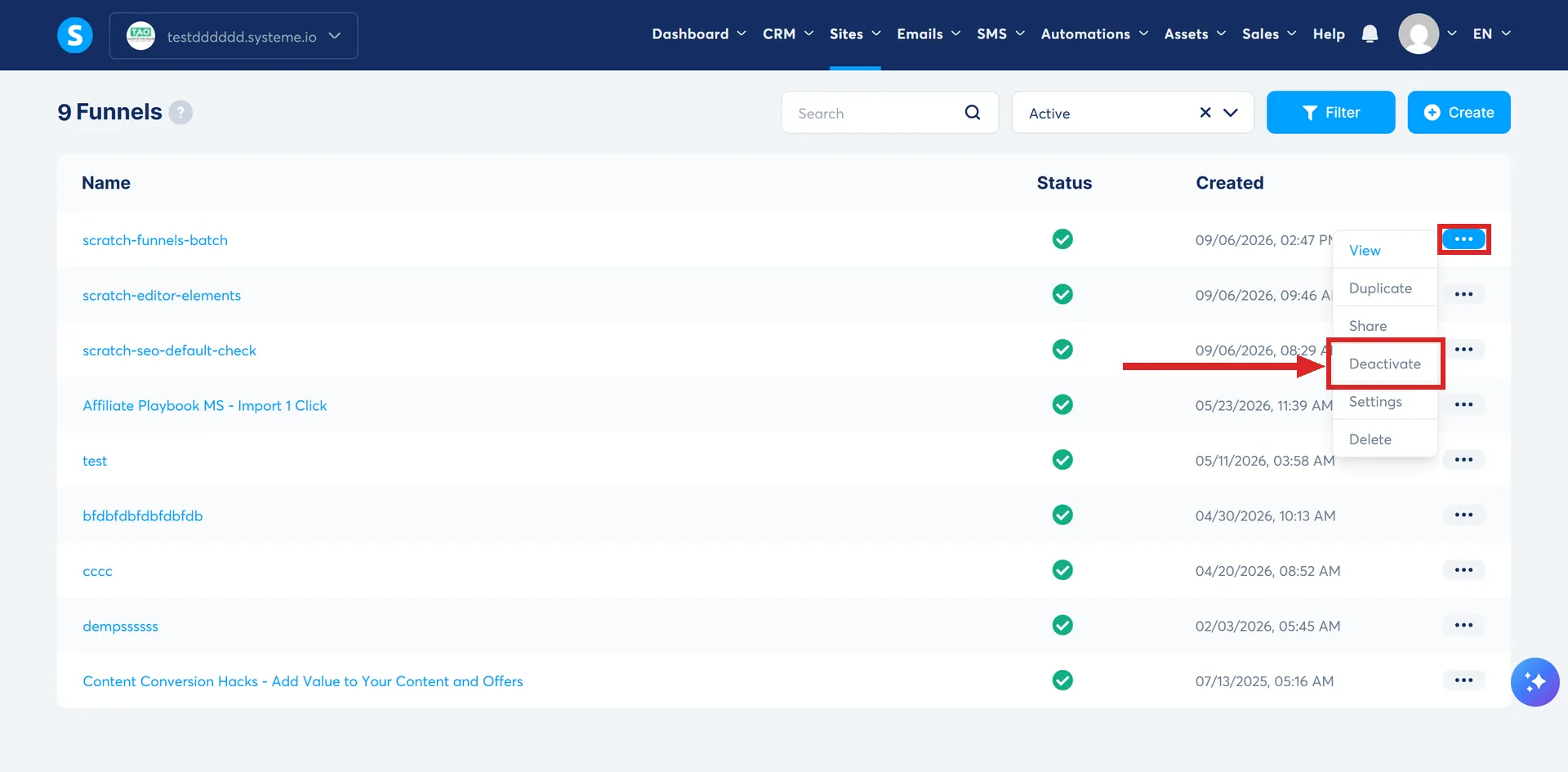
Open the Sites tab, click Sales funnels, find the funnel, click the three dots, and pick Deactivate. A popup asks you to confirm, then a notification appears at the top of the screen.
Deactivating is not deleting
Deleting a funnel is permanent, and it is a different item on the same three-dot menu.
systeme.io's own note on that screen says to consider deactivating a funnel instead if you think you might need it later. A deactivated funnel still exists, still holds its pages, and still answers on its old addresses.
How I checked this answer
Nothing on this site is written from memory. These are the sources I checked to write this answer, and the date I checked them.
- A reply from systeme.io support, 4 September 2026, on deactivating a funnel and funnels going missingsysteme.io support
- How to set up an inactive page on a deactivated sales funnelhelp.systeme.io, article 1659
- How to deactivate a funnelhelp.systeme.io, article 626
- How to delete a funnelhelp.systeme.io, article 2387
Checked on
From my own use
I deactivated a funnel once and forgot I still had emails in an old campaign pointing at it. Everyone who clicked those emails landed on the inactive page instead of the offer. Check your campaigns before you switch a funnel off.
Did this answer your question?
Keep reading
- What happens to my products and buyers if I change a funnel's currency? Everything gets disconnected at once. What is not documented is what a visitor sees, and what an existing subscriber pays.
- What happens to someone who starts my order form but never pays? Nobody reads this far into the order form article, and it is the closest thing systeme.io has to cart recovery.
- Can I put affiliate links in my emails? No rule mentions affiliate links. Several would catch one anyway.