Home / Categories / General
What does an automation rule actually do?
An automation rule watches for one event and does something the moment that event happens. You build it at Automations, then Rules, as a trigger on one side and an action on the other.
The two halves
The rule editor has two columns, Trigger and Action.
The trigger is the event that says when the rule should run. The actions are what systeme.io then does. You add each one with a plus icon and finish with Save Rule.
What can set one off
- Funnel step form subscribed, narrowed to a particular page.
- New sale, for people who bought something.
- Tag added, for contacts given a specific tag.
- Email link clicked, narrowed to one email and then to one link inside it.
- Course completed, Module completed and Lecture completed, each of which can be pointed at a whole course or at one part of it.
What it can do back
Send an email, which you write inside the rule itself. Add a tag, which systeme.io suggests for segmenting those contacts. Subscribe the contact to a campaign.
An emailed attachment is capped at 5 MB. Anything larger has to be compressed first.
Three places to build one
- Automations, then Rules, then Create.
- Inside the funnel editor: pick a page, open its Automation rules tab, then Add rule.
- Inside a website page's Form element, under the Actions tab, which adds rules without leaving the editor.
One built end to end
The rule systeme.io walks through is the common one: send an email the moment a lead subscribes.
-
Open the funnel and pick the opt-in page from the list on the left. Whichever step you pick is the one the tabs across the middle then apply to.
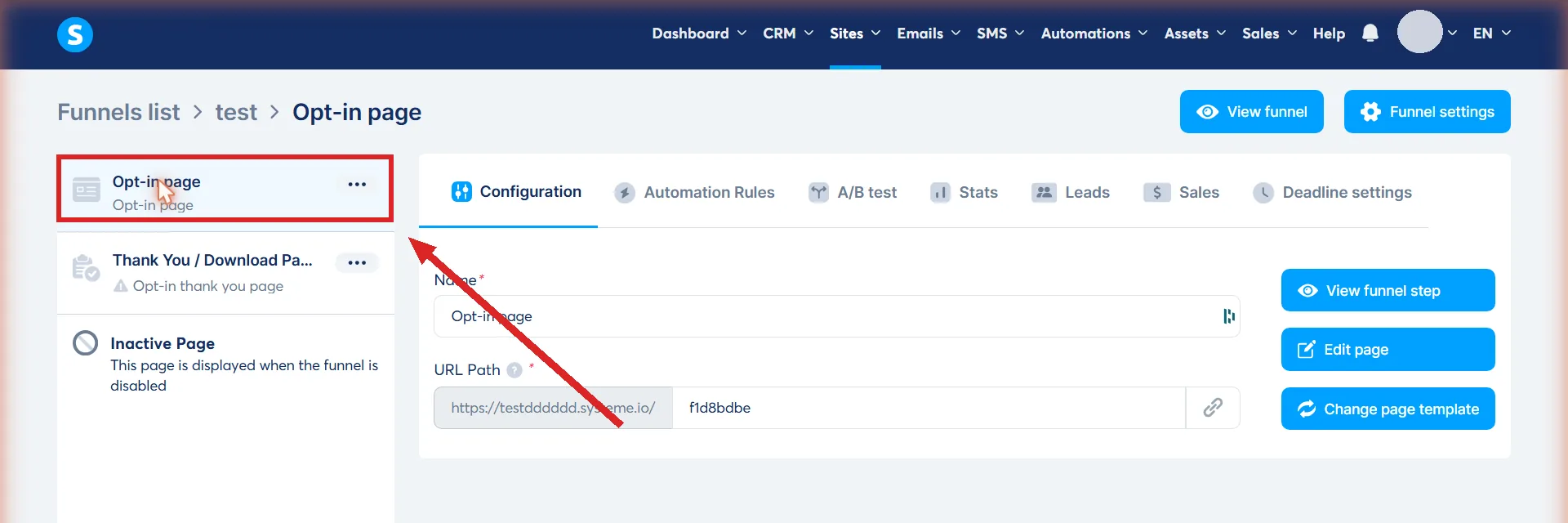
-
Click the Automation Rules tab, then Add rule. Automation Rules is the second tab along, and Add rule is at the bottom of the panel under it. A step with no rules yet shows an empty list there.
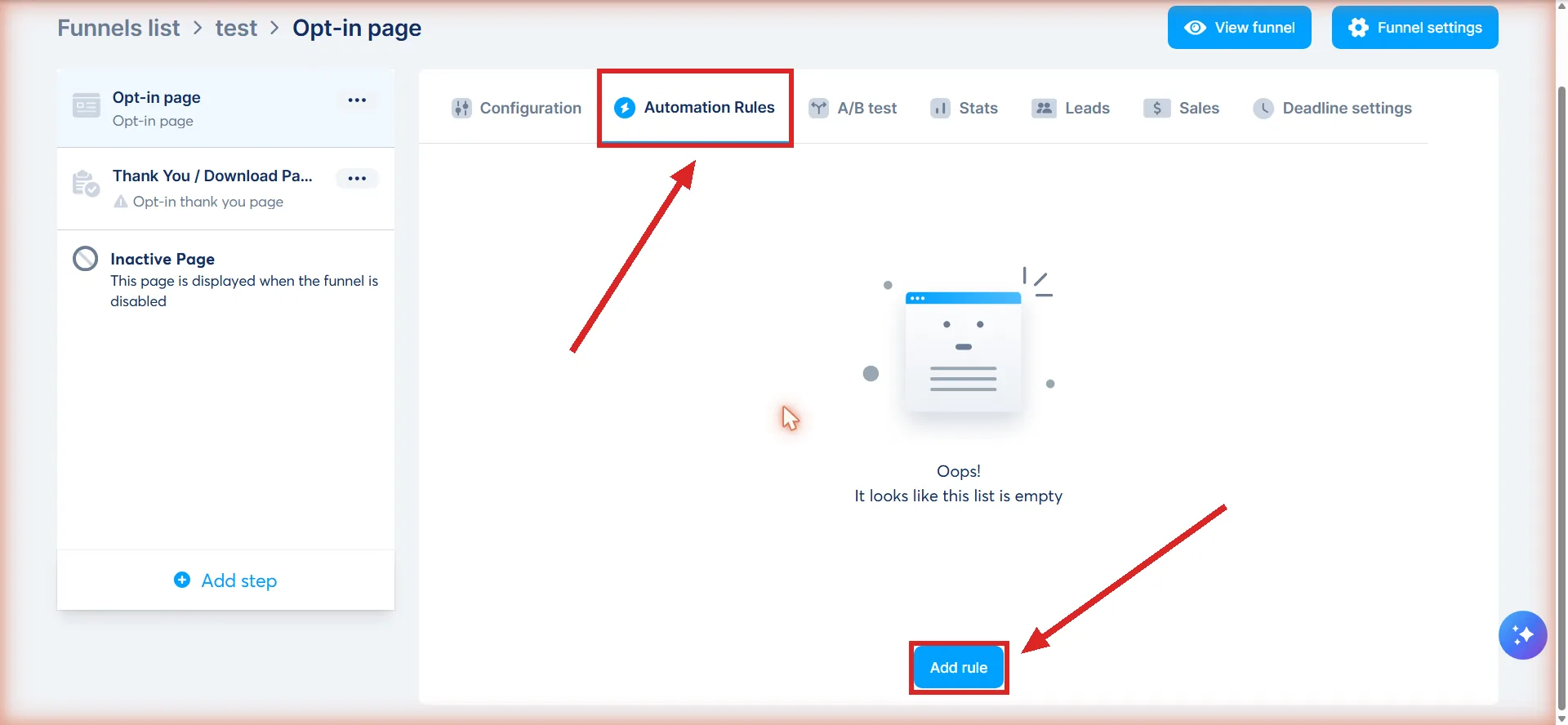
-
Under Trigger, click the plus icon and choose Funnel step form subscribed. It is the first of only two triggers offered here. The other is Page visited.
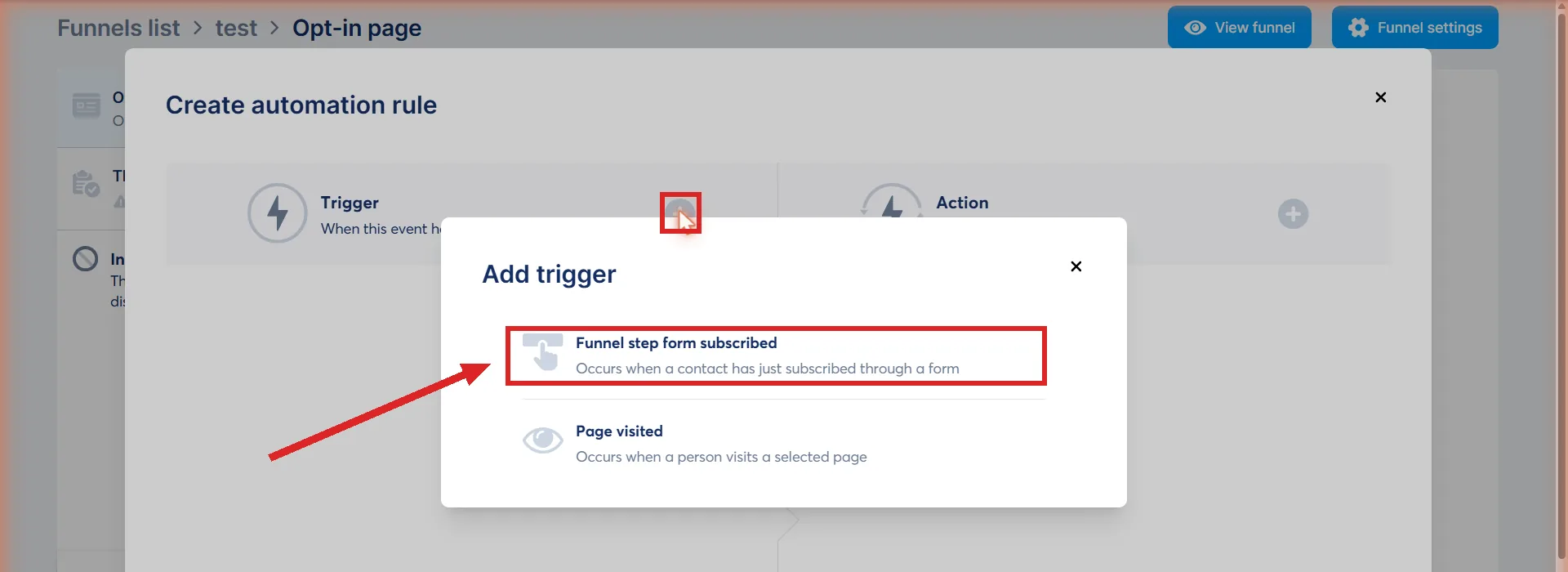
-
Under Action, click the plus icon and choose Send email.
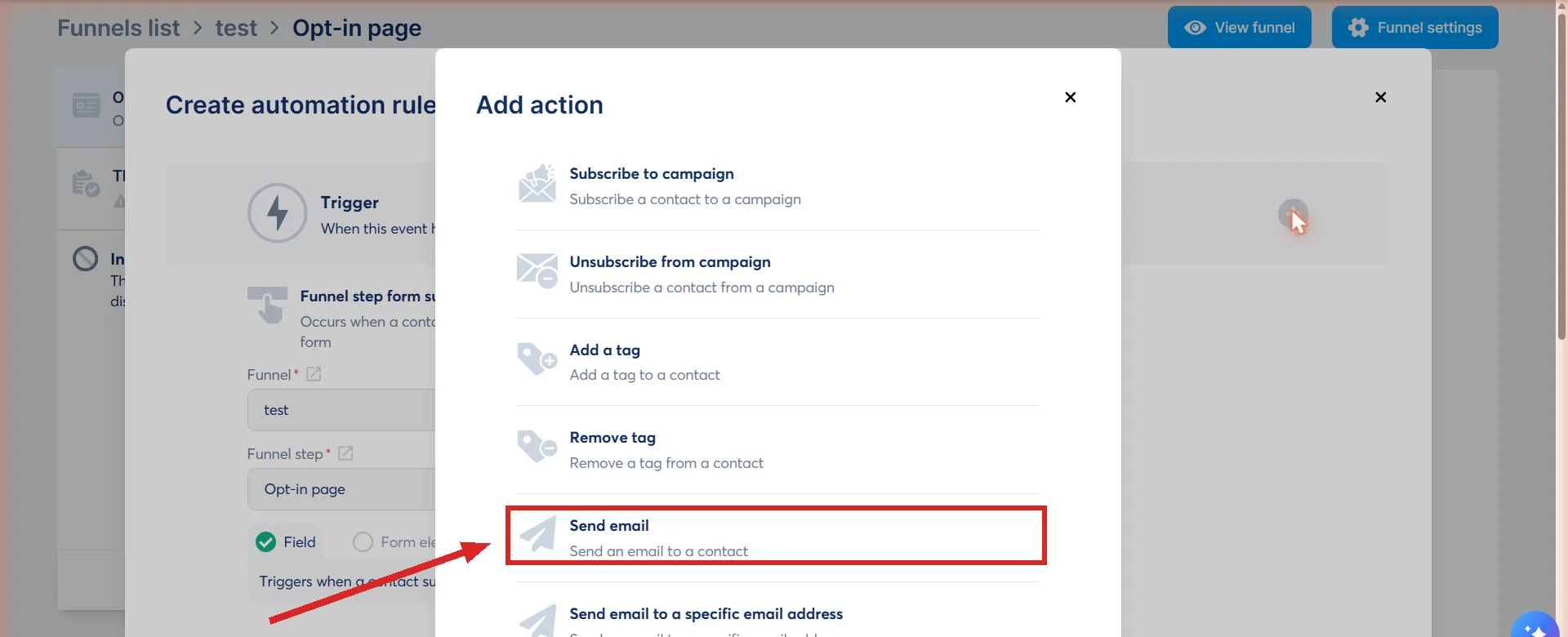
-
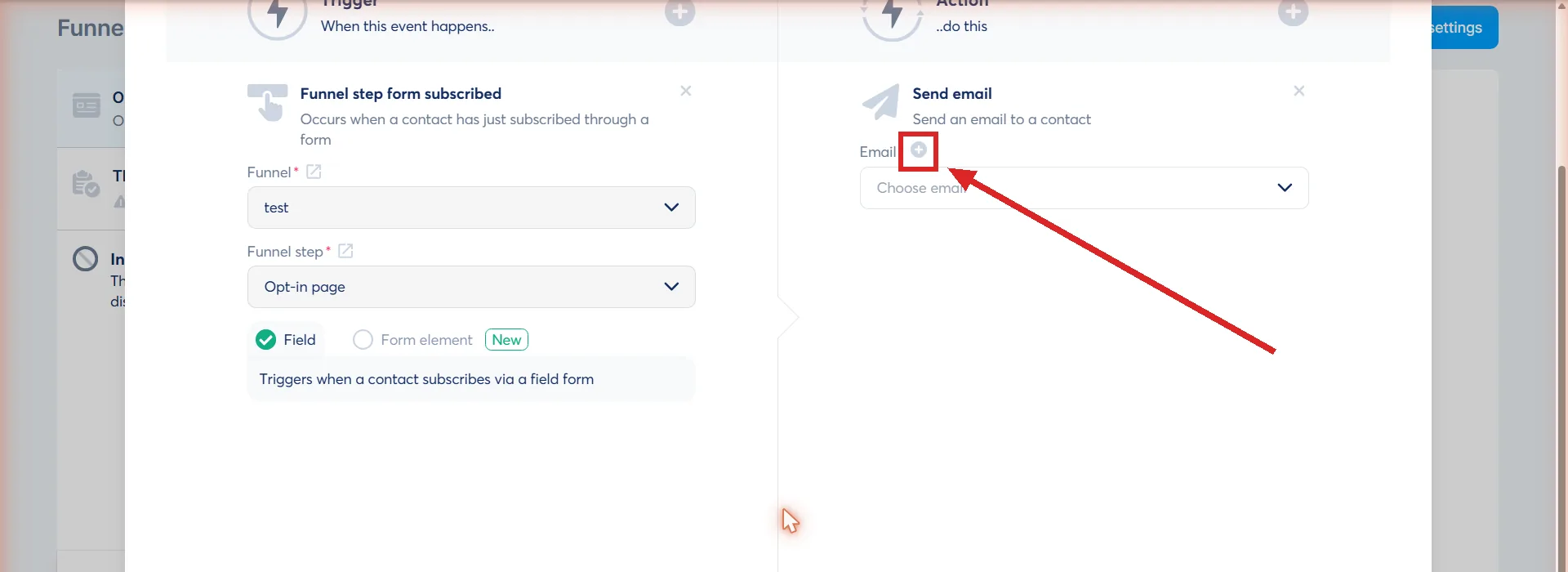
Click the plus icon again to write the email itself, then Save. The plus sits beside the word Email, next to a field reading Choose email.
-
Click Save rule. It is live from that moment. It stays greyed out until the trigger and the action are both complete.
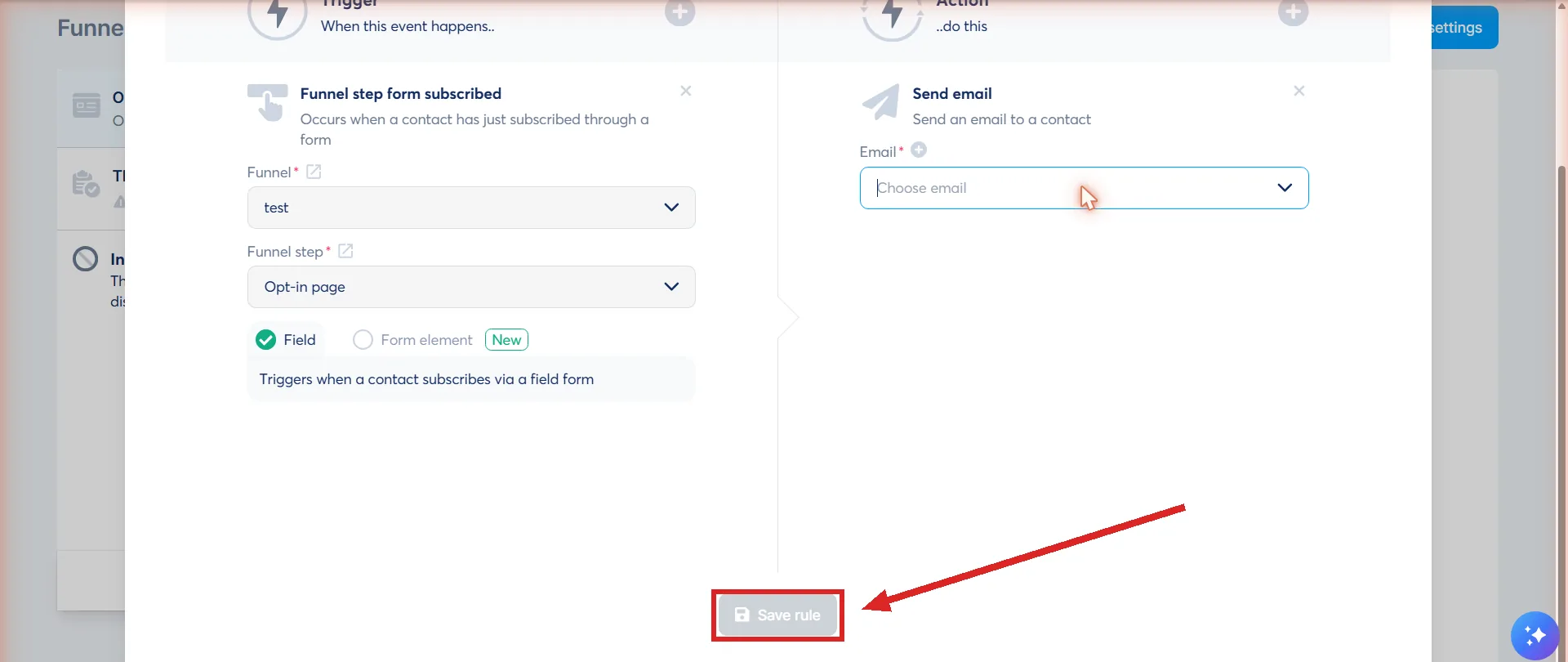
systeme.io's own suggestion at step 4 is to add a second action, Add a tag, so the people this rule catches can be reached again later. The email can carry a file and personalisation variables that fill in the contact's details.
One setting outside the rule decides whether any of it runs. The form button's action has to be set to Submit form. Set to anything else the form still looks fine, and the trigger never fires.
The rule that catches people out
systeme.io says it plainly for the Tag added trigger: the tag has to be added to the contact after the rule is set up. Tagging somebody first and building the rule afterwards does nothing at all.
The cap on a single contact
A trigger can be activated a maximum of 20 times by the same contact. After the twentieth, that trigger is deactivated, and automation rules and workflows are switched off for that person.
That sentence does not say whether reaching 20 turns off only the rule built on that one trigger, or every automation rule and workflow on the account for that contact. It names both in the same breath without separating them. systeme.io also does not publish a way to reset the count for one contact, or to raise the limit above 20. The one-month task history cleanup is not that: it clears a record of past activity, not the counter deciding whether the trigger still fires.
The Email link clicked trigger also carries a one minute cooldown after the first recorded click. That stops a double click, or an email provider's automatic link check, from firing the same rule over and over.
How far back you can look
Automation rule task history is kept for one month, then removed as part of data cleanup. A task missing from a contact's profile is most likely older than 30 days rather than broken.
Turning one off
The three dots beside a rule offer Edit automation rule, Disable rule and Delete rule. A saved rule is live straight away, so disable is the switch, not delete.
How I checked this answer
Nothing on this site is written from memory. These are the sources I checked to write this answer, and the date I checked them.
- How automation rules workhelp.systeme.io, article 140
- How to automatically send an email when a lead subscribeshelp.systeme.io, article 280
- How to trigger automation rules when a customer buys your order bumphelp.systeme.io, article 1726
- How to trigger automations after contacts click links in an emailhelp.systeme.io, article 2927
- How to trigger automations when a course, module or lecture is completedhelp.systeme.io, article 2390
- How to create a websitehelp.systeme.io, article 4526
Checked on
Did this answer your question?
Keep reading
- Can I use systeme.io without knowing any code? Yes. The nearest you get is pasting somebody else's tracking snippet into a box.
- Why does my page look fine on desktop and broken on mobile? There are two views of the page and you have been editing one of them.
- What order should I migrate things in? There is a published running order, and it is the one their own team follows.