Home / Categories / Sales funnels
What is a squeeze page?
A page whose only job is to collect an email address. systeme.io's help centre does not use the term, so the thing to look for when building one is the step type called Opt-in page.
The name and the thing
A squeeze page is a page built to collect an email address and nothing else. One field, one button, no other route off the page.
systeme.io's help centre does not call it that. Its 366 articles carry no title using the term, and the step that does the job is named Opt-in page. The word does survive out of sight: in the webhook payload systeme.io documents for a form subscription, the funnel step's type reads squeeze.
Where to find one
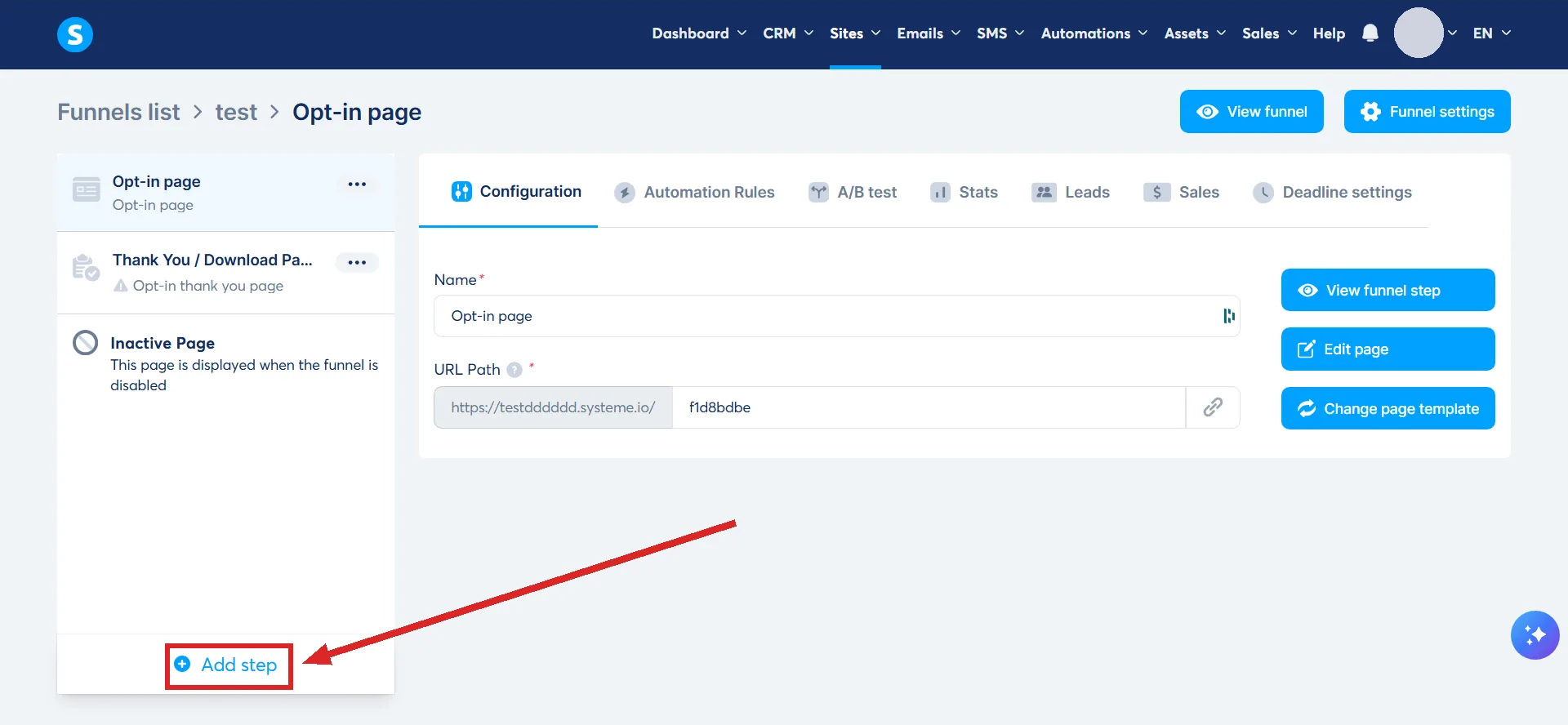
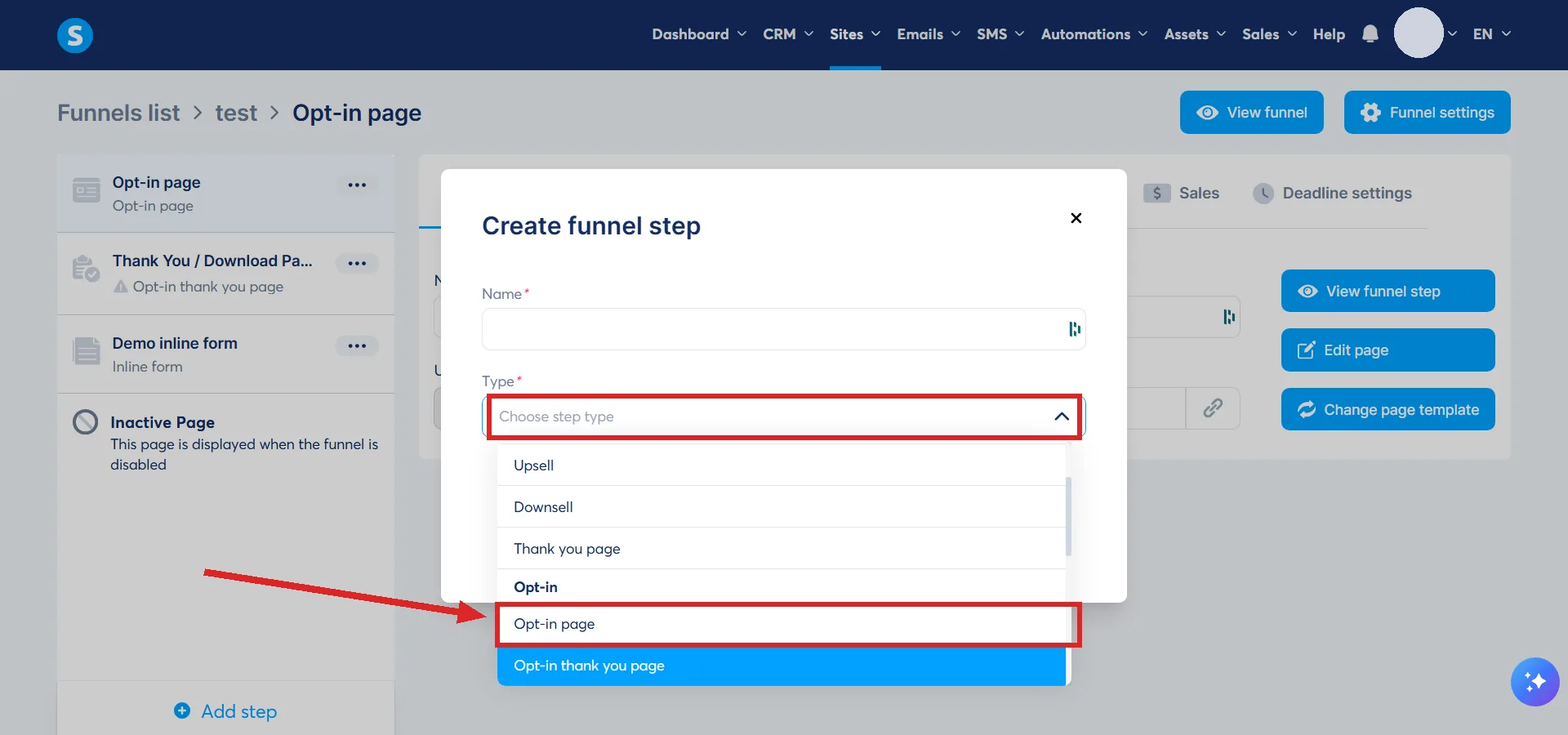
Open Sites, then Sales funnels, then the funnel, and click Add step in the left-hand menu. Choose Opt-in page from the Type field, pick a template or start from scratch, click Save, then Select on the template. Edit page opens the editor.
A whole funnel can also start as one. systeme.io's Build an Audience funnel type is described as the simplest structure it offers: an opt-in page and a thank you page, meant primarily for growing an email list.
Two of them can compete inside one funnel. systeme.io's own A/B test example puts two opt-in pages against each other, with a sales page as the goal they both lead to.
The two elements it will not work without
An opt-in page arrives as a design. What makes it capture anything is two elements you place yourself.
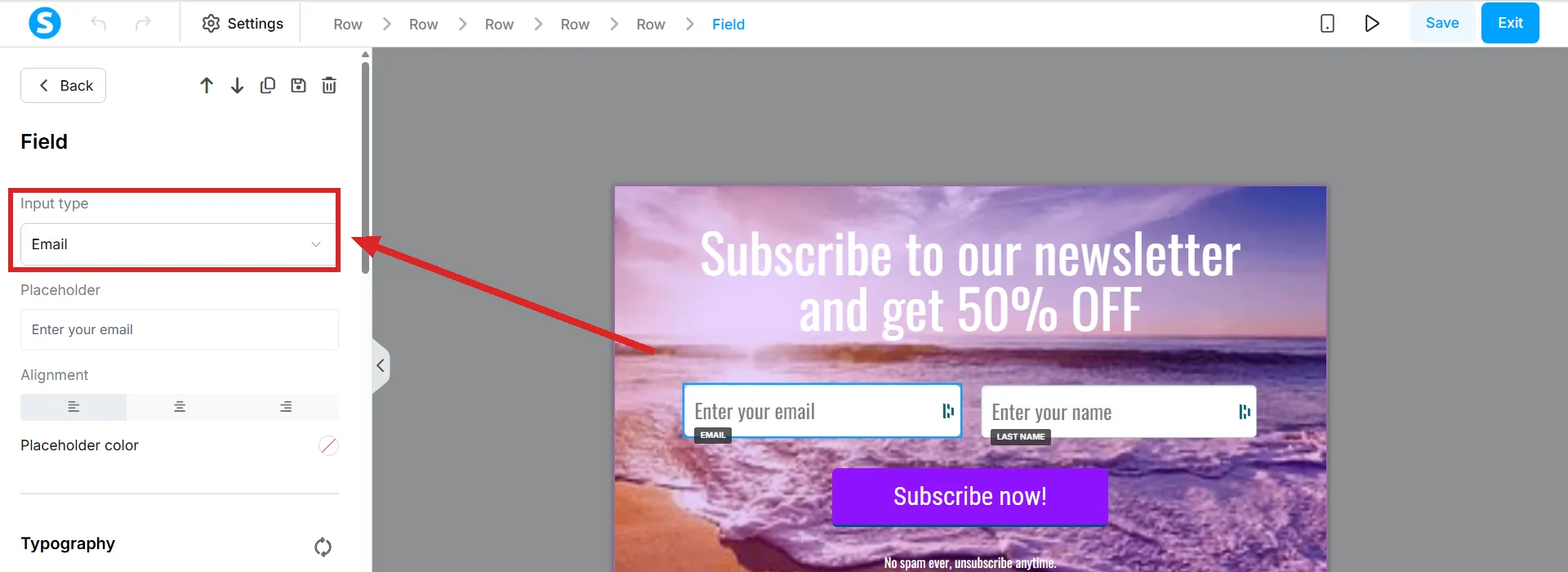
- A form input field, dragged in from the Form section of the sidebar, with its Input type set. systeme.io states the form must contain at least one Email field to capture leads at all.
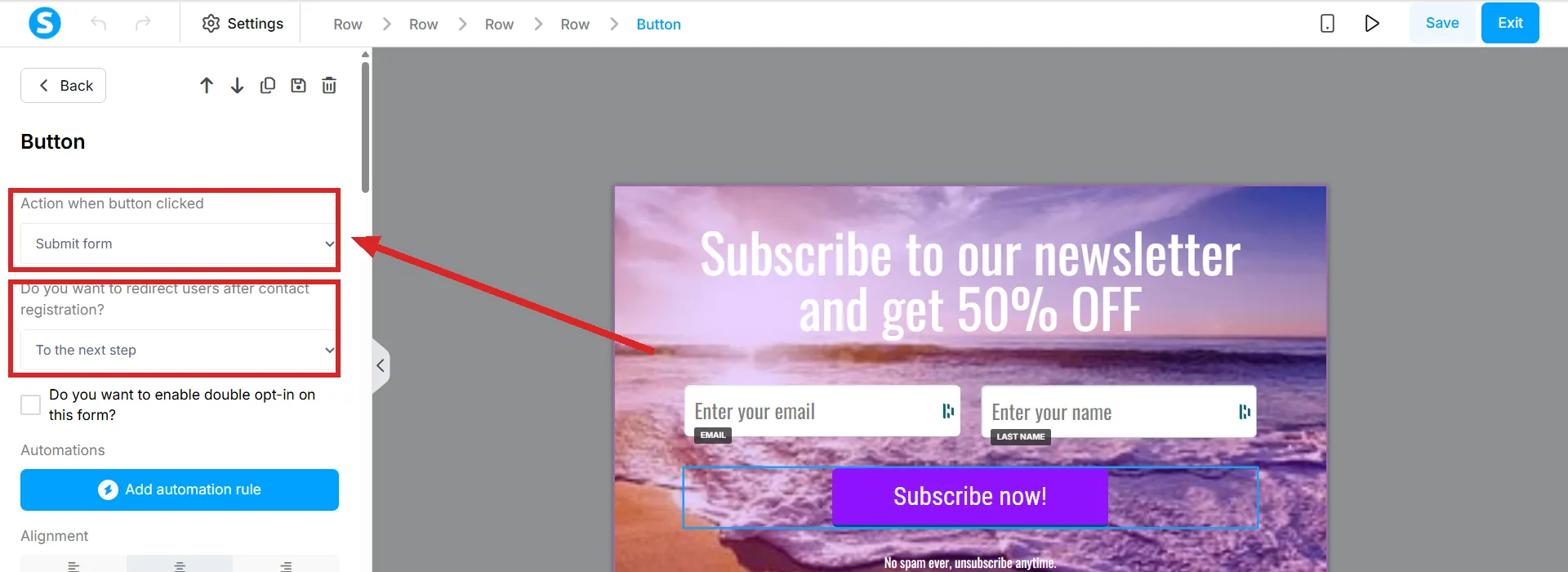
- A button, with Action when button clicked set to Submit form. That action saves the visitor as a contact and moves them on.
The Input type dropdown is what turns a box into a field that does something. systeme.io's worked example is the one that matters here: select Email as the input type, and the contact is added to your contact list when the customer submits the form.
Miss the email field and saving the button produces the message "At least one email input is required on this page". The button has nowhere to put an address.
Where they go after they submit
The button carries the answer, under "Do you want to redirect users after contact registration?". systeme.io names three settings.
| Setting | What the visitor gets |
|---|---|
| To the next step | The next page in the funnel |
| To the custom URL | Any address you type into the Redirection URL field |
| No redirection | The same page, plus text you write that appears after they opt in |
The rule that catches people out
Several Submit form buttons can sit on one page. systeme.io states that each one must contain the same fields and will trigger the same automation rules, so a second button does not give you a second form.
For two genuinely different forms on the same page there is a Form element. It is a single container holding its own input fields, checkboxes and submit button, and systeme.io describes it as the way to build multiple independent forms on one page reliably. Its own Actions tab holds the redirection rules and can carry automations set inside the editor.
Click the element and the panel on the left of the editor splits into three tabs.
| Tab | What is in it |
|---|---|
| Elements | The standard fields, each removable through a bin icon on hover or editable for its placeholder and its Optional box. A plus button adds more, including an extra checkbox or a custom field, and fields are reordered by dragging |
| Design | Layout, row spacing, background colour, borders, spacing and position. Typography is inherited from the page settings rather than set here |
| Actions | No redirection with a success message, or a custom URL. A double opt-in tick box. In-editor automations that add a tag, subscribe the person to a campaign or send an email the moment the form is submitted |
Custom fields are not made here. systeme.io creates them from the contacts page of the dashboard, after which they appear in the form settings under Custom fields.
The form does not have to be on the page
A popup built in the editor can hold it instead. The popup is customised like any page, and a button set to Show popup opens it.
How to tell it worked
The address lands in the contact list of the account. That is the whole test.
From there the page can start something: the automation trigger Funnel step form subscribed takes the title of the page it should watch, so a rule can fire the moment somebody opts in on that specific page.
Putting one together end to end, the page, the tag and the rule that sends the first email, is what the lead magnet funnel guide walks through.
How I checked this answer
Nothing on this site is written from memory. These are the sources I checked to write this answer, and the date I checked them.
- How to create an opt-in pagehelp.systeme.io, article 152
- How to build your contact list using a funnelhelp.systeme.io, article 1602
- How to configure a buttonhelp.systeme.io, article 170
- How to add a form field and a form element to your pagehelp.systeme.io, article 1662
- Why am I seeing the "At least one email input is required" error?help.systeme.io, article 623
- How to create a funnelhelp.systeme.io, article 147
- How automation rules workhelp.systeme.io, article 140
- How to create and trigger a webhook after an opt-in or a salehelp.systeme.io, article 144
- The titles of all 366 help-centre articleshelp.systeme.io
Checked on
Did this answer your question?
Keep reading
- What is double opt-in, and should I turn it on? One extra click before a subscriber counts, and a 24-hour clock on the ones who ignore it.
- What is a price plan, and why isn't it just a price? Three types, a schedule, and a home outside the page that uses it.
- Can I change the email students get when they join my course? No. Every enrollment route fires the same fixed template, and there is no setting to change it.