Home / Categories / Editor
Why does it say "at least one email input is required"?
A button on the page is set to submit a form, and systeme.io cannot find a field whose Input type is Email. Either add that field, or change the button to an action that does not collect one.
What the message means
A button on the page is set to send a form, and the system cannot find a valid email field on that page.
systeme.io names two causes. The email field is missing from the form, or the button's action is not configured correctly.
Cause one: there is no email field
Setting a button to send the form obliges the page to carry a field where contacts type their email address.
Both causes are fixed in the editor, so open the page first: Sites, then Sales funnels, then the funnel, then the page, then Edit page.
A field is added by dragging the Form input element from the left sidebar onto the page. Click the new field, then pick an option from the Input type dropdown.
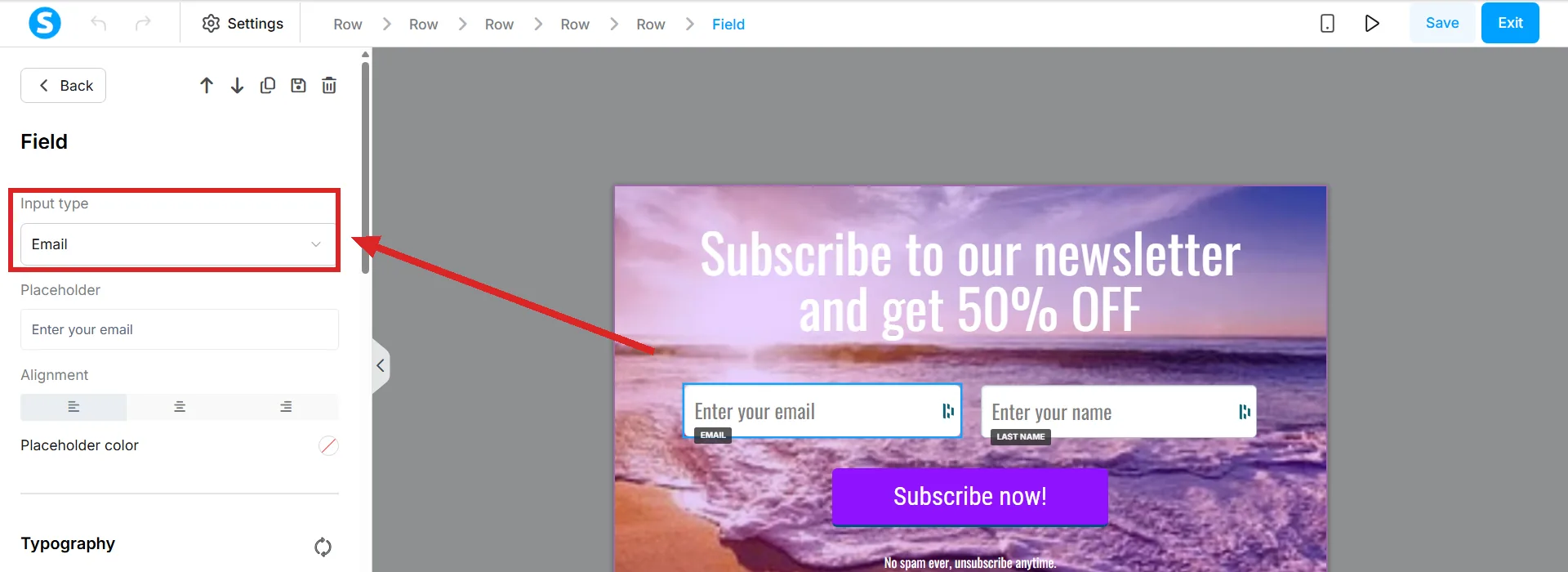
Email is the input type that matters here. Choosing it is what adds the person to your contact list when the form is submitted.
The field that looks right and is not
A box with the word Email printed in it as placeholder text is not necessarily an email field. The first check systeme.io gives is whether the field's Input type is actually set to Email.
The check itself takes a few seconds. Click the field on the page, then read the Input type dropdown in the settings that open in the panel on the left.
The system looks for a valid email field, not for the word.
Cause two: the wrong button action
If the button was never meant to collect an email, the action is the thing to change. A button offers five actions.
- Submit form. Saves the visitor's details as a contact and sends them to the next step in the funnel.
- Show popup. Opens a popup created inside the page editor.
- Open URL. Sends the visitor to a URL you enter, in the same tab or a new one.
- Next step URL. Sends the visitor to the next step in the funnel.
- Download file. Hands over a file you upload.
A button that exists to link somewhere wants Open URL or Next step URL. Either one stops the error.
Two names for the same setting
The help centre calls this action Send form in the article about the error and Submit form in the articles about buttons and popups. There is one action, under two names.
The related fault, once the error clears
Form fields on their own store nothing. To save what somebody types, the page needs a button for them to click.
None of this throws an error if the button's action was never set to Submit form in the first place. The page keeps working, nothing on screen complains, and every submission is quietly thrown away. No error appearing is not proof the form is capturing anything.
The two elements that build a form behave differently here. A Form input is a single field placed on the page by itself, and it depends on a separate Button element wired up beside it. The Form element is different: it is a container, and the submit button is built into the same container as the fields, which is the point of using it instead of separate pieces.
More than one submit button is allowed. The condition systeme.io sets is that each contains the same fields, and each triggers the same automation rules.
How I checked this answer
Nothing on this site is written from memory. These are the sources I checked to write this answer, and the date I checked them.
- Why am I seeing the "At least one email input is required" error?help.systeme.io, article 623
- How to add a form field and a form element to your pagehelp.systeme.io, article 1662
- How to configure a buttonhelp.systeme.io, article 170
Checked on
Did this answer your question?
Keep reading
- What is the SEO section of the editor actually for? Six fields, one of which decides whether the page is allowed into Google at all.
- Can I paste in my own HTML, CSS or JavaScript? Yes, in three places. Two of them are boxes, one is an element you drag on.
- What is a tag actually for? A label on a contact. Nothing gets sent to anybody without one.