Home / Categories / Courses & memberships
Where do my course videos actually live?
Course videos sit on systeme.io's own servers, if you upload the file. Storage is unlimited, but a video file cannot exceed 2GB, and systeme.io recommends uploading videos no larger than 100MB.
Three ways a video gets into a lecture
systeme.io lists three options for putting video on blogs, funnel pages and inside courses and memberships.
- Add a video using a URL.
- Add a video with an embed code.
- Upload the video file to your account.
Only the third makes systeme.io the host. The other two point at a file that stays where it already is.
The upload happens in the editor rather than in the file manager. Open the page or lecture, click Edit page, then scroll down the panel on the left to the Video element and drag it onto the page. Click the video, open the Video type dropdown, choose Upload file, pick the file from your device, wait for it to finish, then click Insert and Save.
Where an uploaded file ends up
In the file manager, under Assets, then Files. Every file uploaded to the account is stored there and can be used again anywhere in the account, including emails, pages, funnels, courses and automations, without uploading it a second time.
The types it lists are images as JPG and PNG, video as MP4, documents as PDF and audio as MP3, given as examples rather than as a closed list. Filters narrow the list by file type, or by where a file is used, such as Funnels, Emails or Communities.
The two numbers
A video file cannot exceed 2GB. For the fastest loading time, systeme.io recommends uploading videos no larger than 100MB.
The first figure is a hard stop. The second is advice, and it sits a long way below the stop.
systeme.io's own suggestion for loading speed is to compress videos with a tool such as Handbrake. Its walkthrough is four steps.
- Open the source video with File: Open a single video file, or drag it in.
- Click Browse and choose where the compressed copy should be saved.
- Tick Web optimized, which saves the file in a format built for the browser.
- Click Start Encode.
To keep the original dimensions, open the Dimensions tab and set Anamorphic to None before encoding.
What the storage limit is
There is not one to report. systeme.io lists unlimited file storage space among the things included on all plans, and describes its media hosting the same way: unlimited storage for your media, including your videos.
So no total allowance is published, and the only published ceiling on a video is the 2GB per file.
Stopping students downloading them
One setting covers the whole account. Click your profile picture, open Settings, click Courses in the left menu, and tick Disable downloading of audio and video from course pages.
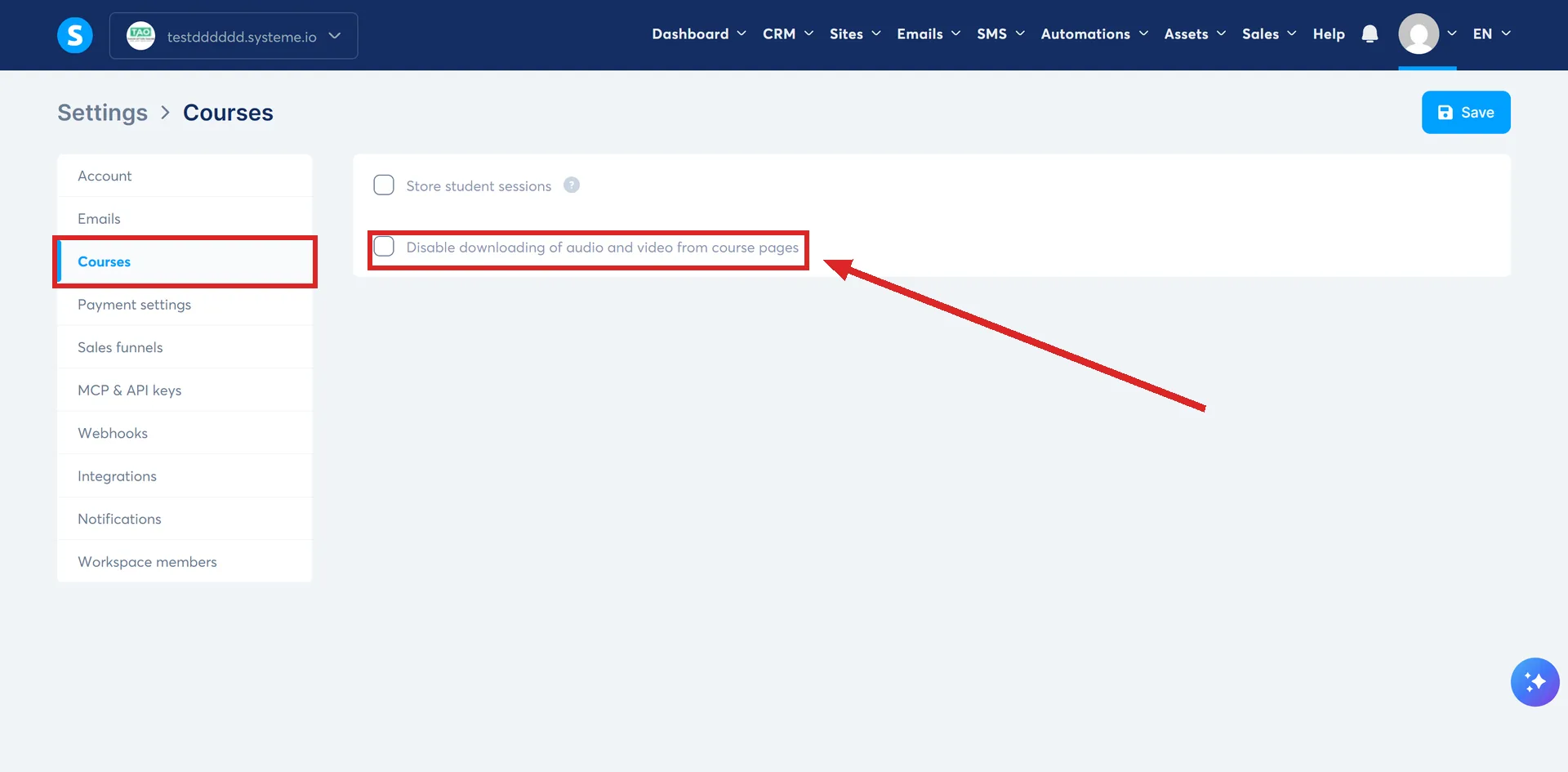
Students can still watch and listen. They cannot pull the file down.
It applies to classic courses only. systeme.io states that the option does not work for light courses.
Deleting a file that is in use
It stays on the live page. systeme.io does not strip a deleted file out of content that is already using it, so a layout cannot break underneath you.
How I checked this answer
Nothing on this site is written from memory. These are the sources I checked to write this answer, and the date I checked them.
- How to host your videos on systeme.iohelp.systeme.io, article 300
- How to manage your files in systeme.iohelp.systeme.io, article 4455
- How to compress a video with Handbrakehelp.systeme.io, article 285
- How to disable downloading of audio and video from course pageshelp.systeme.io, article 2957
- The All plans include sectionsysteme.io/pricing
Checked on
Did this answer your question?
Keep reading
- What are the course access types, and which do I want? Four options in one table, with the plain-English use case behind each one.
- Can I move a course in from Kajabi or Teachable? No import file is documented. What the migration team rebuilds by hand, and what arrives last.
- Why do my emails land in the promotions tab? Gmail decides this, not systeme.io. What shifts the odds, and why the tab costs less than it looks.