Home / Categories / Editor
Countdown timers: which ones are honest and which are not?
Four types on one Countdown element. A fixed date and time is the same moment for everybody, a delay counts a set duration from the moment the page loads, a daily timer runs out and starts again the next day, and a fourth mirrors a funnel deadline set per person.
One element, four types
The Countdown element is dragged onto the page from the left panel. Clicking it opens a Countdown type dropdown, and that dropdown is where the whole question lives.
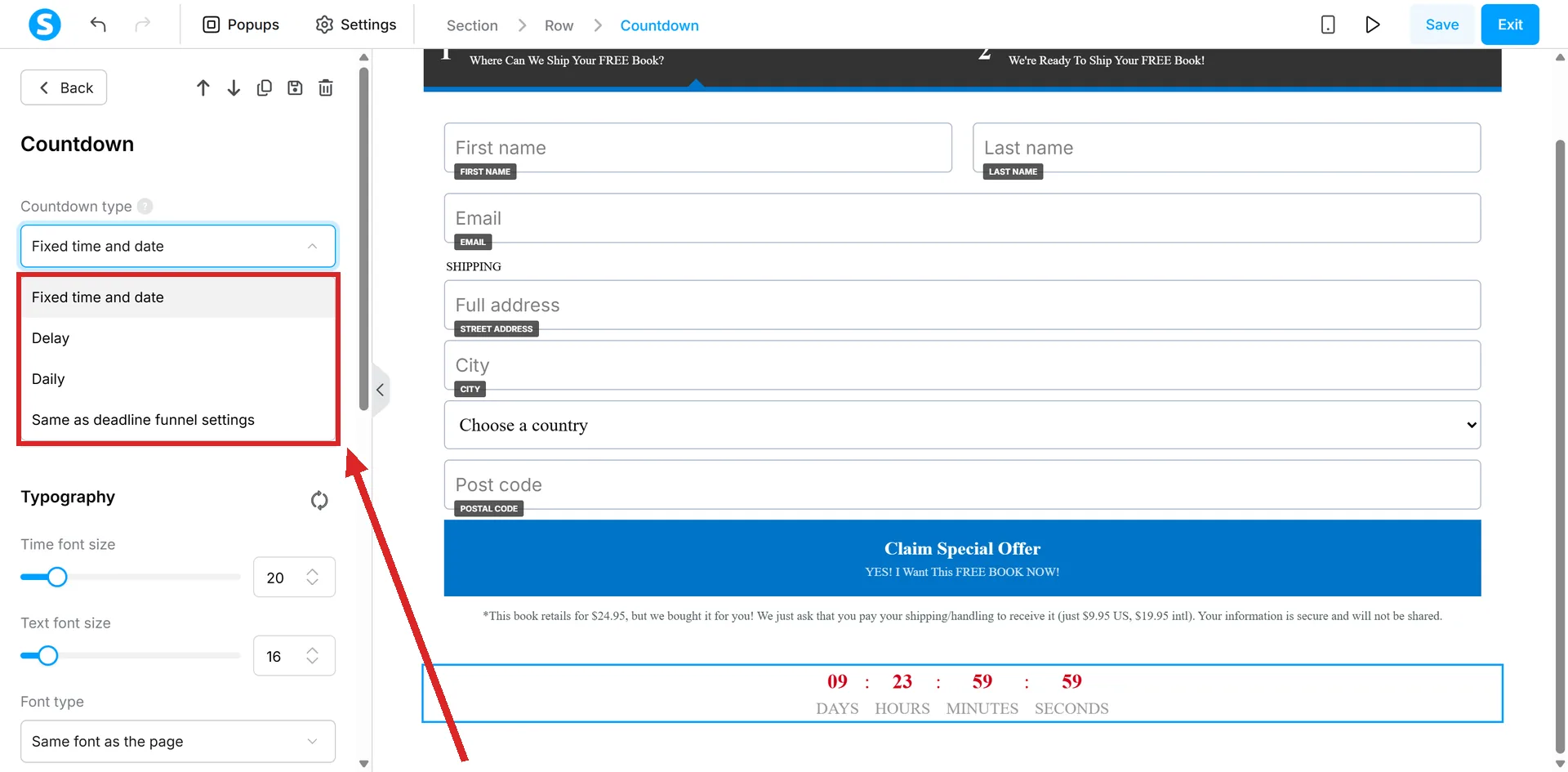
How long that list is depends on the page the element sits on. On an order form page it shows all four types. On an opt-in page in the same funnel it shows three, and the fourth, the one tied to the funnel deadline, is not offered at all. That lines up with the deadline feature only working on order form and sales page steps. None of the four articles this answer draws on mentions it: it was checked in a live account on 6 September 2026, on an opt-in page and an order form page. A sales page was not tried.
| Type | What sets the end | What a second visit shows |
|---|---|---|
| Fixed time and date | A date and time you enter | The same moment, still counting down |
| Delay | A duration in days, hours, minutes and seconds | Not documented |
| Daily | A clock time you want it to end at each day | The same countdown, running again |
| Same as the deadline funnel settings | The funnel's Deadline feature | The prospect's own remaining time |
Fixed time and date
You set an expiry date and time. It is one moment, and it is the same moment for every visitor.
It also has teeth. systeme.io's note is that after the expiry moment the page will no longer be available, and that unless a redirect page is specified, visitors land on an inactive funnel page.
It is the only one of the four where a calendar date is typed in.
Delay
systeme.io describes this as a timer that counts down a specific amount of time per visitor. You set a duration rather than a date, and the full duration is showing as soon as the page loads.
What the documentation does not state is what a visitor sees when they come back, or reload. Whether the count is remembered for that person or starts again is not covered in the article, so it is something to test rather than assume.
Daily
You set the time you want the countdown to end each day. The name is accurate: it ends, and the next day it runs down to the same clock time again.
The same visitor returning the next day sees the countdown running again, towards the same time.
The type tied to a real deadline
The funnel Deadline feature gives each prospect a fixed access period. systeme.io's words: every prospect gets a predetermined access period, regardless of when they registered.
- It works on Order Form and Sales Page steps only, not opt-in pages, inline forms or thank you pages.
- Deadline page expires in a number of days you set, counted from when the contact registers.
- An optional expiry time uses the account's time zone, not the contact's.
- Once it passes, the prospect is redirected to a page you choose. Any page type can be the destination.
The settings sit on the funnel, not on the page. Open Sites, then Sales funnels, then the funnel, and click Deadline settings, then Enable deadline feature. These are the fields, with systeme.io's own example values.
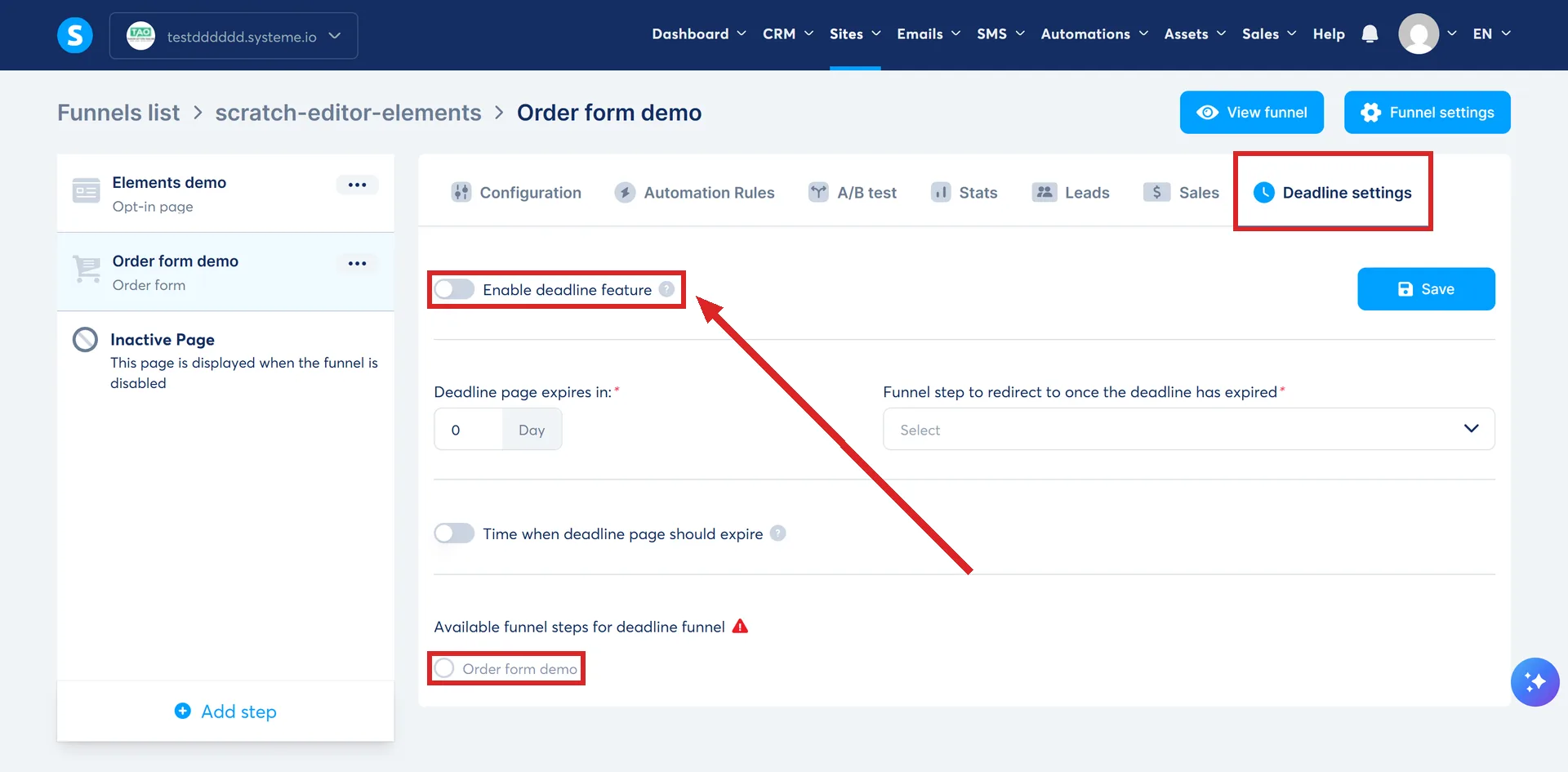
| Field | Example value and what it does |
|---|---|
| Deadline page expires in | 6, so the funnel step stops being available 6 days after the contact registers |
| Time when deadline page should expire | 08:00, so the page expires at 08:00 on the sixth day. Optional, and read in the account's time zone rather than the contact's |
| Funnel step to redirect to once the deadline has expired | Any page type can be picked |
| The pages the deadline applies to | Order forms and sales pages only |
The Deadline settings need saving before you leave the screen.
A countdown on the page is pointed at it by choosing Same as the deadline funnel settings in the page editor. The two then stay in step.
The condition that decides whether a deadline is real
A deadline needs to know who the visitor is. systeme.io states that prospects must have subscribed beforehand, and that the subscription form page must link directly or indirectly to the page with the deadline, because the system needs the email address to display it.
The third scenario in systeme.io's own documentation is the one to read twice: a sales funnel with deadlines and no opt-in form leaves the pages available to prospects even after the deadline has passed.
What happens at zero
The fixed, delay and daily types all offer the same pair of choices when the countdown expires. Redirect the visitor to another page, or do nothing.
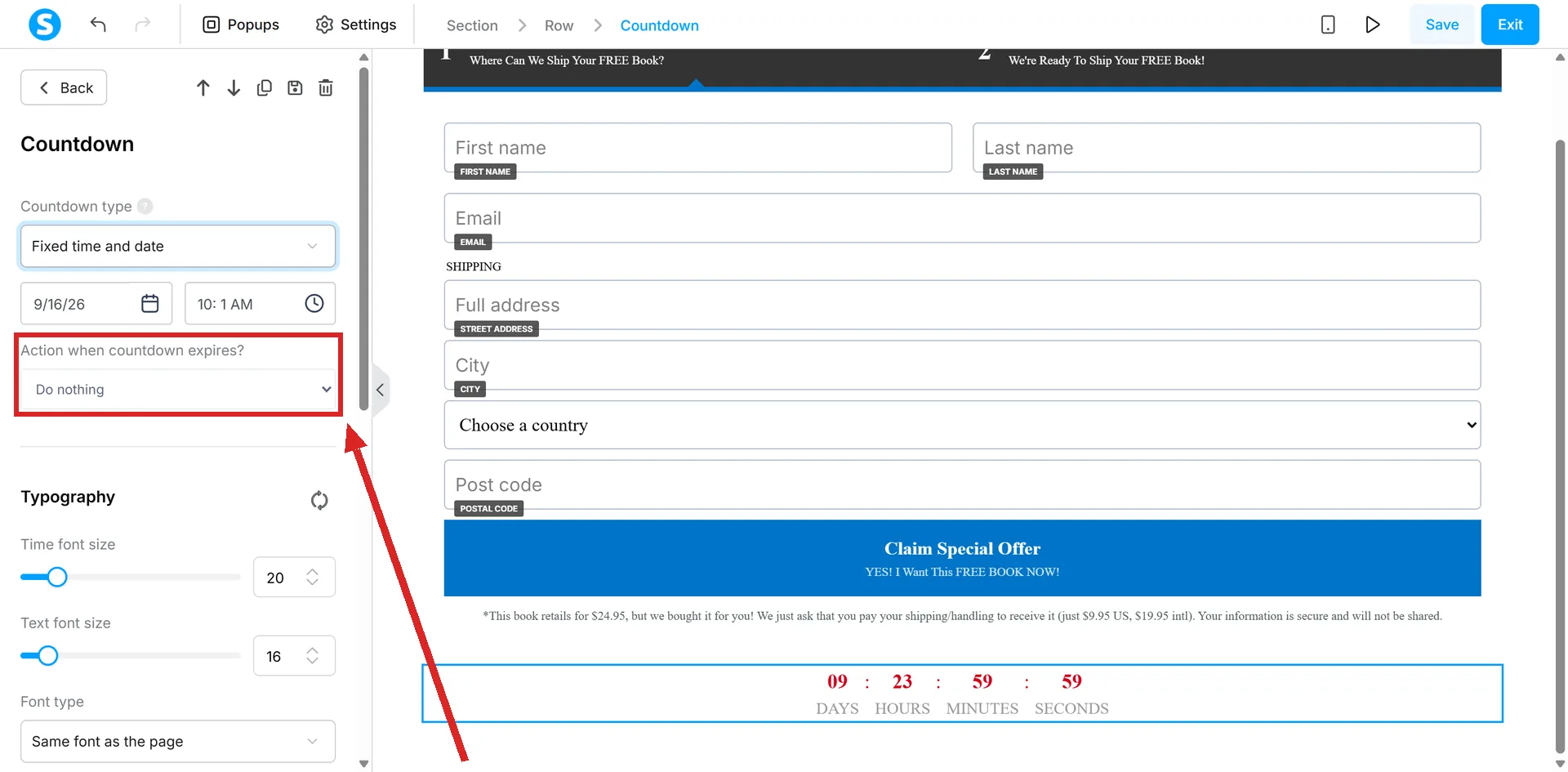
The two choices do not mean the same thing on every type. On a delay countdown, do nothing means the timer stops at 00:00:00 and that is the whole of it.
On a fixed time and date countdown the page itself stops being available at the expiry moment. There the choice only decides where the visitor lands: a page you picked, or an inactive funnel page.
On a daily countdown, zero arrives and the clock runs down to the same time again tomorrow.
How I checked this answer
Nothing on this site is written from memory. These are the sources I checked to write this answer, and the date I checked them.
- How to use the fixed time and date countdown timerhelp.systeme.io, article 333
- How to use the delay countdownhelp.systeme.io, article 338
- How to use the daily countdown featurehelp.systeme.io, article 344
- How to create a deadline for a sales funnelhelp.systeme.io, article 1574
- The Countdown type list on an opt-in page and on an order form page in the same funnel, checked 6 September 2026A live systeme.io account
Checked on
Did this answer your question?
Keep reading
- Can I get an older version of my page back after saving? There is no undo button, and clicking Save is the point of no return.
- Why can't I find the Contact us element in my editor? It is not hidden. It only exists on certain kinds of pages.
- What does an email footer legally have to contain? Two switches in Settings, one badge you cannot remove for free, and one question no help article answers.