Home / Categories / Courses & memberships
What is a course store?
The public catalogue of your courses, served at yourdomain.com/school. Anybody can browse it, including visitors with no account, and each course on it links through to a sales page you chose.
Where it is
At /school on the domain assigned to the course. systeme.io describes the school page as a central library sitting at yourdomain.com/school.
It is public. Visitors can browse and discover courses there without a systeme.io account of any kind.
What makes a course appear on it
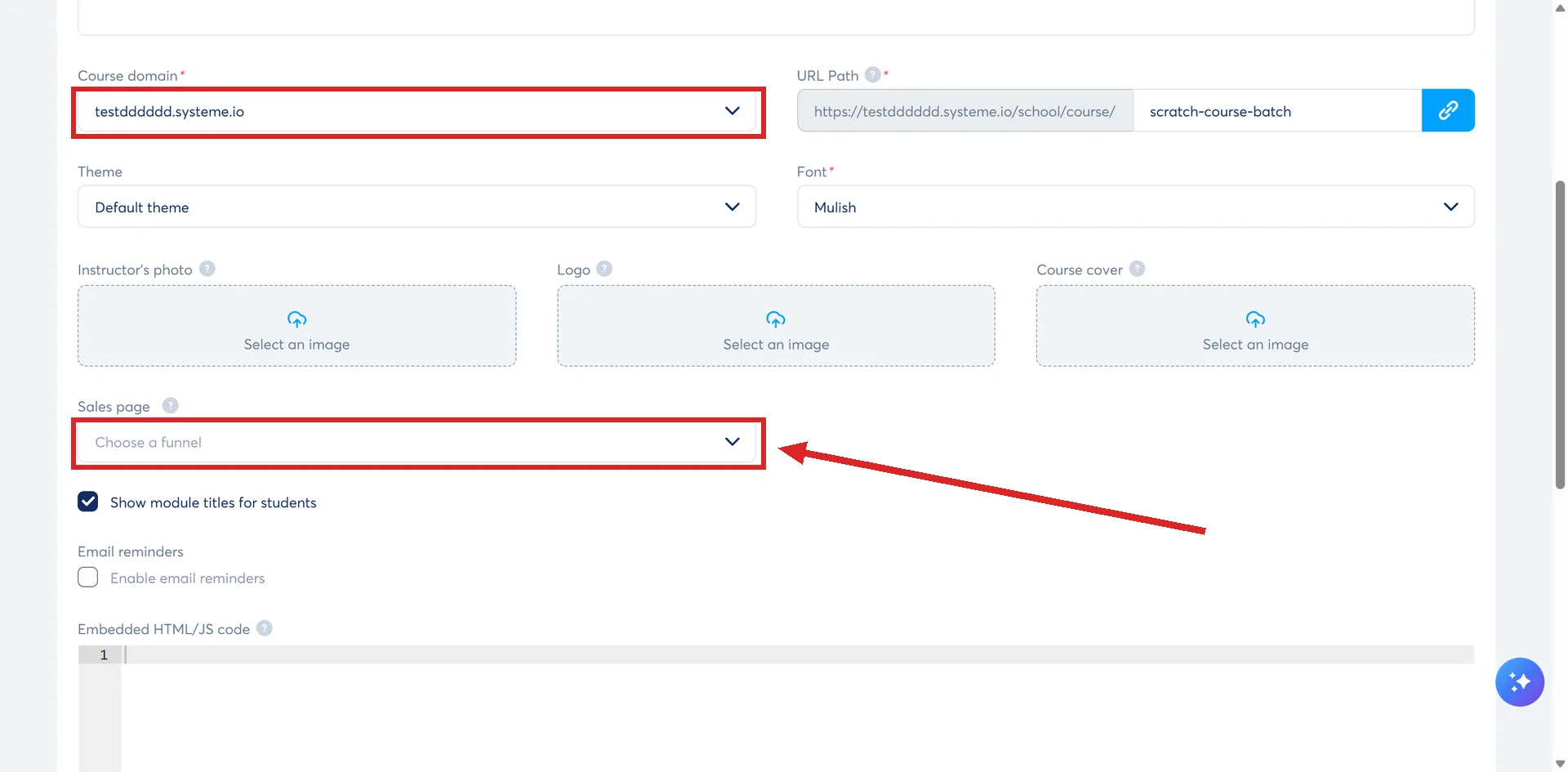
Two settings, both on the course's own Settings screen. Open Assets, then Courses, pick the course, and click Settings.
- A domain selected for that course.
- A sales page: pick the Funnel, then the specific Funnel step holding the sales page, then save at the top.
The sales page is the part that catches people out. Without one linked, the course is hidden from the public school page entirely. systeme.io's reasoning is that the system needs to know where to send a potential buyer.
A visitor who clicks Get access is redirected to that sales page.
The other half: the Explore tab
The same setting puts a course in front of people who have already bought something. Students see an Explore tab in their dashboard listing your other courses.
If they own the course, the button reads Open and takes them back into it. If they do not, it reads Get access and sends them to the sales page.
Two rules limit what shows up there.
- The Explore tab only appears for students already enrolled in at least one of your courses.
- It only lists courses whose language matches the language on the student's profile. A student set to French will not see your English courses. A course's language is changed in the course settings.
A course store is not a creator store
Two different features, in two different places, and the names are close enough to send people to the wrong screen.
| Course store (school page) | Creator store | |
|---|---|---|
| Where it is set up | In each course's settings | Sites, then Creator stores |
| Address | yourdomain.com/school | A domain and URL path you pick when creating it |
| What it lists | Courses that have a sales page linked | Products you add: an external link, an email capture, a digital download, a course, a physical product |
| Taking payment | Sends the visitor to your funnel's sales page | Has its own checkout page and thank you page |
A creator store also carries a header with a bio and social links, a choice of themes, its own SEO settings, and a three-dot menu that can deactivate it.
One thing exists only inside a creator store: the light course. systeme.io's simplified course format is created through Sites, then Creator stores, then the store, then Add new product, then Sell a course. systeme.io states that Sell a course is the only option a light course can be created from.
The store itself is made under Sites, then Creator stores, then Create, and the popup asks for a name, a domain, a URL path and a language. Its other product types are an external link, an email capture, a digital download and a physical product.
How a student reaches their own courses
Inside the account, hover over the Dashboard tab at the top of the page and click Student dashboard. Every course they are enrolled in is listed there.
There is also a direct address for it: systeme.io/school.
How I checked this answer
Nothing on this site is written from memory. These are the sources I checked to write this answer, and the date I checked them.
- How to set up a public course store and promote courses to existing studentshelp.systeme.io, article 1748
- How to set up a creator storehelp.systeme.io, article 3861
- How to create a light coursehelp.systeme.io, article 8769
- How to access your student dashboardhelp.systeme.io, article 1650
Checked on
Did this answer your question?
Keep reading
- What is a course bundle? Several courses sold as one product, and the delay rule that stacks.
- What are the course access types, and which do I want? Four options in one table, with the plain-English use case behind each one.
- What is a spam complaint, and how many is too many? The denominator is opened emails, not sent. That changes the arithmetic a lot.