Home / Categories / Booking calendar
What happens when someone cancels a booking?
Both the host and the invitee are emailed, the booking cannot be rescheduled afterwards, and a connected Google Calendar entry is updated to match. No money moves on its own: a refund on a paid booking has to be issued by hand.
Where a cancellation is made
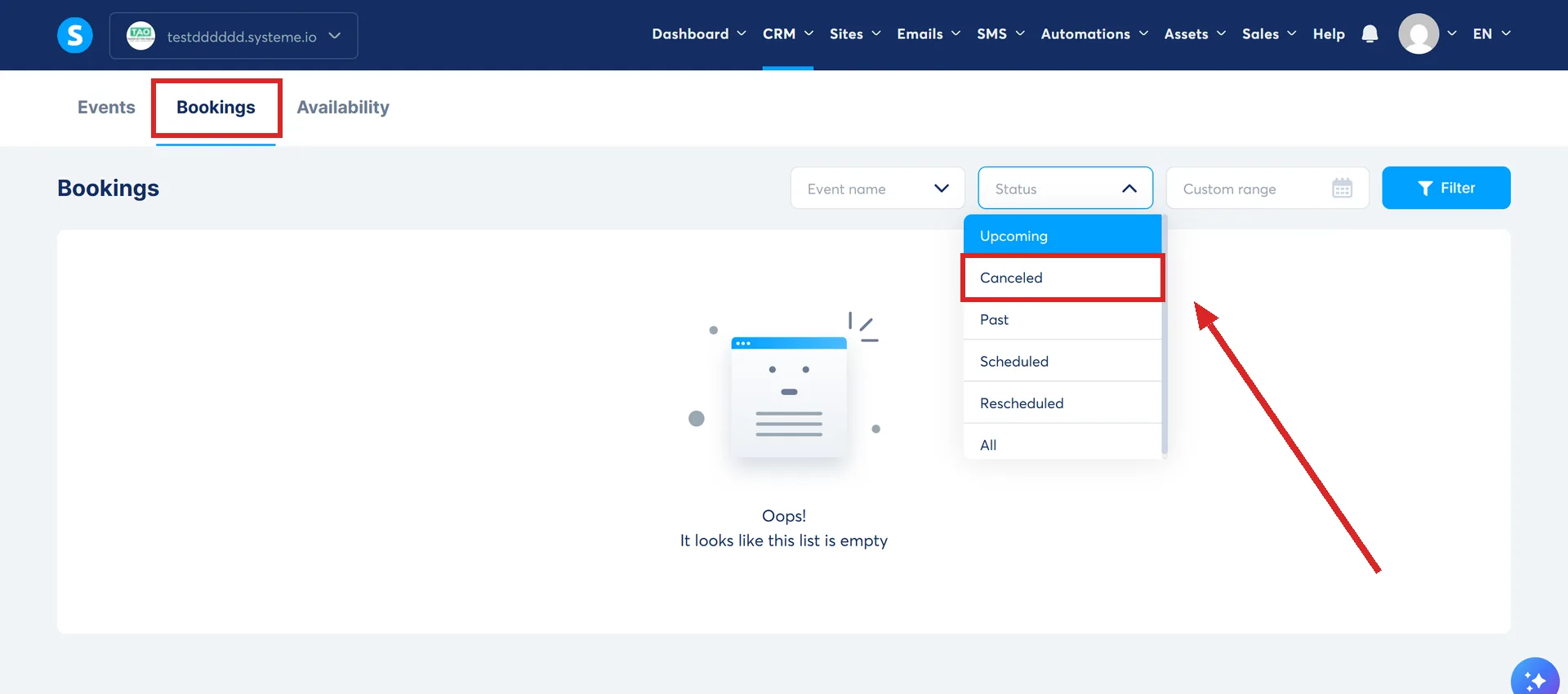
The host cancels from the bookings list. Go to CRM, select Calendar, open the Bookings tab, find the booking, click the three-dots menu and choose Cancel booking. A popup asks for Confirm.
The invitee cancels from the confirmation email they already have. The button sits at the bottom of it, next to the one for rescheduling.
What runs without you
- An email to both sides. Once the cancellation is confirmed, the host and the invitee are both told by email.
- The status changes to Canceled. It shows in the Bookings tab, which can be filtered by status to pull up every cancellation at once.
- A connected calendar updates itself. Where Google Calendar is integrated, the event is automatically updated or removed to reflect the cancellation.
What a cancellation cannot undo
Itself. A cancelled booking cannot be modified or rescheduled, and the Reschedule option is hidden from the three-dots menu for anything carrying a Canceled status.
Cancelled and past bookings can be cleared out of the list with Delete on that same menu.
The money does not move
Refunds are not automatic. systeme.io's support team states that where a paid booking is cancelled and a refund is wanted, the refund has to be processed by hand through your payment method.
Cancelling the booking and refunding the buyer are two separate actions. Doing the first does not do the second, and nothing on the cancellation screen mentions the payment.
Where the refund is actually made
systeme.io documents a refund action inside the account. Go to Sales, then Transactions, find the transaction, click the three-dots menu, click Refund, then confirm. The filters on the left take a customer email address, a price plan, a date range, a customer type or a country.
Three things about that screen are worth knowing before a booking gets cancelled rather than after.
- It depends on the gateway. Refund availability depends on your payment gateway, and there has to be enough in the gateway balance to cover the refund.
- Partial refunds do not exist. systeme.io does not currently support refunding part of a transaction, so a deposit cannot be kept back this way.
- Your own bank is allowed instead. systeme.io states a transaction can be refunded through your own bank account, and that doing it there as well as in systeme.io does not produce a double refund.
How close to the start a client may cancel
There is a setting for it on each event, in the availability section of the event itself under CRM, then Calendar.
Cancellation deadline decides how close to the start time invitees are allowed to cancel. Set to 0 hours it allows cancellations right up to the moment the meeting starts. Set to 24 hours it blocks last-minute ones.
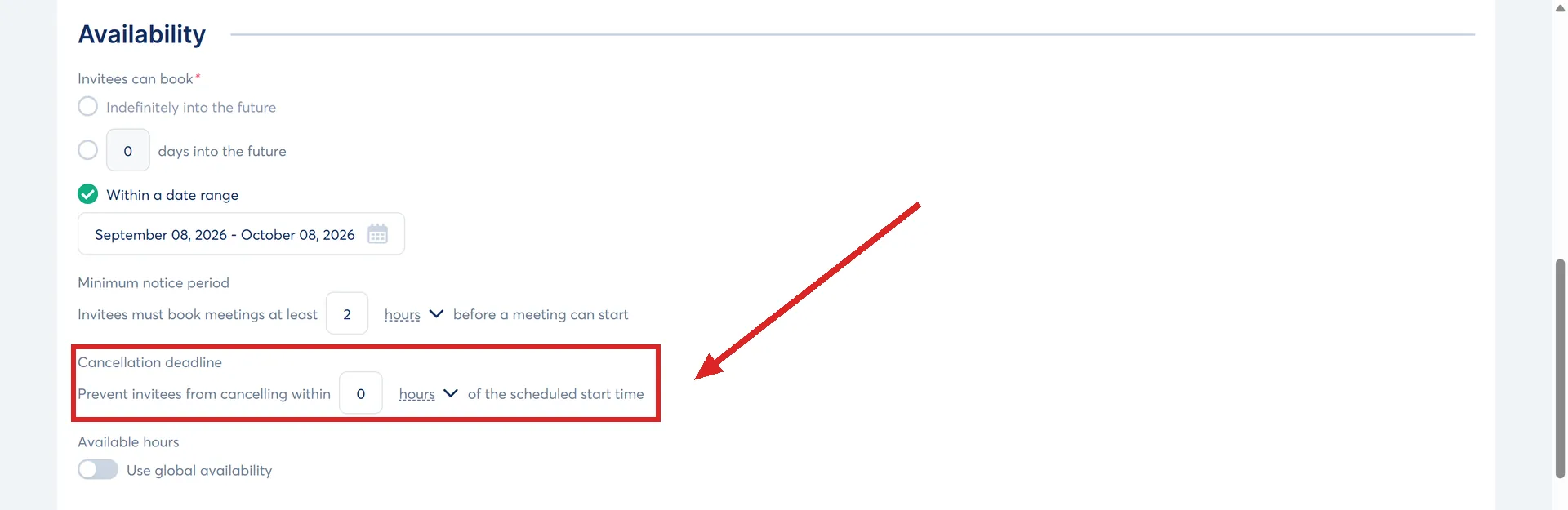
For a paid booking that setting is the closest thing to a refund policy the platform gives you, because it controls when a client can still walk away.
What the documentation does not say
- Reminder emails. systeme.io states reminders are recalculated and sent again when a booking is rescheduled. No page says what becomes of a reminder already scheduled for a booking that has since been cancelled.
- The slot. Nothing published says whether a cancelled slot goes back on the calendar for somebody else to book.
Money is the gap here. Neither of systeme.io's two calendar articles mentions it at any point, so nothing published tells you what a cancellation does to a payment that has already been taken.
How I checked this answer
Nothing on this site is written from memory. These are the sources I checked to write this answer, and the date I checked them.
- A reply from systeme.io support, 4 September 2026, on migration and booking cancellationssysteme.io support
- How to reschedule or cancel calendar bookingshelp.systeme.io, article 10603
- How to manage your calendar bookingshelp.systeme.io, article 10272
- How to refund your customerhelp.systeme.io, article 259
- How to set up your calendar eventshelp.systeme.io, article 10270
Checked on
Did this answer your question?
Keep reading
- Can I get deleted contacts back? There is a bin, and it holds them for 30 days. Where it is, and the row that never empties.
- What is the safest way to import an old list? The file it will take, the two things set during the import itself, and the wait afterwards.
- What actually happens when I delete a contact? It goes to a bin, not to nothing. And your contact count drops the moment it does.