Home / Categories / Deliverability
SPF, DKIM and DMARC, in plain English
SPF names the servers allowed to send for your domain, DKIM proves the message was not altered on the way, and DMARC says what happens when either check fails. systeme.io generates the records when you authenticate a domain, and you add them to your DNS.
What is email authentication and why does it decide everything?
Authentication is the proof that the server sending an email is allowed to send for that domain. Without it a receiving server has no way to tell a real message from a forged one.
Since February 2024, Gmail, Yahoo and Microsoft have tightened what they accept. systeme.io's documentation states that emails from senders using unauthenticated domains are automatically sent to the spam folder. Microsoft strengthened its own requirements again in May 2025.
It is also a hard gate inside the product. Authenticating a domain name is mandatory to send emails from systeme.io.
The three records, one line each
| Record | What it answers | What happens without it |
|---|---|---|
| SPF | Which servers may send for this domain | A failure brings a high risk of rejection or a spam label |
| DKIM | Has the message been altered since it was sent | Modern providers treat the email as less reliable |
| DMARC | What to do when SPF or DKIM fails | The domain is open to spoofing, and filters get more suspicious |
systeme.io's own summary is that the three together act as a technical passport, checked before the content of an email is analysed at all.
What systeme.io actually asks you to add
Hover over your profile picture, click Settings, then Emails. Go to the Domains section and click the link that starts "Click here to authenticate your domain".
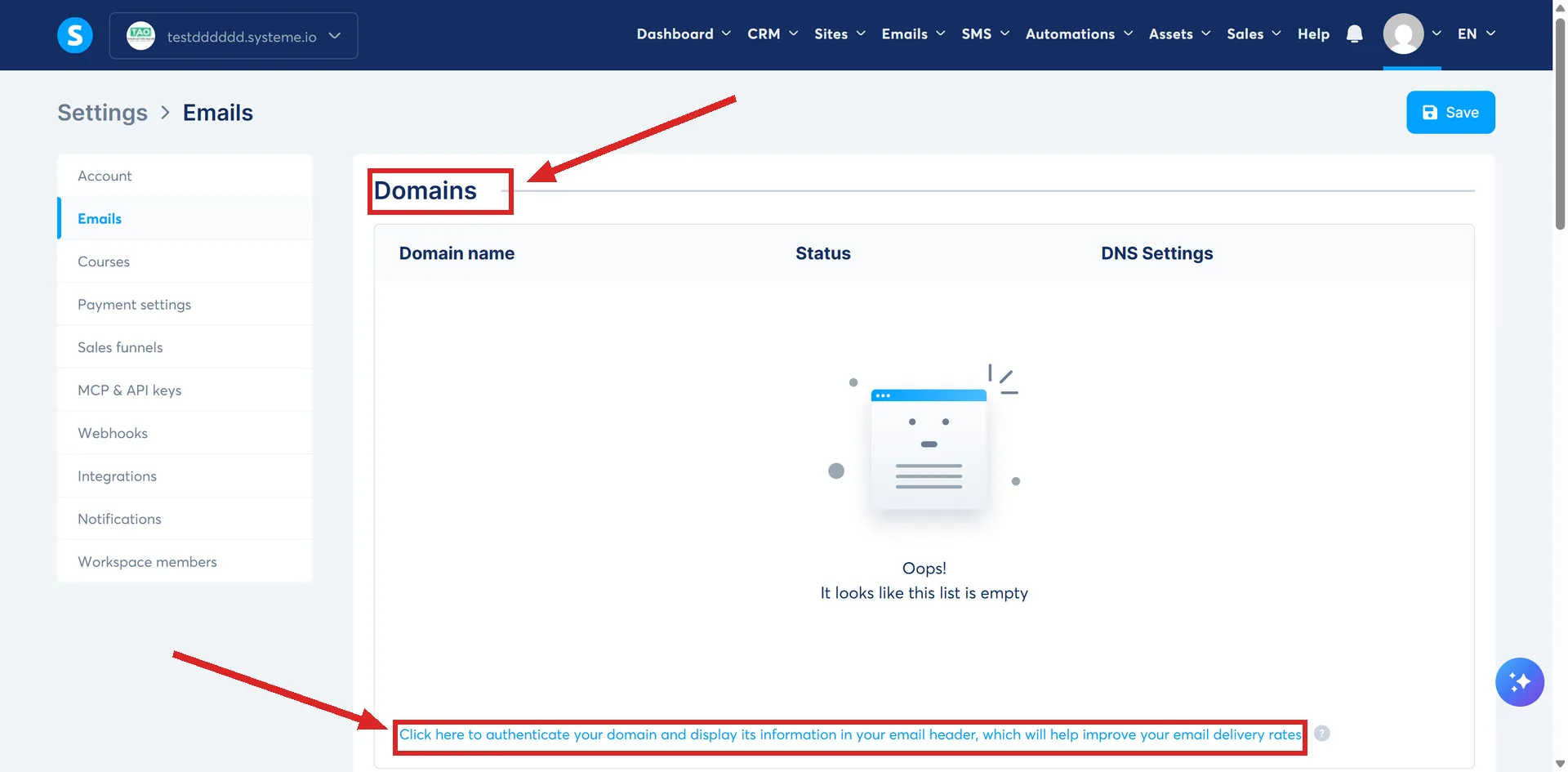
Entering the domain without the "www" and saving generates the records. systeme.io's worked example uses the domain sio-team.live.
Three CNAME records then appear in a table, along with a DMARC record. Both have to be added to the DNS zone at your domain host.
The documented example values look like this:
| Type | Name | Value |
|---|---|---|
| CNAME | si942517 | inbound.systeme.io. |
| CNAME | systemeio1._domainkey | key1.systeme.io. |
| CNAME | systemeio2._domainkey | key2.systeme.io. |
Two of the three carry _domainkey in their names. systeme.io's documentation says that authenticating the domain adds the SPF and DKIM records to it, and names those three CNAMEs plus the DMARC record as what has to go into your DNS zone.
Two details in that table trip people up. In the Name field you enter only the part before your domain name, so si942517 and not si942517.yourdomain.com. In the Value field the address takes a full stop at the end.
What you do at the domain host
systeme.io's walkthrough uses GoDaddy and says the process is similar at most hosts. Log in, open the domain, click DNS records, then Add new record.
- Pick CNAME as the record type.
- Paste the systeme.io Name into your host's Name field, minus your own domain. In systeme.io's example the generated value is si942517.sio-team.live, and what gets typed is si942517.
- Paste the systeme.io Value into your host's Value field, and add a full stop at the end. The example value in the table above already carries one, after the final o.
- Save, then repeat for the other two CNAMEs.
Then change the record type to TXT and add the DMARC record the same way.
The DMARC record is separate
It is a TXT record, not a CNAME. The name is _dmarc, and the documented starting value is v=DMARC1; p=none; rua=mailto:youraddress@yourdomain.com
Filled in, one row of a DNS zone looks like this. The address is systeme.io's own example.
| Type | Name | Value |
|---|---|---|
| TXT | _dmarc | v=DMARC1; p=none; rua=mailto:example@example.com |
The host normally adds your domain to that name on its own, giving _dmarc.yourdomain.com. systeme.io's instruction is that if it is not added, type the whole thing, _dmarc.yourdomain.com, into the Name field instead of _dmarc.
The policy part of that value tells receiving servers how to handle mail that fails SPF or DKIM. systeme.io documents p=none as the value to use and does not set out what the other settings do.
The rua address receives a daily report from email providers, sent as raw XML. systeme.io recommends pointing it at an address created for that purpose rather than at your main inbox. Several addresses can be listed, separated by commas with no spaces.
Its worked example makes the pattern plain: an address of example@example.com gives a value of v=DMARC1; p=none; rua=mailto:example@example.com
One warning about the multi-address example in the same article. It is printed as rua=mailto:youraddress@yourdomain1.com,mailto:yourdomain2.com, and the second entry has no mailbox name in front of the domain. Copy the pattern from the single-address example instead, one full email address per mailto, commas between them.
A DNS zone can hold many TXT records, but there must be only one DMARC record per domain. Two of them conflict and the policy stops working.
The rules that catch people out
- The domain has to have a live homepage. If it leads to a 404 page, email providers may block your emails, and a parking page does not count.
- systeme.io's own worked example makes it concrete: authenticate a domain such as sio-team.live, and if that site is not functional, emails sent from info@sio-team.live may be blocked on the receiving end. A parking page fails the same test as a dead one, because inbox providers increasingly read signals outside the email itself: web presence, brand consistency, domain activity. Article 316 only says providers may block the emails; neither article documents how often that happens or how a provider would notice.
- The bar for clearing it is low. systeme.io's own goal for it is not a complex website but a coherent environment that confirms the business is real, and its suggested fix where nothing exists yet is to build a homepage on the domain with a funnel or a blog.
- A domain can only be authenticated in one systeme.io account or sub-account. Adding one that is already authenticated elsewhere returns an error.
- A sub-account is its own separate slot for this rule. Nothing in the documentation treats a sub-account as automatically sharing the parent account's authenticated domains, or the other way round.
- Two accounts can each add the same domain and sit with it pending at the same time, each generating its own CNAME and DMARC records. Whichever one gets its records live and verified first locks the domain to that account and strips it from the other's pending list, and nothing in the documentation describes a warning sent to the one that loses out.
- Whether two subdomains of the same root, such as mail.example.com and news.example.com, count as the same domain or as different ones for this exclusivity rule is not addressed anywhere in the documentation.
- Domains from personal email providers such as Gmail, Yahoo and ProtonMail cannot be authenticated. Only a custom domain can.
- Authentication is not the last step. The sender email address on that domain still has to be confirmed separately before it will send.
Checking it worked
systeme.io points at two outside checkers: a DNS checker for the three CNAMEs, entering the full name including your domain, and mxtoolbox for the DMARC record. A green tick against the exact value on all three CNAMEs means the domain is authenticated.
The full name is the part that catches people out here. In the systeme.io example you search for si942517.sio-team.live, not si942517 on its own.
Records showing in red mean a DNS error to fix. systeme.io asks you to contact support after making the change either way, so the team can verify it from their side.
How I checked this answer
Nothing on this site is written from memory. These are the sources I checked to write this answer, and the date I checked them.
- How to authenticate your domain name for email sendinghelp.systeme.io, article 316
- How to create a DMARC recordhelp.systeme.io, article 2241
- Email deliverability: how spam filters workhelp.systeme.io, article 10452
- DMARC Reports: How to read and use themhelp.systeme.io, article 10240
- Why do my emails end up in the spam folder?help.systeme.io, article 2923
- General guidelines and best practices for email deliverability during the first few dayshelp.systeme.io, article 4247
Checked on
Did this answer your question?
Keep reading
- Why do my emails land in the promotions tab? Gmail decides this, not systeme.io. What shifts the odds, and why the tab costs less than it looks.
- What is a bounce, and what should I do about one? Hard, soft, and what the grey and blue addresses in your statistics are telling you.
- Block, element, section: what is the difference? Three of these are parts of a page. The fourth is a saved copy of one.