Home / Categories / Emails
What does an email footer legally have to contain?
systeme.io supplies an unsubscribe link and a footer text box you fill in yourself. It publishes no legal checklist, so what else belongs down there depends on the law where you and your readers are.
What systeme.io puts down there for you
Two things, both in Settings under Emails.
Reach that screen from your profile picture, then Settings, then Emails.
- An unsubscribe link. A tick box labelled Display "Unsubscribe from campaign" link switches it on. The words on the link are yours to write, and the wording can be set separately for each language.
- Footer text. A free text box underneath. Whatever goes in it appears at the bottom of your emails.
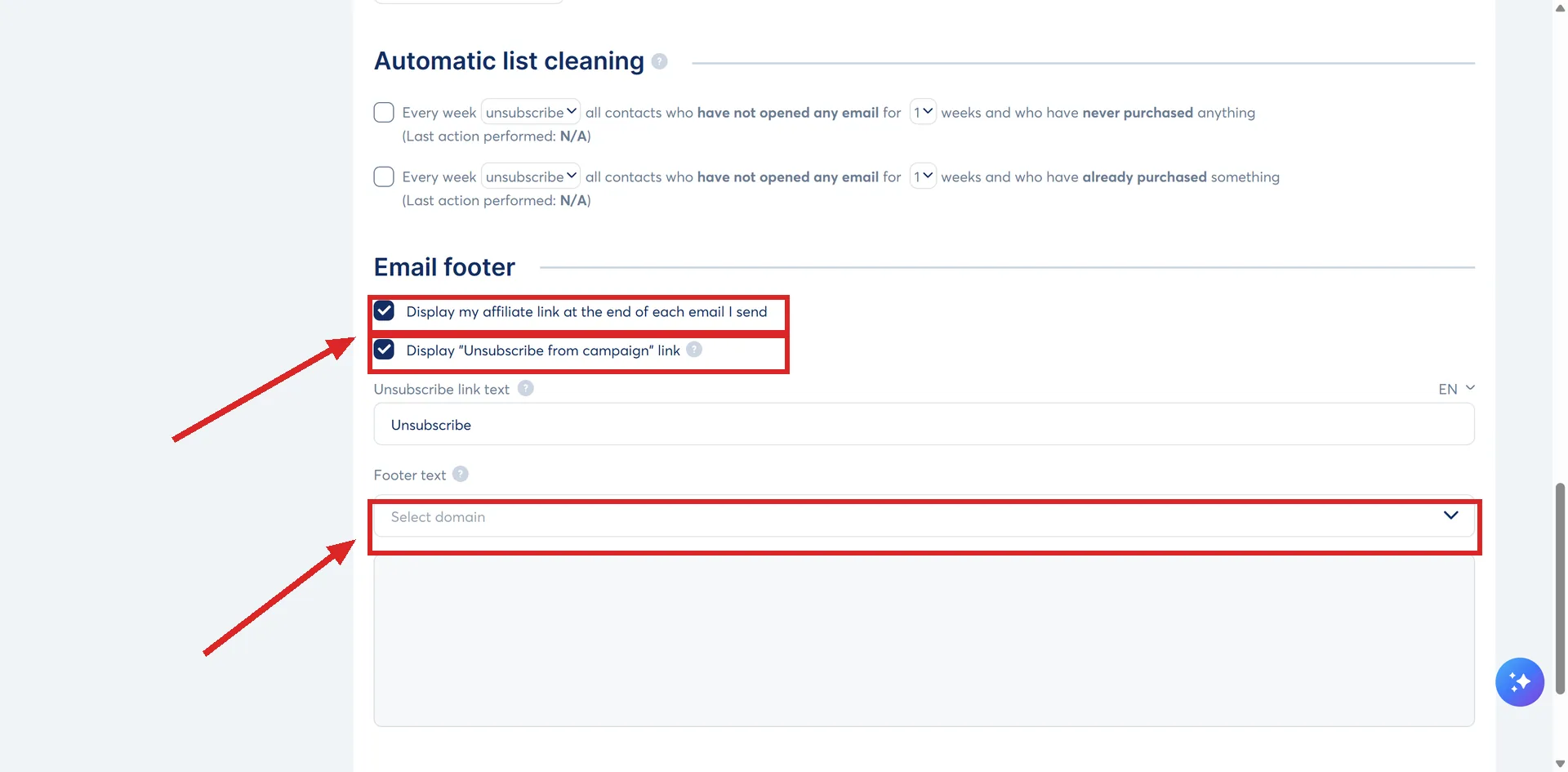
The footer text is held per domain rather than once for the account. The dropdown above the box lists your account address and every verified sender address, so a business running two brands can give each of them different wording, different links and different contact details.
The badge you cannot take off for free
Emails carry a "Sent with systeme.io" line at the bottom by default, and that line is an affiliate link promoting systeme.io.
A second tick box in the same Emails settings controls it, the one about displaying an affiliate link at the end of every email sent. Clearing that box removes the badge, and it needs a paid subscription: Startup, Webinar or Unlimited. Accounts on the free plan cannot take it off.
Why the unsubscribe link is worth more than compliance
systeme.io treats a visible unsubscribe link as protection for the sender rather than a concession to the reader.
Somebody who does not want your email has three ways out: unsubscribe, stop opening, or press the spam button. The first costs one contact. The second quietly drags your open rate down. The third damages your sending reputation and, done often enough, can get you blacklisted by email providers.
Of those three, the cheapest one is the one worth making visible.
The legal part is not systeme.io's to answer
The help centre publishes no legal checklist. It does name two things. Unsubscribe links are mandatory on a marketing platform. And its deliverability guidance asks you to sign your emails, putting your name, brand name and information in the footer, along with the company name and a link to your website if you trade as one. It adds that being identifiable this way is necessary for some destinations, German servers among them.
Its compliance guidance goes further on consent than on footers. Consent has to be voluntary and active, the box has to be unticked by default, the wording has to say what the person will receive, and a record of it is worth keeping: the date, the context, and the exact wording they agreed to. That record is what answers a complaint or an audit later.
Whether your footer also needs a postal address, a company number or anything else is set by the law where you trade and where your readers live, and it differs between countries. That is a question for your own jurisdiction or an adviser, not for a help article about a tick box.
How I checked this answer
Nothing on this site is written from memory. These are the sources I checked to write this answer, and the date I checked them.
- How to remove "Sent with systeme.io" and customize your email footerhelp.systeme.io, article 2008
- Good practices for email deliverabilityhelp.systeme.io, article 363
- Don't risk getting blocked: identify your compliant and non-compliant listshelp.systeme.io, article 11009
- How to improve the deliverability of my emails (advanced tips)help.systeme.io, article 1643
Checked on
Did this answer your question?
Keep reading
- How often should I email a list that is brand new? There is no number in the documentation. There is a shape, and it rules out both extremes.
- Unsubscribed, bounced, complained: what is the difference? Three different things happen. systeme.io files them under two labels, and that catches people out.
- What is a workflow, and how is it different from an automation rule? Rules fire and finish. Workflows can wait, branch, and sit switched off until you say so.