Home / Categories / Emails
Unsubscribed, bounced, complained: what is the difference?
Unsubscribed, bounced and complained are three different events. systeme.io records them under two statuses: Unsubscribed is its own, while a delivery failure and a spam complaint both land the contact in Bounced.
The three side by side
| Unsubscribed | Bounced | Complained | |
|---|---|---|---|
| Who caused it | The contact, or you | The receiving mail server | The contact |
| What happened | They opted out, or were opted out in bulk | The address failed to accept the mail | They pressed the spam button |
| Status in systeme.io | Unsubscribed | Bounced | Bounced |
| Still in the contact list | Yes | Yes, unless the address was fake | Yes |
| Receives anything further | No | No | No |
Unsubscribed
A decision, made by a person or made on their behalf. The contact stops receiving marketing emails and stays in the contact list with their history intact.
You can set it yourself. Selecting contacts and choosing Unsubscribe from all marketing emails under More actions does it in bulk, and the automatic list cleaning in Settings can do it every week to anybody who has not opened an email for a number of weeks you choose, anywhere from 1 to 26.
The same More actions menu also carries Unsubscribe from campaign, paired with Subscribe to campaign as its opposite. Unlike the account-wide action above, this one removes a contact from one specific campaign. Nothing on the account-wide status changes, so the contact should still be reachable through other campaigns and newsletters, though the article does not confirm this directly.
Unsubscribing rather than deleting is the recommended move for customers, because the purchase record survives it. Unsubscribing stops the emails without taking the contact off the list.
No mechanism is documented for what reverses that status once it is set. Bounced has a documented path back, support restoring it by hand once the address is confirmed to work again, but nothing in what systeme.io publishes says what turns an Unsubscribed contact back to Subscribed.
The reader-facing footer link a contact clicks to unsubscribe carries that same name, Unsubscribe from campaign. systeme.io does not state whether clicking it runs that narrow, one-campaign action, or the broader Unsubscribe from all marketing emails.
Bounced
A delivery failure reported back by the recipient's mail server. Nobody chose it. There are two kinds and only one changes the contact's status.
- Soft bounce. Temporary. The server was unavailable, an IP or domain was blocked, the content was flagged. The address stays active and the contact is not marked, because only that one message failed. It appears in blue and clickable in the statistics.
- Hard bounce. Permanent. The address is invalid, does not exist, or the inbox is full. It appears in grey, and it is not going to work later either.
A full inbox marks the contact as Bounced. Addresses identified as fake or deactivated are removed from the contact list automatically instead of being marked.
Once a contact is Bounced, systeme.io stops attempting to send to them at all rather than trying and failing. Support can reverse the status by hand if the address is known to be working again.
Complained
A complaint is a reader pressing spam or junk in their own inbox. It is the most expensive of the three, because it tells the inbox provider directly that mail from you is unwanted.
systeme.io has no separate status for it. A contact who marks one of your emails as spam is moved into the Bounced status, alongside the addresses that failed to deliver.
That is the part worth carrying away. A Bounced list is not purely a list of broken addresses. Some of the entries on it are perfectly working addresses belonging to people who did not want the email.
What none of the three do
None of them take a contact out of a campaign. An unsubscribed or bounced contact stays enrolled and keeps moving through the steps on the delays that were set, receiving nothing along the way.
If the status ever returns to subscribed, they resume at whatever step the timeline has carried them to by then.
A contact who unsubscribed right after email two, in a campaign where email three was due a week later and email four a month after that, comes back to find both due dates already behind them. Whether the overdue steps then arrive in a rush or trickle out on their original spacing is not documented.
Finding each group
Open CRM, then Contacts.
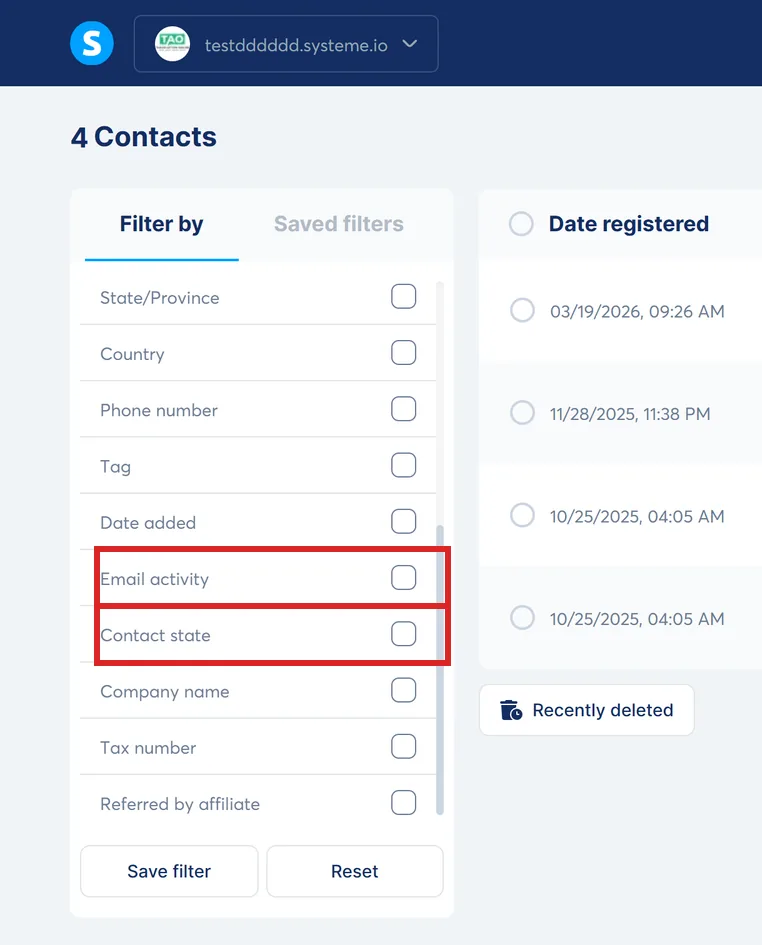
The contact list has a Contact Status filter. Bounced contacts also carry a stop icon on their profile, and clicking it shows the reason that address failed.
How I checked this answer
Nothing on this site is written from memory. These are the sources I checked to write this answer, and the date I checked them.
- Understanding and managing email bounce on systeme.iohelp.systeme.io, article 2924
- What to do with contacts that have a "Bounced" statushelp.systeme.io, article 276
- How to manually clean your email listhelp.systeme.io, article 139
- How to automate the process of cleaning up your contact listhelp.systeme.io, article 4216
- Setting up email campaigns: a guide to common scenarios and key considerationshelp.systeme.io, article 10453
- How to manually subscribe a contact to an email campaignhelp.systeme.io, article 159
- How to remove "Sent with systeme.io" and customize your email footerhelp.systeme.io, article 2008
Checked on
Did this answer your question?
Keep reading
- Can I bring my old autoresponder's emails with me? Yes, but only two ways: their migration team, or your own copy and paste. There is no import file.
- If I delete an email campaign, what happens to the people halfway through it? Interrupted at once, and everyone in it is unsubscribed from it for good.
- Why does my page look fine on desktop and broken on mobile? There are two views of the page and you have been editing one of them.