Home / Categories / Deliverability
Do I need a cookie banner?
systeme.io's documented route to a cookie banner is an outside tool whose script you paste into the page header. Whether the law requires a banner depends on where your visitors are, which is a question for your own jurisdiction.
What systeme.io gives you
No cookie banner of its own, as far as the help centre goes. The route it documents is an outside tool that you connect yourself.
The help centre walks through Cookiebot as its example, and says plainly that it is only an example: other services exist and work the same way. Its free plan covers one domain, with descriptions in English only.
What gets set up on the outside tool
The work happens there before anything is pasted into systeme.io. In the example tool the screens run in this order.
| Tab | What it is for |
|---|---|
| Domains | Add your domain with the green plus button |
| Banner | The look and behaviour of the banner, and the consent method used on the site |
| Privacy Trigger | An optional control on every page that lets a visitor see and change their consent. Its position and theme are set here |
| Declaration | The automatic detailed cookie list. Paid plans only |
| Content | Your own description of what the site uses cookies for. One language on the free plan |
| Your scripts | The two snippets to copy into systeme.io |
Where the script goes
A tool of this kind hands you two snippets, and they go to two different places.
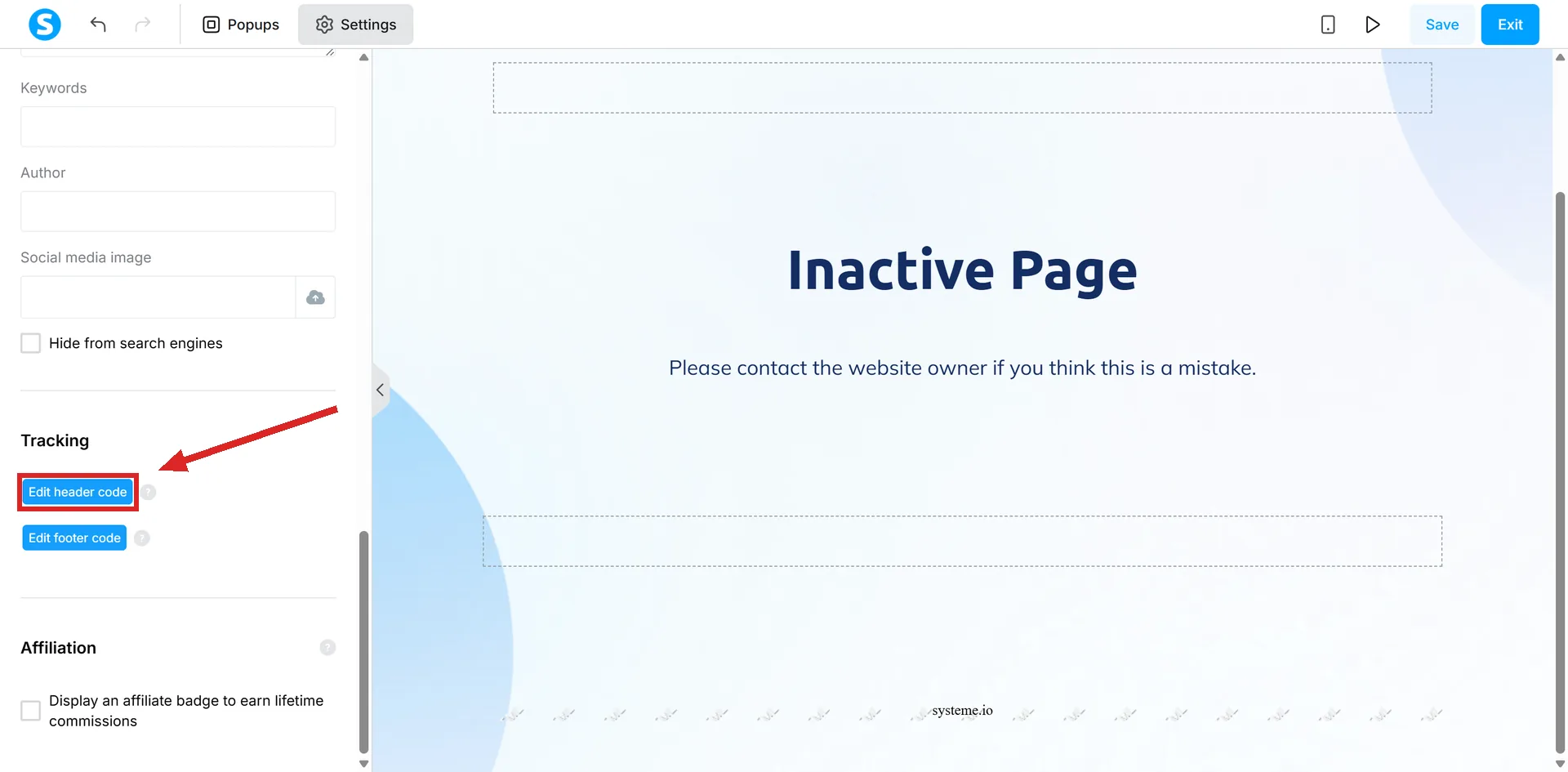
- The header script. Open Sites, then Sales funnels, then the funnel, then the page, then Edit page. In the editor, open Settings at the top left, scroll to the Tracking section, and paste it into the header field. That field is for anything that belongs between the head tags of a page.
- The declaration script. This one is added as an HTML element on whichever page the cookie declaration should appear on.
One rule applies to both boxes. systeme.io's documentation says not to include head, html, body or footer tags in the header, footer, tracking code or Raw HTML fields.
Raw HTML is the element that puts custom code into the body of a page, and it has two quirks worth knowing before you go looking for it. It is not available on info pages, and it does not render in preview mode, so anything placed with it shows only on the live page.
Doing it once instead of page by page
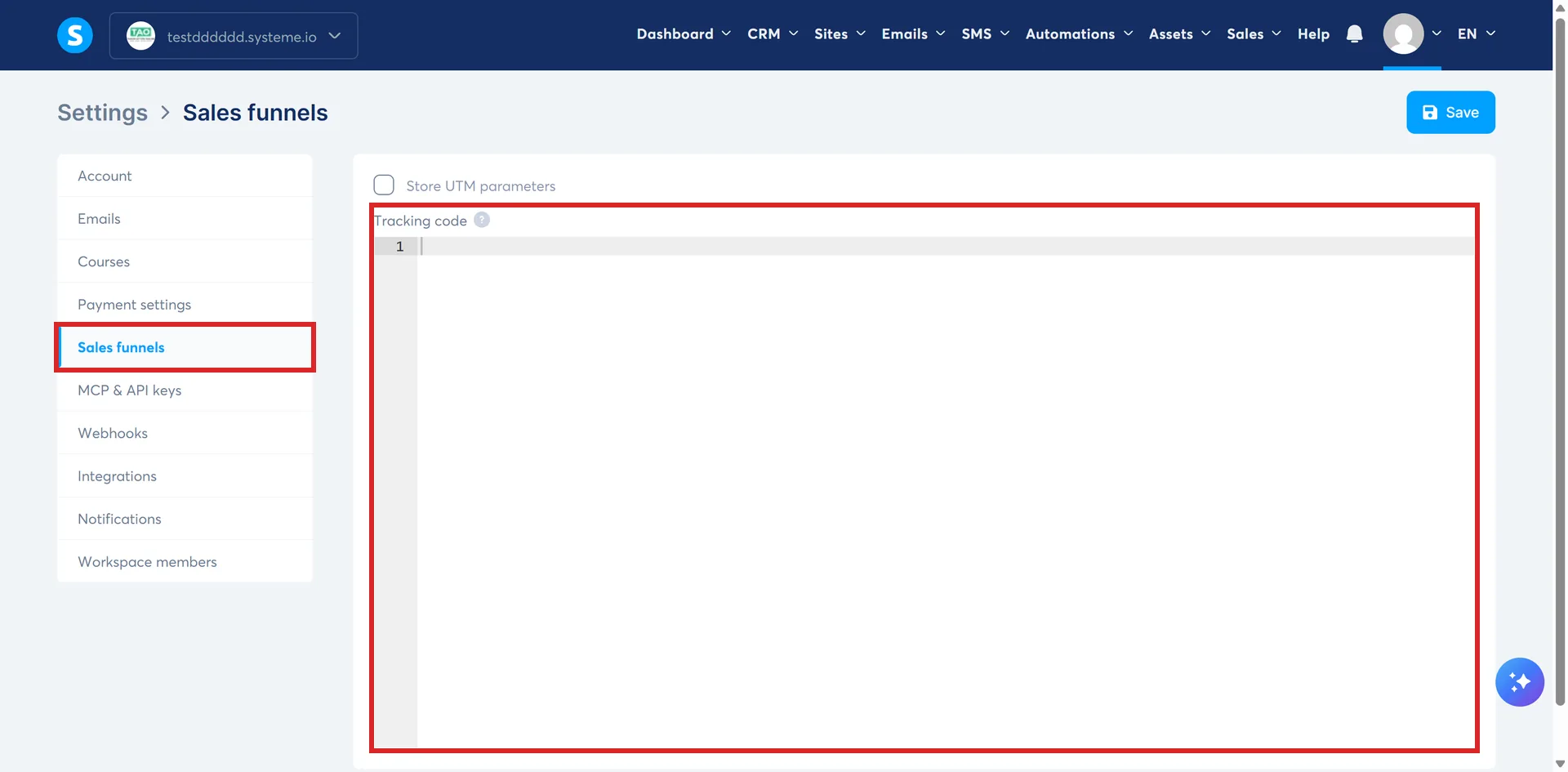
Pasting a header script onto every page of every funnel is the slow way to do it. Under your profile picture, Settings, then Sales funnels, there is a Tracking code box that applies to all funnels at once.
A blog is handled separately. Putting the header script on the Blog layout page applies the banner to every blog post and page automatically.
Whether you actually need one
That is a legal question and the answer depends on where your visitors are, not on which platform the site is built with. Consent rules differ between countries, and the rules covering cookies are not the same rules that cover email marketing consent.
systeme.io's article is written around a GDPR compliant banner, but it sets out no test for when one is required and names no law beyond that. Whether your site needs a banner, and what it has to say, is a question for a source covering your own jurisdiction or for a lawyer. A help article cannot answer it and neither can this page.
The consent record systeme.io does keep
This is a different thing that gets confused with cookie consent, so it is worth separating.
For a purchase, systeme.io stores the proof of consent taken from a tick box on an order form or an upsell page. Under Sales, then Transactions, the three dots beside a transaction open a Customer consent record.
That record holds the consent method, the exact wording shown on the tick box, the email address, the date and time, the browser and device, the IP address, the URL of the order form and the tick box ID, with a Download PDF button for a copy.
It will be empty in three cases: the transaction predates the feature, there was no tick box on the page, or the tick box was optional and the buyer left it unticked.
That covers what a buyer agreed to at the point of purchase. It is not cookie consent and it does not stand in for a banner.
This is not legal advice
Whether a banner is required where you operate is not a question systeme.io's documentation answers, and it is not one I can answer for you either.
What is above is what the help centre publishes: it names one outside tool, says others work the same way, and describes no built-in banner anywhere.
How I checked this answer
Nothing on this site is written from memory. These are the sources I checked to write this answer, and the date I checked them.
- How to set up a GDPR compliant cookie banner?help.systeme.io, article 2045
- Is it possible to insert HTML, CSS, or JS code?help.systeme.io, article 306
- How to view and download customer consent recordshelp.systeme.io, article 11433
Checked on
Did this answer your question?
Keep reading
- Can I trust my open rate? The number systeme.io itself calls unreliable also decides who gets deleted.
- Can I put affiliate links in my emails? No rule mentions affiliate links. Several would catch one anyway.
- What size should my images be? No published page-image size anywhere. The two numbers that do exist are for a favicon and for email.