Home / Categories / Sales funnels
What actually is a sales funnel?
A sales funnel is an ordered set of pages a visitor moves through towards one action. In systeme.io it is also one object: a named container of steps that carries a domain and a currency.
What it is meant to do
systeme.io describes a sales funnel as a structure designed to guide prospects through a sales process, built to raise conversion rates by keeping the visitor's journey simple.
That is the marketing meaning. The other meaning is a thing in the menu, and the two get muddled.
What systeme.io means by it
A funnel is one object in your account. It is created under the Sites tab, at Sales funnels, and it asks for a Name, a Domain and a Currency, and for one of four funnel types.
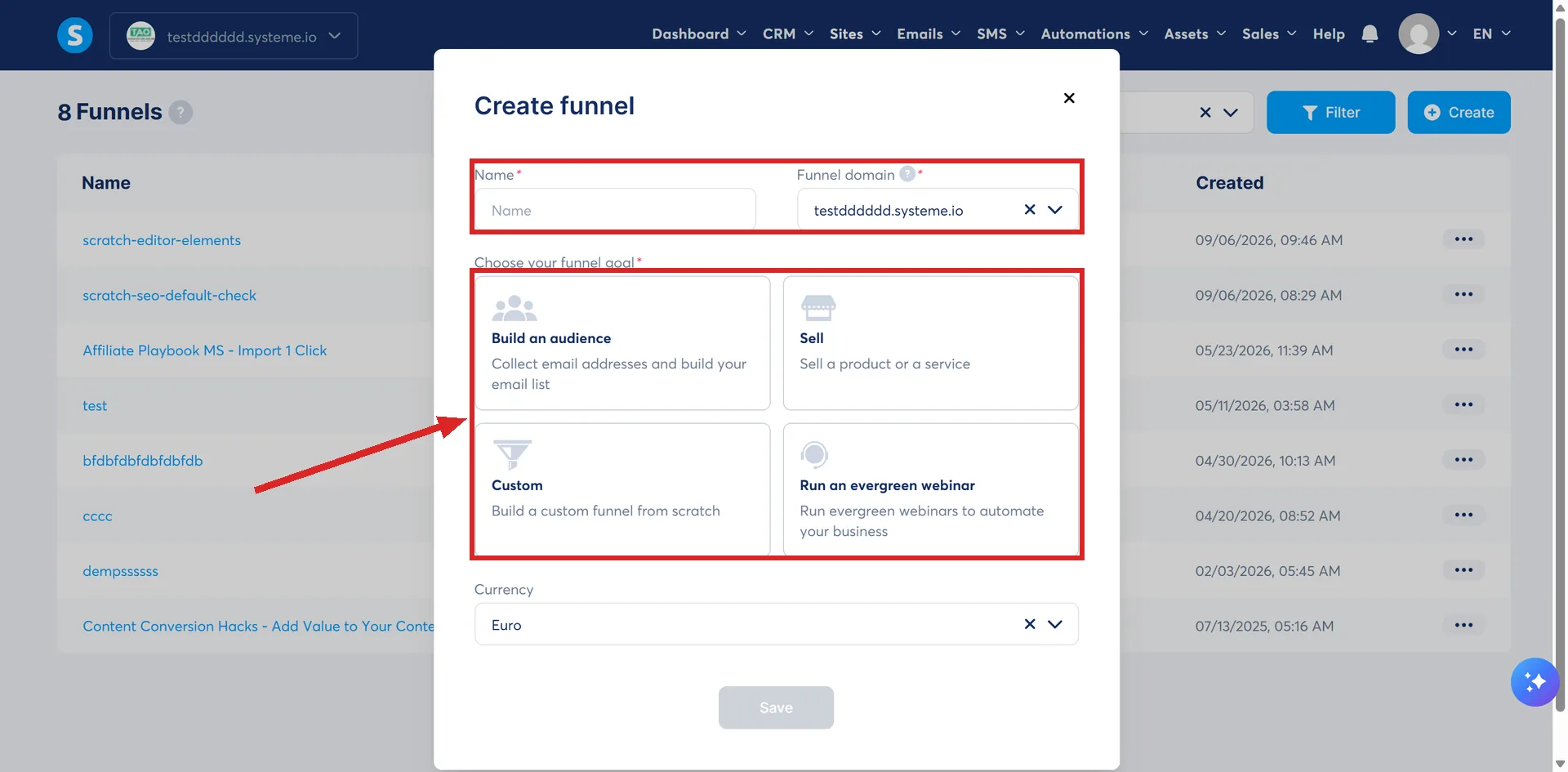
Every page inside it is called a step. New ones are added with + Add step.
The Create button is on that same Sales funnels page. Once the funnel exists, its pages are listed down the left, and that list is where one is opened or a new step added.
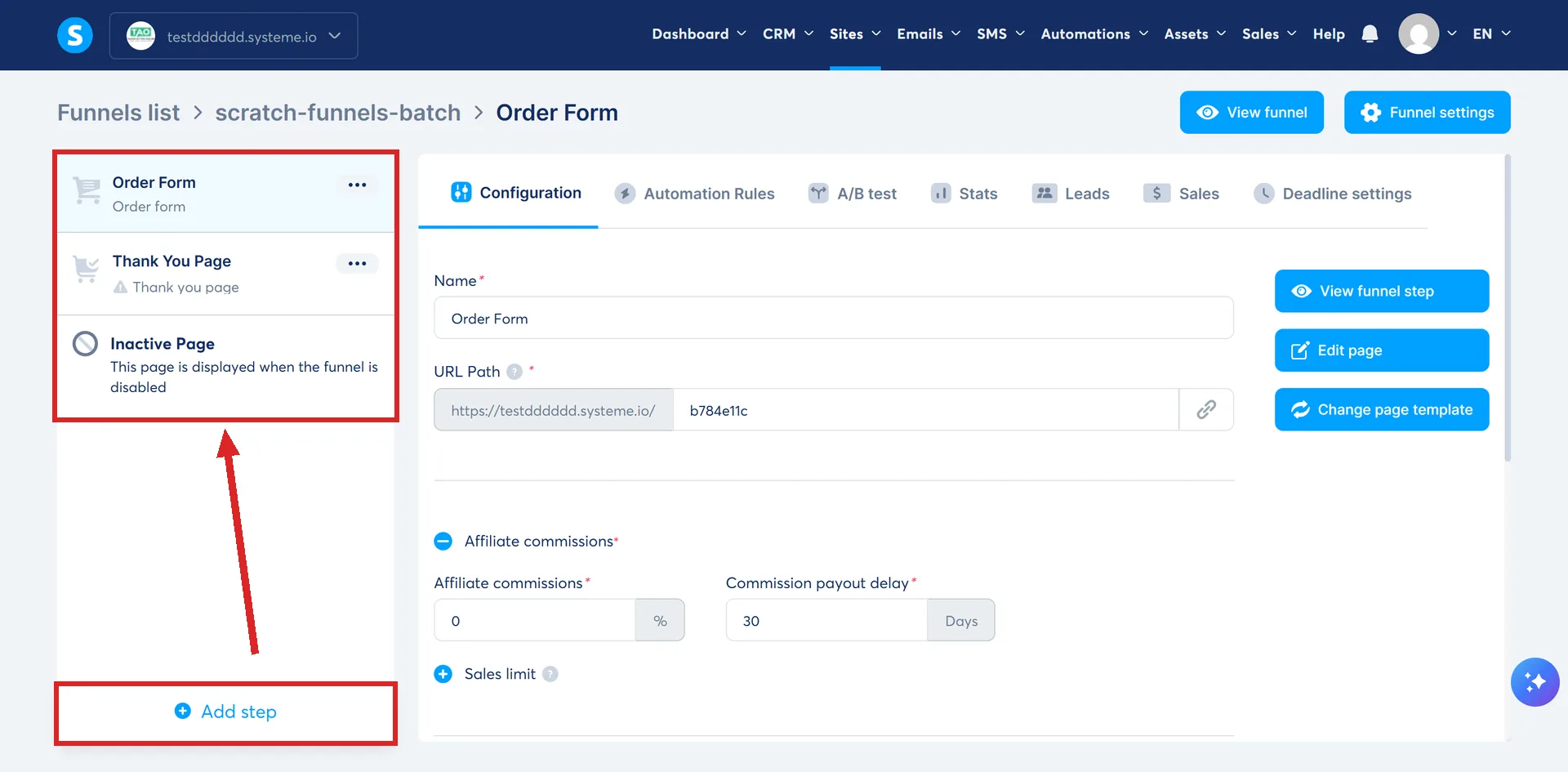
Order is part of the definition
The steps are not a loose pile of pages. systeme.io states that funnel steps must be in a set order to work, and it links some of them for you: once a payment is validated the buyer is sent to the upsell page, and a declined upsell sends them to the downsell and then the thank you page.
The full sequence systeme.io uses as its worked example runs: opt-in page, sales page, order form, upsell, downsell, thank you page. Six steps, in that order, inside one funnel.
Not every join in that chain is automatic. The first two are wired by hand, on the button. Opt-in to sales page uses Submit form with the redirection set To the next step. Sales page to order form uses Open URL with the order form's address pasted in.
Everything from the order form onwards is the part systeme.io connects for you.
One funnel is one thing your plan counts
The free plan allows 3 sales funnels. Startup, at $17 a month, lifts that to unlimited.
The figure counts funnels rather than pages.
A funnel has an on and off state
Funnels can be inactive. The funnel list can be filtered to show inactive ones, and a funnel is switched back on from the three dots beside it, then Activate.
The filter is a drop-down on the funnel list at Sites, then Sales funnels. Set it to Inactive and press Filter. Activate then asks for a Confirm before it takes effect.
This is worth knowing because an inactive funnel is not a broken funnel and gives no error. It is a funnel that has been switched off and is missing from the default view.
The word does not always mean selling
systeme.io recommends the sales funnel feature for building a simple website of up to five pages.
So a funnel in your account may be a shop front, a list builder, or a five-page site. The feature name is fixed, the purpose is not.
A funnel limit published two different ways
The FAQ under systeme.io's pricing table says the Startup plan carries unlimited funnels. Article 4243, which is about sub-accounts, builds its worked example on the opposite: "if you're on the Startup plan with a limit of 10 sales funnels".
Both are systeme.io's own pages. Neither is presented here as correct. Read your own plan screen before you build anything that assumes either number.
For a first one, the lead magnet funnel guide builds the smallest version there is: two pages that collect an email address and hand something over.
How I checked this answer
Nothing on this site is written from memory. These are the sources I checked to write this answer, and the date I checked them.
- How to create a funnelhelp.systeme.io, article 147
- When to use the sales funnel feature and the blog featurehelp.systeme.io, article 1005
- How to configure links between funnel pageshelp.systeme.io, article 330
- How to activate a funnelhelp.systeme.io, article 277
- The pricing FAQ below the plan comparison tablesysteme.io/pricing
- How to create a sub-account on systeme.iohelp.systeme.io, article 4243
Checked on
Did this answer your question?
Keep reading
- What is an order bump, in plain English? A tick box on the order form. What it can sell, and the step that stops it showing.
- Order bump or upsell: which should I add first? One is a setting on a page you already built. The other is a whole page.
- Do I need my own domain to use systeme.io? No. Every account already has a working address. Here is the point where your own starts to matter.