Home / Categories / General
Should I build my website with a funnel or a blog?
For a website, neither a funnel nor a blog is the usual answer. systeme.io has a website builder under Sites, and it is the one to reach for. A blog suits a site built around posts, and a funnel suits a handful of pages pointed at one action.
There are three options, not two
systeme.io has a website builder. It sits under Sites, alongside Funnels and Blogs, and it builds and manages a multi-page site from one place.
Their own documentation has not caught up. The help article on building a website still opens by telling you to choose between the blog and the funnel feature, and points at the website builder only in a single line at the very bottom.
What the website builder does that the workarounds do not
- New pages join the menu on their own. Creating a page offers to add it to the navigation, and that switch is on by default.
- A login page and a contact page already exist. Every website ships with them under Utilities, and the contact page carries a working form. Turn the contact page off if you do not want it.
- Global styles. Fonts, colours and buttons are set once, for the whole site.
- More than one language is supported, with a language chosen when the site is created.
The editor is the same page builder used for funnel pages, so there is nothing new to learn.
The rule that catches people out
A website is tied to a domain, and a domain can only belong to one website at a time. If the domain is already attached to another website, it has to be removed there first.
Removing a domain does not park the site quietly. The website is deactivated, and stays unreachable until another domain is assigned.
When a blog is still right
When the site exists to publish posts. A new blog arrives with a home page, an about page, a posts page and a contact page already made, and it is built for adding to over time.
Extra pages go in at Sites, then Blogs, then the blog's title, then the Pages tab, then Create. The popup asks for a name and a URL path.
The menu on that route is not edited page by page. It is set once inside Blog layout, and what you put there appears on every blog page. A single page can opt out with Don't use blog layout. Menu items can be a blog page picked from a dropdown, a blog post, or a custom URL typed in.
When a funnel is still right
When the whole site is a few pages pointed at one action, and the funnel was getting built anyway.
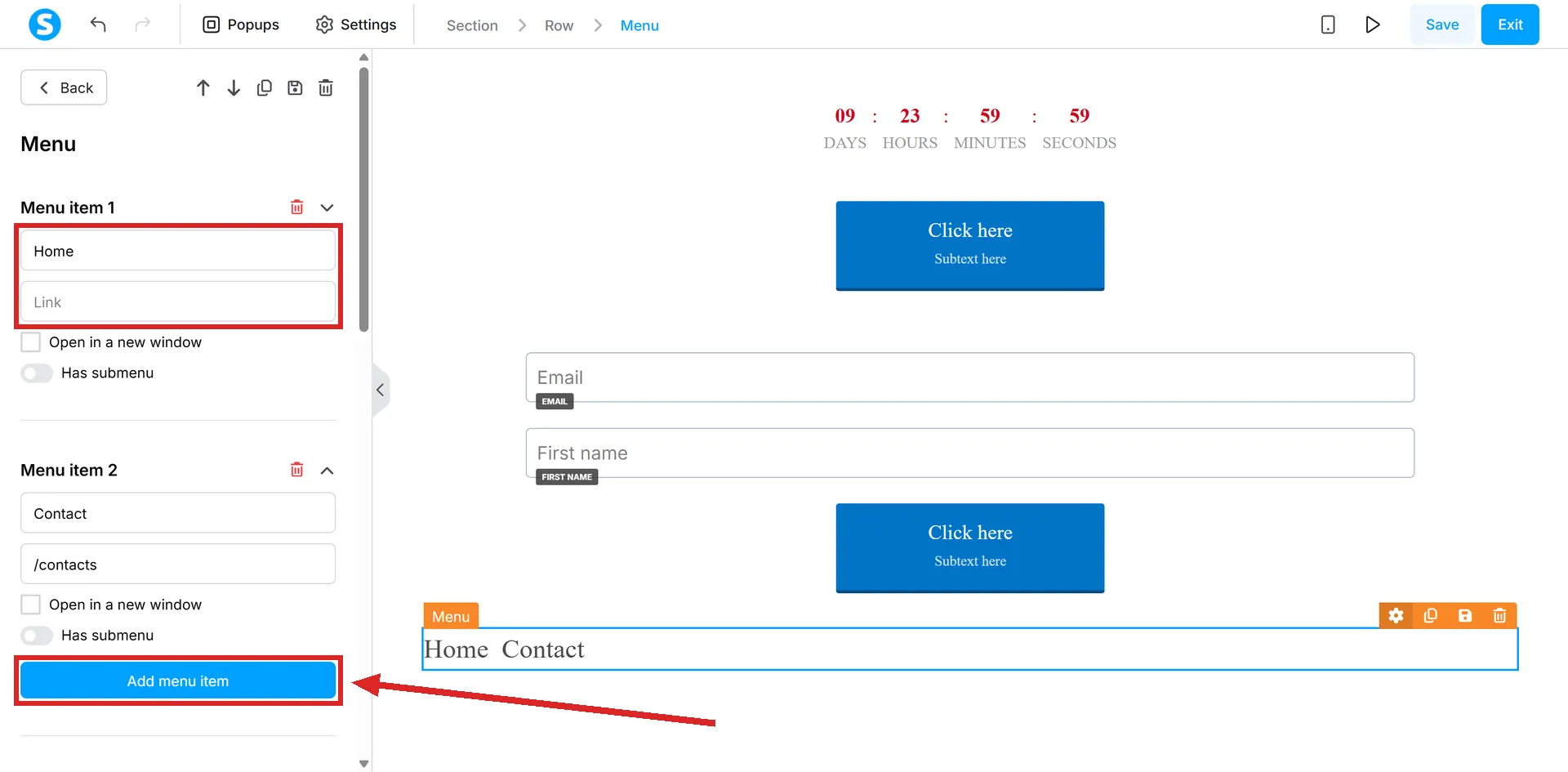
Know what that route costs. You add the Menu element yourself and wire up every item by hand, copying each page's URL and pasting it into the menu one at a time.
In full: open the funnel step you want to link to, copy its URL, go back to the home page editor, click the Menu element, click Add menu item, type a title and paste the URL. Then repeat that for every page. systeme.io recommends up to five pages on this route, and suggests saving the finished menu as a master block so the other pages can reuse it rather than have it rebuilt.
The home page rule on the older routes
Building from a blog or a funnel, only one page on the domain can be the home page. It can be a blog page or a funnel page, and you have to pick.
Either way it is claimed by clearing the URL path, and both of systeme.io's guides make that an explicit step rather than something the platform does for you. The blog route puts it behind the three dots beside the blog, then Settings. The funnel route puts it on the page itself.
How I checked this answer
Nothing on this site is written from memory. These are the sources I checked to write this answer, and the date I checked them.
- How to create a websitehelp.systeme.io, article 4526
- What are the different methods to create a website?help.systeme.io, article 1596
Checked on
Did this answer your question?
Keep reading
- Do I need my own domain to use systeme.io? No. Every account already has a working address. Here is the point where your own starts to matter.
- What does an automation rule actually do? Trigger on the left, action on the right. Plus the per-contact cap nobody mentions.
- What can an AI actually do inside my systeme.io account? Counted off a live connection: 113 tools in 14 areas, and two systeme.io pages that both undercount them.