Home / Categories / Sales funnels
What pages does a simple funnel actually need?
A simple funnel needs two pages. systeme.io's Build an Audience type gives you an opt-in page and a thank you page. Its Sell type gives you an order form and a thank you page.
The four starting points
Funnels are made under Sites, then Sales funnels, then Create.
Creating a funnel asks for a name, a domain and a currency, then offers four types.
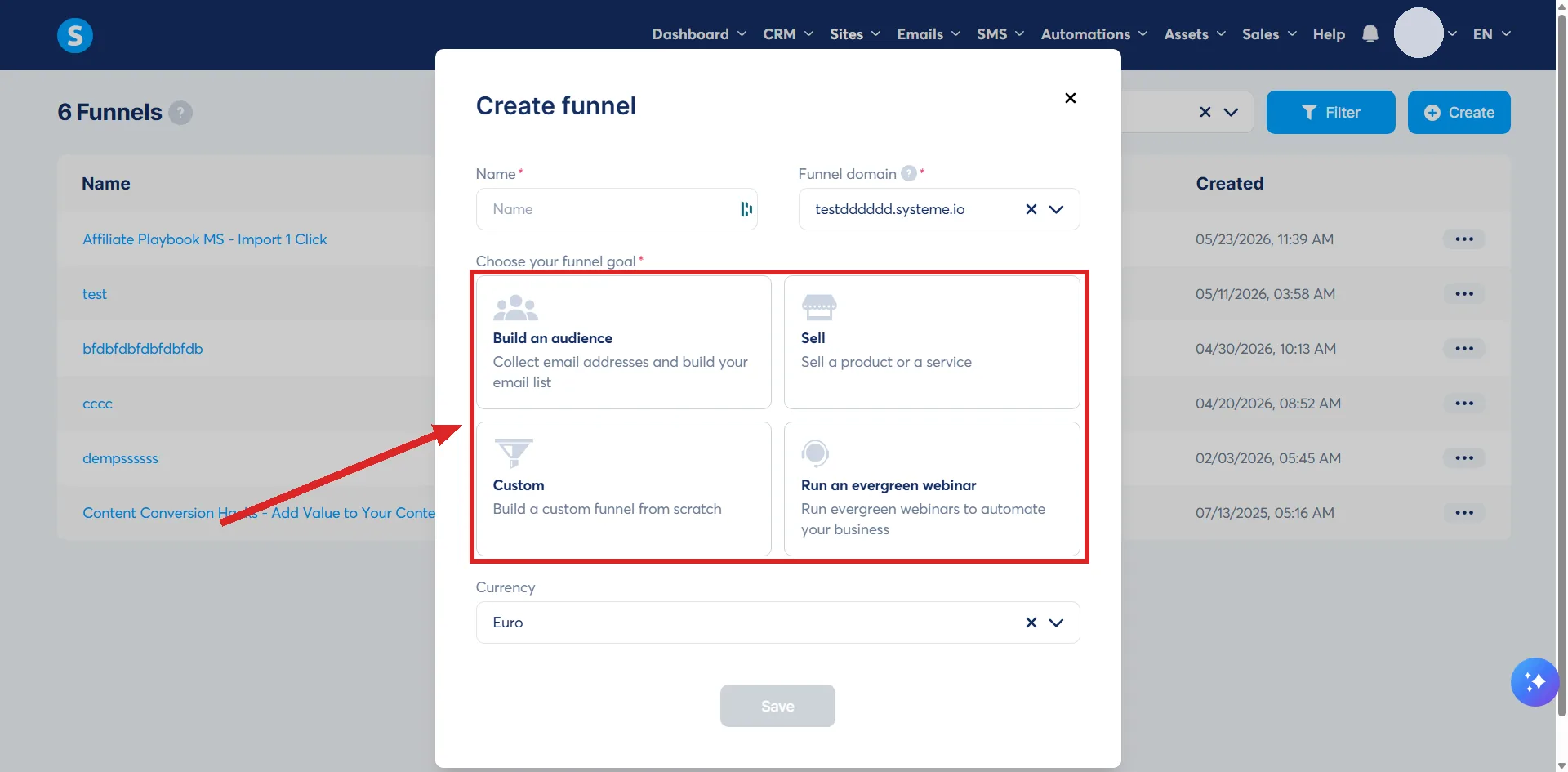
| Type | Pages you get | What it is for |
|---|---|---|
| Build an Audience | Opt-in page, thank you page | Growing an email list |
| Sell | Order form, thank you page | Taking payment |
| Custom | None, a blank canvas | Any structure you build yourself |
| Run an evergreen webinar | Three pages | Selling through a recorded webinar |
The webinar type is only available on the Webinar and Unlimited plans.
So the answer is two
A page that asks for something, and a page that confirms it happened. Everything past those two is a choice.
The Custom type gives you nothing at all, which is the right pick only when you already know the shape you want.
Pick the right thank you page
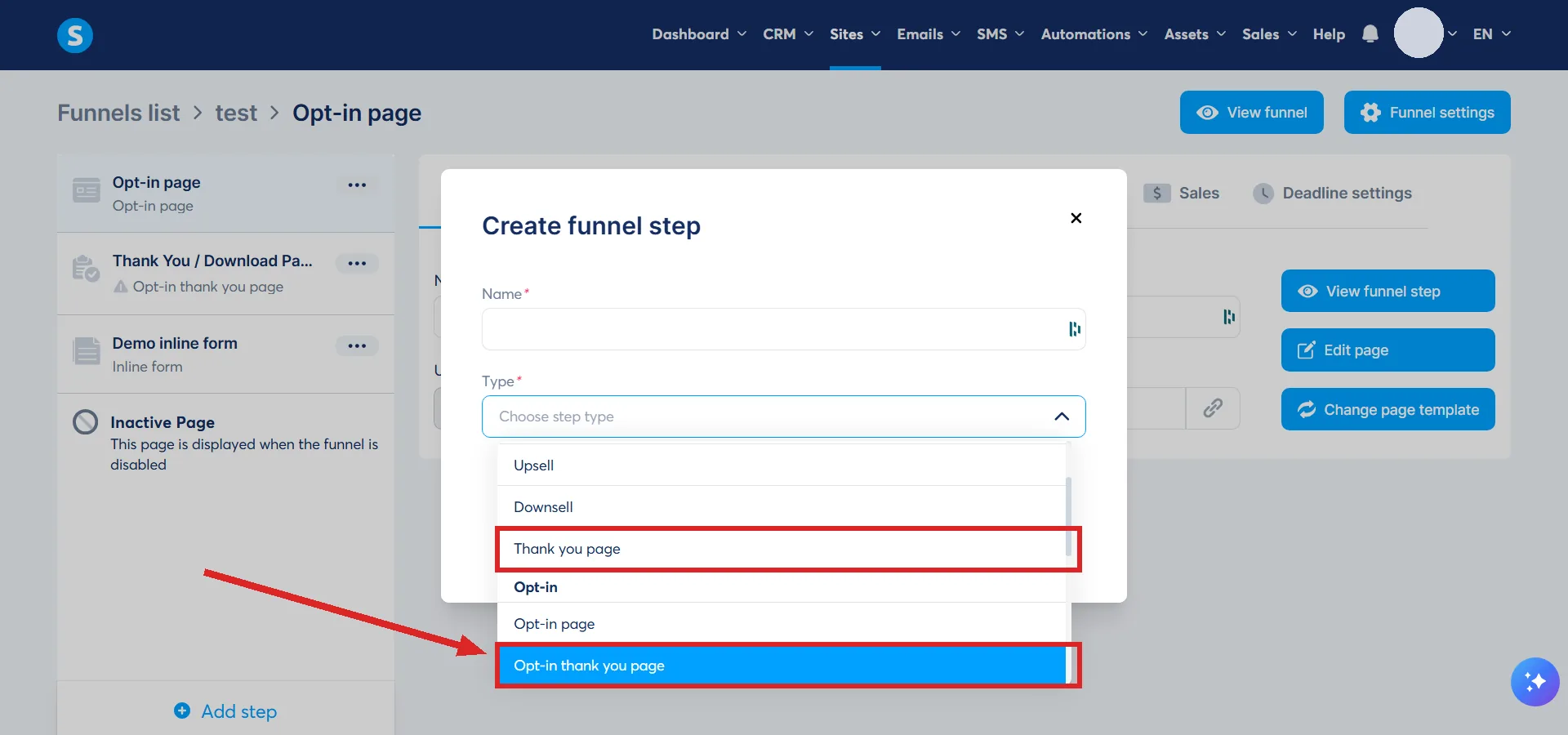
There are two of them and they are not interchangeable. Opt-in thank you page, under the Opt-in category, is for after somebody subscribes or registers. Thank you page, under the Sales category, is for after a purchase, and it is the one that can display an order summary.
On a funnel that takes money, pick the sales version.
Both live in the same place. Click Add step in the left-hand menu of the funnel, and the popup lists page types under category headings. A thank you page appears under both, but not under the same name: the Sales one is called Thank you page and the Opt-in one is called Opt-in thank you page.
What to add later, not now
Any funnel takes a new page at any time through Add step in that same left-hand menu. The type you picked at the start locks nothing in.
- An order bump, once the order form is converting.
- An upsell, once there is something worth offering next.
- A sales page in front of the order form, when the offer needs explaining before the price.
Start with the two pages the preset hands you. A funnel with four half-finished pages sells less than one with two that work.
Those two pages, built and working, are what the lead magnet funnel guide covers step by step.
How I checked this answer
Nothing on this site is written from memory. These are the sources I checked to write this answer, and the date I checked them.
- How to create a funnelhelp.systeme.io, article 147
- How to create a thank you pagehelp.systeme.io, article 321
- How to create an opt-in pagehelp.systeme.io, article 152
- How to create an order form/payment pagehelp.systeme.io, article 252
Checked on
From my own use
My first funnels had the right pages but the wrong layout. I did not have the important elements above the fold, where a visitor sees them without scrolling.
Did this answer your question?
Keep reading
- What is a squeeze page? The common name for a page systeme.io calls something else. And the two elements it needs.
- What is a price plan, and why isn't it just a price? Three types, a schedule, and a home outside the page that uses it.
- Why can't my students see the lecture I just added? It saved as a draft. The three places that need activating before a student can see anything.