Home / Categories / Blog
Is the systeme.io blog good enough to replace WordPress?
Whether the systeme.io blog can replace WordPress depends on what the old site does. systeme.io's blog covers posts, pages, categories, a shared layout and menu, an RSS feed and a sitemap. Its documentation describes no comments and no add-ons.
What is being compared here
Everything below is what systeme.io publishes about its own blog, in the twelve articles that make up the Blog section of its help centre. Nothing here describes what WordPress does, because that belongs in WordPress's own documentation rather than systeme.io's.
What the blog is built to do
A blog is created from the Sites tab: click Blogs, then Create. The popup asks for a name, a blog domain, a URL path and a template. Those first three, plus the language, can be changed afterwards under Blog settings.
Inside, the blog has its own menu with three kinds of content: Posts, Pages and Categories. It does not arrive empty. A new blog comes with sample posts, five sample pages and three categories already named.
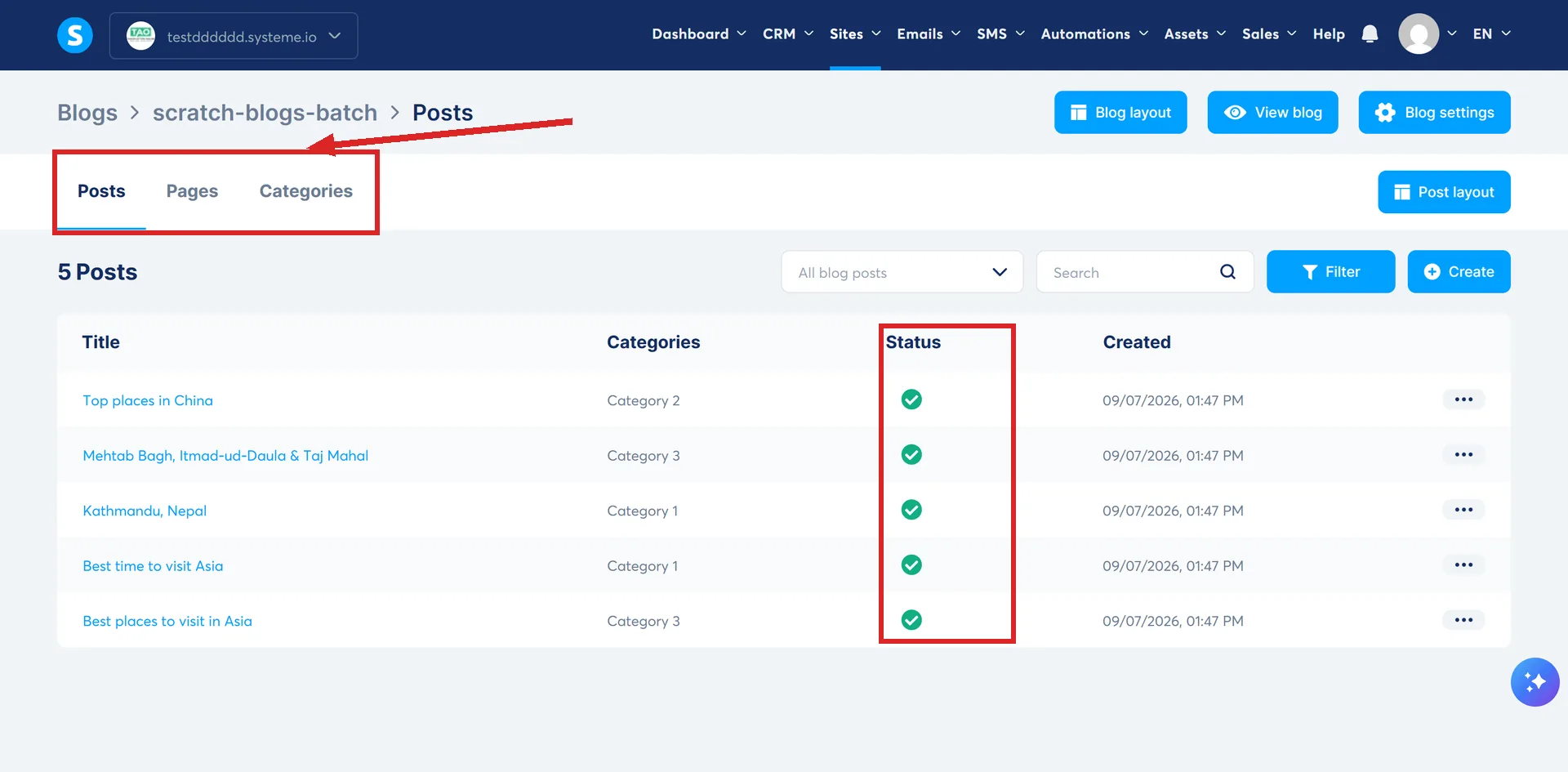
A post is created with a title, a short description, a URL path, an image and one or more categories. Saving it does not publish it. The post has to be opened from the three dots menu and Activated before a visitor can see it, and the same menu holds Edit and Delete.
Every post's three-dot menu carries the same Activate, Edit and Delete options. Open a sample post's menu to see whether it has already been activated or is still waiting for that step.
Activate is not a scheduler for a future date. It is a switch, and the post is either showing or it is not.
The parts that behave like a theme
Two layouts do the work a template would do elsewhere, and both are edited in the page builder.
- Blog layout. Sets the header, footer and content placeholder. Anything added here appears on every blog page and every post, and can only be edited back inside the layout editor.
- Reached at Sites, then Blogs, then the blog's name, then Blog Layout. No article among systeme.io's blog documentation describes a way to opt one specific post out of this shared header, the way a page can be told Don't use blog layout.
- Post layout. The same idea for posts. It arrives holding four dynamic elements: the post's categories, title, image and content. A Blog post date element can be added to show the publication date.
The menu is defined inside the blog layout, so it stays consistent across every page and post. Each item is either a link to a blog page or a custom URL, and items can carry submenus.
Three pages cannot be removed: the Home page, the Post list page and the Search page. The About and Contact pages that come with a new blog can be deleted. Any single page can be told Don't use blog layout so it looks nothing like the rest.
The search plumbing it handles on its own
- A sitemap. Every connected domain generates one at /sitemap.xml, grouping the sitemaps of the blogs and funnels on that domain. systeme.io's own worked example is https://help-articles.systeme.io/sitemap.xml. It updates the moment a post is created, and the domain's robots.txt file references it, so nothing has to be submitted by hand.
- An RSS feed, generated when the blog is created and updated on every publish.
- SEO fields per category, a title and a description, separate from the ones on a page.
What the documentation never mentions
These are absences in systeme.io's own blog articles, not claims about what the product cannot do.
- Comments. None of the twelve articles refers to a comment system.
- Plugins or add-ons. Same. Nothing describes extending the blog with third-party software.
- An author. The fields on a new post are title, short description, URL path, image and categories. There is no author among them.
Three limits are stated outright rather than left out. The RSS feed carries only the 20 most recent posts. It is not suitable for podcast distribution and does not support media content. And the domain sitemap currently covers funnels and blogs only, with other assets described as coming in future updates.
The form is the awkward part
systeme.io documents no opt-in form element on a blog page. Its documented route builds the form as a step inside a sales funnel and then places its script on the blog page through a Raw HTML block.
systeme.io documents running both
There is a help article for putting a systeme.io form or popup onto a WordPress site. The form goes in through Appearance, then Widgets, into a sidebar or footer area, then Update.
The popup script has two routes. One is a header and footer plugin: systeme.io names Insert Headers and Footers by WPBeginner, installed from the Plugins section, with the script pasted into its Header box. The other is Appearance, then Theme File Editor, then footer.php, with the script placed immediately before the closing body tag and saved with Update file. systeme.io says those are not the only ways.
That route keeps the email list, the funnels and the payments in systeme.io while the pages stay where they are.
Where a blog is the wrong tool anyway
systeme.io's own guidance puts the blog with regular publishing and search traffic, and the sales funnel with direct selling and simple sites of up to five pages.
For a general multi-page site there is now a third option that is neither. The Websites feature, also under Sites, builds and manages a multi-page site from one place, with a menu each new page is added to by default, global styles, and login, contact and search pages already made.
How I checked this answer
Nothing on this site is written from memory. These are the sources I checked to write this answer, and the date I checked them.
- All twelve articles systeme.io publishes about its bloghelp.systeme.io, the Blog category listing
- How to create a blog with systeme.iohelp.systeme.io, article 175
- How to add a form or a popup on your systeme.io bloghelp.systeme.io, article 414
- How to create a blog pagehelp.systeme.io, article 639
- How to manage a blog's layouthelp.systeme.io, article 700
- How to manage the blog post layouthelp.systeme.io, article 1689
- How to create a blog menuhelp.systeme.io, article 641
- How to create a blog posthelp.systeme.io, article 359
- How to access your domain's sitemaphelp.systeme.io, article 11336
- How to use the RSS feed for your systeme.io bloghelp.systeme.io, article 11064
- How to integrate a systeme.io form or popup on a WordPress sitehelp.systeme.io, article 1592
- When to use the sales funnel feature and the blog featurehelp.systeme.io, article 1005
- How to create a websitehelp.systeme.io, article 4526
Checked on
Did this answer your question?
Keep reading
- What is a blog category for? Not a label on a post. It is a page, with its own address and its own SEO fields.
- How many blogs can I have? One number is written down, and it is the free plan's. Where to look for the others.
- What is the booking calendar for, and who needs it? Scheduling inside the account instead of a separate app. Where it lives, and where it stops.