Home / Categories / Deliverability
What is list hygiene, and why does it decide whether you get delivered?
Taking dead and silent addresses off the list so the people left behind actually open things. systeme.io has both a manual filter and a weekly automatic clean, and the target it publishes is a 20% open rate.
What it means
List hygiene is the habit of removing or silencing two kinds of contact: addresses that no longer work, and people who have stopped opening anything.
Those are exactly the two groups systeme.io names as the ones that limit deliverability. Addresses that are marked Bounced, and addresses that are inactive or unsubscribed.
Why it decides whether you get delivered
Email providers analyse campaign data and penalise a sender whose emails are not opened. Every inactive contact left on the list drags the open rate down, whether or not anything else is wrong.
Inside systeme.io that number is not cosmetic. Open rate is one of three metrics deciding which pool of sending IP addresses an account is placed in, alongside spam rate and bounce rate.
| Pool | Open rate |
|---|---|
| Low risk | Over 20% |
| Moderate risk | 10% to 20% |
| High risk | Under 10% |
The reputation of those IP addresses is, in systeme.io's words, one of the most important factors in email deliverability, which is why the statistics decide the pool at all.
The number to aim at
systeme.io recommends keeping the open rate at a minimum of 20%, and reads the result like this: 20% and above is good, 10% to 20% is average, and below 10% means the list needs cleaning.
Cleaning by hand
The filters live in the CRM tab, under Contacts.
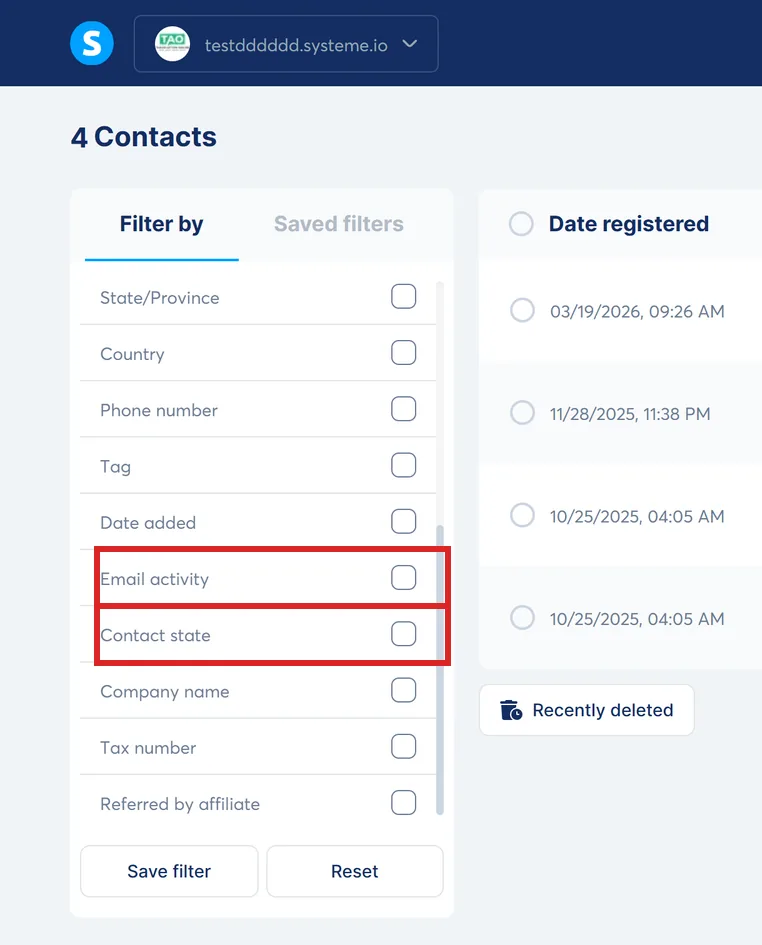
- Turn on the Email activity filter and set a date in the field No email opened or clicked since. How far back you go depends on how often you send.
- Add the Contact state filter and choose Has not made any payment yet, which leaves your customers out of the selection.
- Select the result and delete it, or open More actions and choose Unsubscribe from all marketing emails.
systeme.io's worked example uses a one-month window: with today taken as 16 January 2026, the date entered in the field is 16 December 2025. What comes back is everyone who has not opened or clicked in that month and has never bought anything.
systeme.io recommends keeping customer data for accounting, so for anyone who has bought something, unsubscribing is the better of those two. It stops the emails without losing the purchase history.
The setting that does it every week
Hover over your profile picture, click Settings, then Emails, and scroll down to Automatic list cleaning. It offers two rows: one for contacts who have never purchased anything, one for contacts who have. Each row can either unsubscribe or delete.
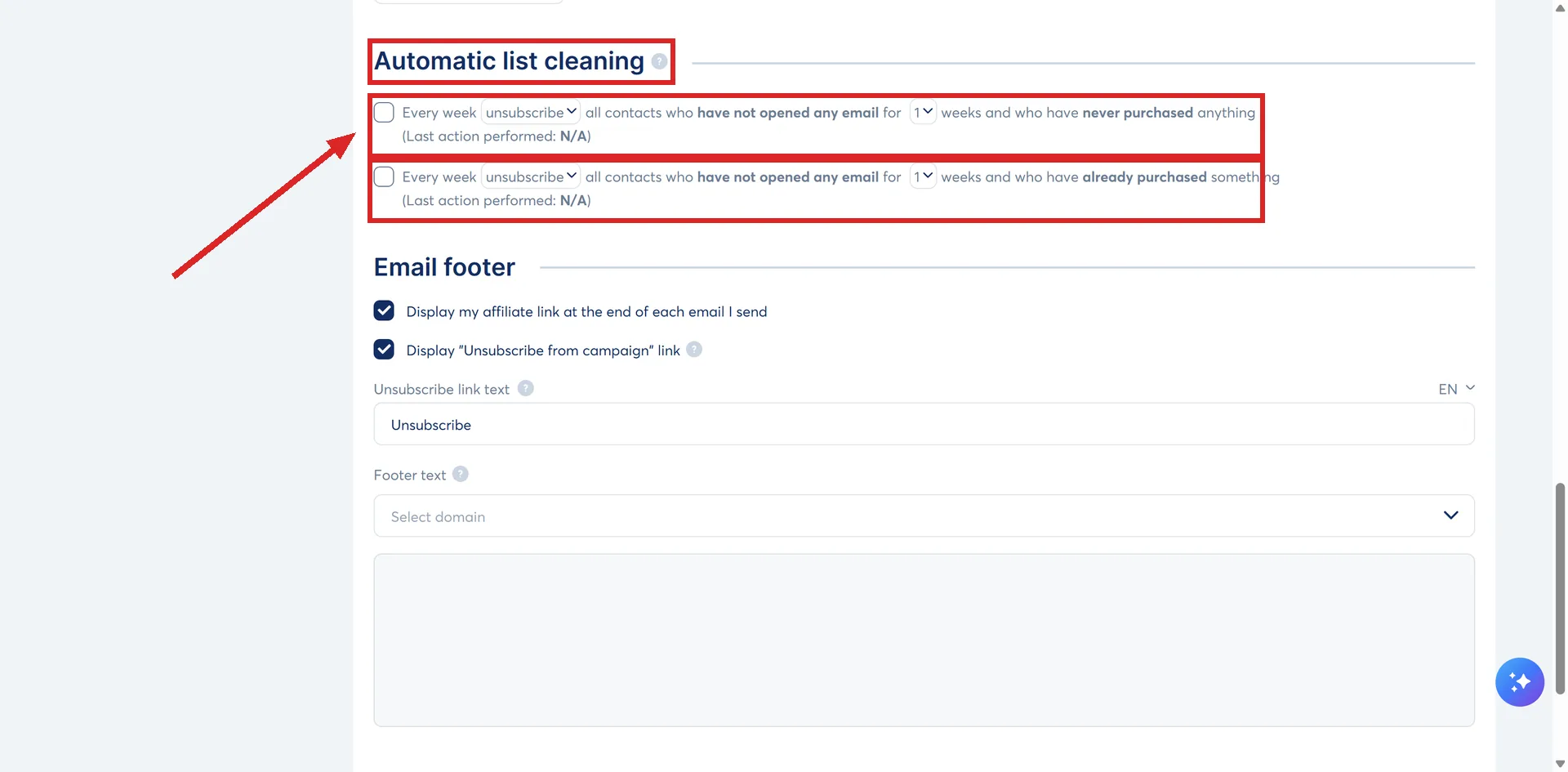
The window is anything from 1 to 26 weeks without an open. Ticking a box means the clean runs every week from then on with nothing else to remember.
Each box is labelled as a full sentence. Set to 8 weeks, the four of them read like this.
| What the box says | What it does |
|---|---|
| Every week delete all contacts who have not opened any email for 8 weeks and who have never purchased anything | Removes the record entirely |
| Every week unsubscribe all contacts who have not opened any email for 8 weeks and who have never purchased anything | Stops the emails, keeps the record |
| Every week delete all contacts who have not opened any email for 8 weeks and who have already purchased something | Removes a customer record, purchase history included |
| Every week unsubscribe all contacts who have not opened any email for 8 weeks and who have already purchased something | Stops the emails to a customer, keeps the record |
systeme.io's recommendation for anyone keeping sales records for accounting is the unsubscribe version of each pair rather than the delete version.
Unsubscribing through this setting does not remove anybody from the contact list. It stops the sending and leaves the record in place.
How often to do it
systeme.io's advanced guidance is at least once a month. Its re-engagement guidance treats 3 to 12 months with no opens and no clicks as the usual mark of an inactive contact, depending on how often you normally send.
Try waking them before deleting them
A re-engagement campaign is worth one attempt before the list shrinks, and systeme.io sets out how to run one without hurting the account.
- Tag the inactive contacts and send to a slice first, 10% to 20% of the list, rather than the whole group at once.
- Follow up 3 to 7 days later with the ones who did not react.
- Treat anyone still silent after two emails as a contact to consider removing. Keeping them costs engagement rate.
Two limits on this. systeme.io advises against trying to re-engage contacts who have been inactive for a very long time, and it suggests deleting anyone past 12 months, or setting them to unsubscribed if the record has to stay.
How I checked this answer
Nothing on this site is written from memory. These are the sources I checked to write this answer, and the date I checked them.
- How to manually clean your email listhelp.systeme.io, article 139
- How to automate the process of cleaning up your contact listhelp.systeme.io, article 4216
- How to improve your email deliverabilityhelp.systeme.io, article 157
- How to improve the deliverability of my emails (advanced tips)help.systeme.io, article 1643
- Re-engagement campaign: practical guide to wake up your inactive subscribershelp.systeme.io, article 11008
- Do you need a dedicated IP to send emails with systeme.io?help.systeme.io, article 4468
Checked on
From my own use
I clean my list once a quarter and delete anyone who has stopped opening. Be careful with anyone who has course access. I have deleted a few of those by accident because they had gone quiet, and forgot they had bought a course. For course buyers who stop opening, tag them instead and send them course updates only. A good open rate matters too much to skip the cleaning.
Did this answer your question?
Keep reading
- What is the safest way to import an old list? The file it will take, the two things set during the import itself, and the wait afterwards.
- What is a warm-up period, and do I need one? The first 500 emails from a new account are already a warm-up, run for you.
- What is the SEO section of the editor actually for? Six fields, one of which decides whether the page is allowed into Google at all.